Vertex animation
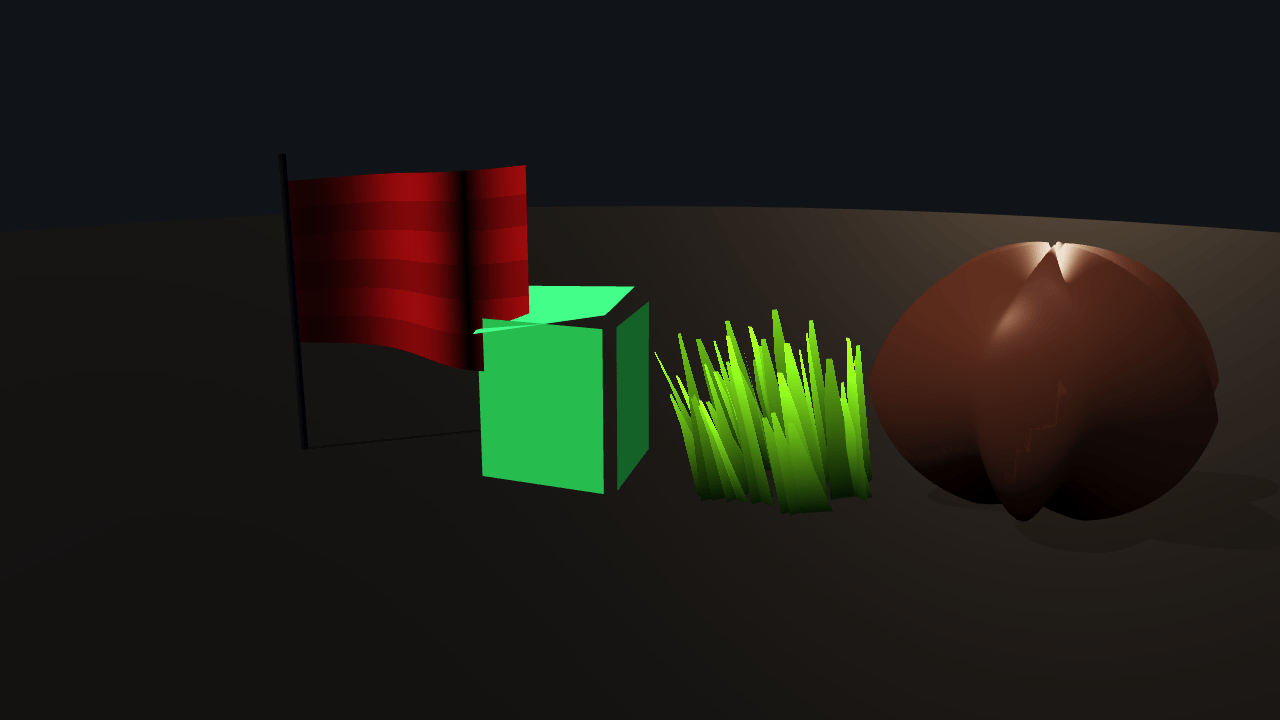
Two routes to vertex motion, side by side. The flag, the cube and the grass are full `"shader"` materials that own their vertex stage: they read ignifx's clock and move the vertex wherever they like, with no script, no skeleton and no per-frame CPU work at all — and no shadow, because Lite cannot draw a custom material into the studio rig's ESM shadow map. The sphere on the right is an ordinary PBR material with a `.surface.wgsl` whose `displace` hook bulges it: lit, shadow-casting and probe-lit like any PBR surface, but its offset is a fixed function of the vertex's own position, because Lite declares a plugin's uniforms fragment-visible only and a `displace` that reaches for a uniform or the clock is refused with `IGX-0723`.
Off airLivePaused
Vertex animation
Shaders · 3D
WebGPU: checking…See browser support
Try this
- Push Strength to its maximum: the flag's normal bends with the wave, so the cloth lights as cloth.
- Turn the sphere's bulge off and on. The shape snaps back, and each switch costs one pipeline rebuild.
- Note that nothing here has an `update` method. Every animation in the frame is one sine in WGSL.
Show source code
Source
import { Camera, createMaterialAsset, pbrMaterialDefinition, SHADER_ASSET_TYPE, shaderMaterialDefinition,} from "ignifx";import { bootExample } from "../_kit/boot.ts";import { attachOrbit } from "../_kit/orbit.ts";import { twoPlaces } from "../_kit/format.ts";import { bind, readout, slider, toggle } from "../_kit/panel.ts";import { CLEAR_COLOR, createStage, FLAG, placeSubjects, SHOT, STATIC_PHASE, WIND } from "./stage.ts";import type { AssetHandle, MaterialAsset, ShaderAsset } from "ignifx";/** * The two routes to vertex motion, side by side, and what each one keeps. * * ## A `"shader"` material owns its vertex stage * * The flag, the jelly cube and the grass are full custom materials. Their `mainVertex` reads * `shaderUniforms.time` — ignifx's clock, because Babylon Lite ships none — and moves the vertex * wherever it likes. Nothing is animated on the CPU: there is no script, no skeleton and no * per-frame work in this file at all. What they give up is the engine's shading: they light * themselves from `mainLightDirection`, `mainLightColor` and `ambientColor` (the studio probe's * average colour), and they cast no shadow into this rig's ESM map, which Babylon Lite cannot draw * a custom material into. * * ## A surface shader's `displace` hook cannot read the clock * * The sphere on the right is an ordinary PBR material with `bulge.surface.wgsl` layered onto it. It * is lit, shadow-casting, probe-lit and tone-mapped like any other PBR surface, and its shape is * changed before any of that happens. But **`displace` may not read a uniform, a texture or * `time`**: Babylon Lite declares a plugin's uniforms and samplers with fragment-stage visibility * only and gives a plugin no vertex helper-function channel, so `@ignifx/core` inlines the body into * Lite's own vertex entry point and refuses one that reaches for either (`IGX-0723`). The bulge is * therefore a fixed function of the vertex's own position, and wind needs the other route. * * ## Why the frame is still moving when the clock is stopped * * `?static=1` stops the clock before `app.start()`, so `shaderUniforms.time` reads `0` and every * wave would be caught at its rest pose — a flat flag. Each animated shader therefore declares a * `phase` uniform that is simply added to `time`, and `setup` writes a fixed non-zero phase into it * when the flag is set. The poster and the golden are a real pose, and the same one every time. * * `stage.ts` beside this file holds the lighting and the placements; `meshes.ts` builds the flag's * grid and the grass tuft with `MeshAsset.fromData`, and documents the UV contract the two shaders * depend on. *//** The four `.wgsl` files, in the order the materials below are built. */const ADDRESSES = [ "shaders/vertex-animation/flag.wgsl", "shaders/vertex-animation/jelly.wgsl", "shaders/vertex-animation/grass.wgsl", "shaders/vertex-animation/bulge.surface.wgsl",];/** The flag's waves along the cloth for each gust a second the grass and the jelly take. */const FLAG_WAVES_PER_GUST = 2;bootExample({ title: "Vertex animation", settings: { rendering: { clearColor: CLEAR_COLOR, msaaSamples: 4, // `materialPlugins` is what the sphere's `displace` hook needs; `shadows` proves it still // casts one. Both are read once, when `app.start()` registers the scene. features: { shadows: true, materialPlugins: true }, }, time: { fixedDeltaTime: 1 / 60 }, }, async setup({ app, canvas, panel, random, flags }) { const eye = app.world.createEntity("Main Camera"); eye.addComponent(Camera, { near: 0.03, far: 120, fov: SHOT.fov }); attachOrbit(app, eye, { yaw: SHOT.yaw, pitch: SHOT.pitch, // A phone held upright opens further back, so the whole row is in the shot. distance: canvas.clientHeight > canvas.clientWidth ? SHOT.portraitDistance : SHOT.distance, target: SHOT.target, minDistance: 1.4, maxDistance: SHOT.maxDistance, }); await createStage(app); // Every shader is loaded and awaited before `app.start()`: a completed load settles at once, and // a material cannot be built from a shader that has not decoded (IGX-0501). const shaders = ADDRESSES.map((address) => app.assets.load<ShaderAsset>(address, { type: SHADER_ASSET_TYPE })); await Promise.all(shaders.map((handle) => handle.promise)); const phase = flags.isStatic ? STATIC_PHASE : 0; /** * Builds one `"shader"` material from a loaded file, with the phase already applied. * * @param index - Which of {@link ADDRESSES} it is. * @param values - The uniforms this material opens on, beside the file's own defaults. * @returns The handle, or `null` when the shader did not load. */ const animate = (index: number, values: Record<string, number>): AssetHandle<MaterialAsset> | null => { const shader = shaders[index]; return shader === undefined ? null : createMaterialAsset(app, shaderMaterialDefinition({ shader, values: { ...values, phase } }), []); }; const flag = animate(0, { wind: WIND.strength, frequency: WIND.frequency * FLAG_WAVES_PER_GUST, span: FLAG.width, }); const jelly = animate(1, { wobble: 0.18, frequency: WIND.frequency }); const grass = animate(2, { wind: WIND.strength, frequency: WIND.frequency }); // The PBR route: an ordinary material declaration with one `.surface.wgsl` in its `surfaces` // list, written exactly as a `.material.json` writes it. Everything the engine does to a PBR // surface still happens; the hook only moves the vertex first. const sphere = createMaterialAsset( app, pbrMaterialDefinition({ name: "vertex-animation/bulged", baseColor: { r: 0.78, g: 0.46, b: 0.3, a: 1 }, metallic: 0.1, roughness: 0.42, surfaces: [ { shader: "shaders/vertex-animation/bulge.surface.wgsl", name: "bulge", values: {}, textures: {}, enabled: true, priority: 500, }, ], }), [], ); placeSubjects(app, { flag, jelly, grass, sphere }, random); const [bulge] = sphere.value.surfaces; panel({ title: "Vertex animation", groups: [ { label: "Wind", controls: [ slider( "Strength", { min: 0, max: 0.6, step: 0.01, format: twoPlaces }, { value: WIND.strength, change: (value: number): void => { // `setUniform` re-uploads the material's own uniform block and recompiles nothing, // which is what makes a slider cheap enough to drag. flag?.value.setUniform("wind", value); grass?.value.setUniform("wind", value); jelly?.value.setUniform("wobble", value * 0.75); }, }, ), slider( "Frequency", { min: 0.2, max: 6, step: 0.1, format: twoPlaces }, { value: WIND.frequency, change: (value: number): void => { grass?.value.setUniform("frequency", value); jelly?.value.setUniform("frequency", value); flag?.value.setUniform("frequency", value * FLAG_WAVES_PER_GUST); }, }, ), readout("Shader clock", (): string => (flags.isStatic ? `stopped, phase ${twoPlaces(phase)}` : "running")), ], }, { label: "Surface displace", // Toggling a surface shader changes Lite's pipeline cache key and rebuilds the material's // renderables: a settings operation, not a per-frame one. controls: bulge === undefined ? [] : [toggle("Bulge the sphere", bind(bulge, "enabled"))], }, { label: "Frame", collapsed: true, controls: [readout("Draw calls", (): string => String(app.renderer.drawCalls))], }, ], }); },});/** * The stage the four subjects stand on, and where each of them stands. * * @remarks * Split out of `main.ts` for the reason `pbr-model/shot.ts` is: a lamp intensity and a lane position * are numbers found by looking at rendered candidates, and none of them is a lesson about vertex * animation. What is left in `main.ts` is the four shader loads, the materials built from them, the * phase that keeps a stopped clock honest, and the panel. */import { createMaterialAsset, Environment, MeshAsset, MeshRenderer, pbrMaterialDefinition } from "ignifx";import { backdropFade, backdropMaxDistance } from "../_kit/backdrop.ts";import { createBackdrop, createStudioFloor, createStudioRig, loadEnvironment } from "../_kit/stage.ts";import { createFlagMesh, createGrassMesh } from "./meshes.ts";import type { App, AssetHandle, ColorLike, MaterialAsset } from "ignifx";/** * Where the four subjects stand, in metres along X. * * @remarks * The sphere stands well clear of the tuft. Its bulge pushes lobes about 0.6 m out from its * centre, and the tuft's blades reach about 0.3 m from theirs and lean further in the wind: any * nearer and the blades pierce the lobes in every frame. */export const LANE = { flag: -1.5, jelly: -0.05, grass: 0.72, sphere: 1.8 } as const;/** The flag's cloth, in metres: how far it reaches from the pole, and how tall it is. */export const FLAG = { width: 0.95, height: 0.6 } as const;/** * The phase written into every animated shader under `?static=1`, in seconds. * * @remarks * Any non-zero value would do; this one was chosen because it catches the flag mid-swing rather * than at either end of its travel, which is the pose that reads as cloth in a still image. */export const STATIC_PHASE = 1.7;/** The near-black the frame is cleared to; the backdrop sphere covers it everywhere. */export const CLEAR_COLOR: ColorLike = { r: 0.012, g: 0.015, b: 0.022, a: 1 };/** The wind the example opens on. */export const WIND = { strength: 0.24, frequency: 2.4 } as const;/** How wide the backdrop sphere is, in metres. */const BACKDROP_DIAMETER = 18;/** The opening shot, aimed at the middle of the row. */export const SHOT = { fov: 36, yaw: 8, pitch: 14, distance: 4.6, /** * How far back the shot opens on a portrait canvas. The orbit camera keeps a square frame's * width there, which is narrower than the landscape frame this row was composed in, so the row * would lose the flag and the sphere off its two ends; from here it fits, still inside the * backdrop. */ portraitDistance: 6.6, target: { x: 0.35, y: 0.42, z: 0 }, maxDistance: backdropMaxDistance(BACKDROP_DIAMETER),} as const;/** The materials {@link placeSubjects} hangs on the four meshes. */export interface SubjectMaterials { /** The flag's `"shader"` material. */ readonly flag: AssetHandle<MaterialAsset> | null; /** The jelly cube's `"shader"` material. */ readonly jelly: AssetHandle<MaterialAsset> | null; /** The grass tuft's `"shader"` material. */ readonly grass: AssetHandle<MaterialAsset> | null; /** The sphere's PBR material, with `bulge.surface.wgsl` layered onto it. */ readonly sphere: AssetHandle<MaterialAsset>;}/** * Builds the lighting, the studio probe, the floor and the backdrop, and the metal pole the flag * hangs from. * * @remarks * The probe does two jobs. It lights the PBR sphere, and it is what the three custom materials read * as `ambientColor`; without one that is zero, and the side of the cloth the key light misses * renders black. * * @param app - The app the entities and the assets belong to. * @returns Nothing; the entities are the world's. */export async function createStage(app: App): Promise<void> { createStudioRig(app, { focus: SHOT.target, keyIntensity: 2.9, rimIntensity: 0.8 }); await createBackdrop(app, { diameter: BACKDROP_DIAMETER }); const environment = loadEnvironment(app, "studio"); await environment.promise; const sky = app.world.createEntity("Environment").addComponent(Environment, { environment }); sky.imageProcessing.toneMapping = "aces"; createStudioFloor(app, { size: 20, color: CLEAR_COLOR, fade: backdropFade(BACKDROP_DIAMETER, 5) }); const pole = app.world.createEntity("Pole"); pole.transform.localPosition.set(LANE.flag, 0.56, 0); pole.addComponent(MeshRenderer, { mesh: MeshAsset.cylinder(app, { diameter: 0.028, height: 1.12 }), materials: [ createMaterialAsset( app, pbrMaterialDefinition({ name: "vertex-animation/pole", baseColor: { r: 0.5, g: 0.52, b: 0.56, a: 1 }, metallic: 0.8, roughness: 0.32, }), [], ), ], // A 28 mm pole's shadow is a hairline at best, so it is not worth a caster. castShadows: false, });}/** * Places the flag, the jelly cube, the grass tuft and the bulged sphere. * * @remarks * The three animated subjects declare `castShadows: false` on purpose and not by omission: the * studio rig's shadow map is ESM, and Babylon Lite cannot draw a `"shader"` material into an ESM * map, so the engine would leave them out and warn (`IGX-0724`). The sphere, whose displacement * happens inside the engine's own PBR vertex stage, casts and receives normally. * * @param app - The app the entities and the assets belong to. * @param materials - The four materials, already built. * @param random - The kit's seeded generator, so the same seed grows the same tuft. */export function placeSubjects(app: App, materials: SubjectMaterials, random: () => number): void { const flag = app.world.createEntity("Flag"); flag.transform.localPosition.set(LANE.flag, 0.42, 0); flag.addComponent(MeshRenderer, { mesh: createFlagMesh(app, FLAG.width, FLAG.height, 28, 8), materials: [materials.flag], castShadows: false, receiveShadows: false, }); const jelly = app.world.createEntity("Jelly"); jelly.transform.localPosition.set(LANE.jelly, 0.3, 0); jelly.addComponent(MeshRenderer, { mesh: MeshAsset.box(app, { size: 0.5 }), materials: [materials.jelly], castShadows: false, receiveShadows: false, }); const grass = app.world.createEntity("Grass"); grass.transform.localPosition.set(LANE.grass, 0, 0); grass.addComponent(MeshRenderer, { mesh: createGrassMesh(app, 44, 0.3, random), materials: [materials.grass], castShadows: false, receiveShadows: false, }); const sphere = app.world.createEntity("Bulged sphere"); sphere.transform.localPosition.set(LANE.sphere, 0.42, 0); sphere.addComponent(MeshRenderer, { mesh: MeshAsset.sphere(app, { diameter: 0.72, segments: 48 }), materials: [materials.sphere], castShadows: true, receiveShadows: true, });}/** * The two meshes this example builds in code, because both of them are *about* their vertices. * * @remarks * `MeshAsset.plane` is one quad and `MeshAsset.ground` lies in XZ, and a flag needs a grid that * stands up with a UV running from the hoist to the fly. `MeshAsset.fromData` takes the three * arrays a mesh actually is — positions, normals, indices — plus the UVs, and publishes them as an * asset like any primitive factory. * * The UV layout is the contract with the shaders beside this file, so it is written down here and * nowhere else: **`uv.x` runs from the anchored edge to the free one, and `uv.y` runs from the root * to the tip.** `flag.wgsl` multiplies its wave by `uv.x`, which pins the hoist; `grass.wgsl` * squares `uv.y`, which plants the root and tightens the bend towards the top. */import { MeshAsset } from "ignifx";import type { App, AssetHandle } from "ignifx";/** How many floats a position or a normal holds. */const VECTOR3 = 3;/** * Builds a subdivided quad standing in the XY plane, facing `+Z`, with its anchored edge at `x = 0`. * * @param app - The app whose engine uploads the geometry. * @param width - How far the cloth reaches from the pole, in metres. * @param height - How tall it is, in metres. * @param columns - Quads along the length. The wave's smoothness is this number. * @param rows - Quads up the height. * @returns The handle, with one holder — the caller. */export function createFlagMesh( app: App, width: number, height: number, columns: number, rows: number,): AssetHandle<MeshAsset> { const vertices = (columns + 1) * (rows + 1); const positions = new Float32Array(vertices * VECTOR3); const normals = new Float32Array(vertices * VECTOR3); const uvs = new Float32Array(vertices * 2); const indices = new Uint32Array(columns * rows * 6); for (let row = 0; row <= rows; row += 1) { for (let column = 0; column <= columns; column += 1) { const index = row * (columns + 1) + column; const u = column / columns; const v = row / rows; positions[index * VECTOR3] = u * width; positions[index * VECTOR3 + 1] = v * height; positions[index * VECTOR3 + 2] = 0; normals[index * VECTOR3 + 2] = 1; uvs[index * 2] = u; uvs[index * 2 + 1] = v; } } let cursor = 0; for (let row = 0; row < rows; row += 1) { for (let column = 0; column < columns; column += 1) { const a = row * (columns + 1) + column; const b = a + 1; const c = a + columns + 1; const d = c + 1; indices[cursor] = a; indices[cursor + 1] = c; indices[cursor + 2] = b; indices[cursor + 3] = b; indices[cursor + 4] = c; indices[cursor + 5] = d; cursor += 6; } } return MeshAsset.fromData(app, "vertex-animation/flag", { positions, normals, indices, uvs });}/** * Builds a tuft of grass blades: one quad each, scattered in a disc and turned to face any which * way, with `uv.y` running from root to tip. * * @remarks * One mesh, one draw call, and every blade bends on its own because `grass.wgsl` hashes the blade's * **world** position into the gust term. Real foliage at scale goes through `InstancedMeshRenderer` * or `TerrainScatter`; a tuft is small enough that one baked mesh is the honest answer. * * @param app - The app whose engine uploads the geometry. * @param blades - How many blades the tuft holds. * @param radius - The disc the roots are scattered over, in metres. * @param random - The kit's seeded generator, so the same seed grows the same tuft. * @returns The handle, with one holder — the caller. */export function createGrassMesh( app: App, blades: number, radius: number, random: () => number,): AssetHandle<MeshAsset> { const positions = new Float32Array(blades * 4 * VECTOR3); const normals = new Float32Array(blades * 4 * VECTOR3); const uvs = new Float32Array(blades * 4 * 2); const indices = new Uint32Array(blades * 6); for (let blade = 0; blade < blades; blade += 1) { const angle = random() * Math.PI * 2; const distance = Math.sqrt(random()) * radius; const rootX = Math.cos(angle) * distance; const rootZ = Math.sin(angle) * distance; const yaw = random() * Math.PI; const halfWidth = 0.055; const height = 0.3 + random() * 0.28; // The blade lies in the plane its yaw turns it into, so a tuft has depth from every angle. const dx = Math.cos(yaw) * halfWidth; const dz = Math.sin(yaw) * halfWidth; const corners: readonly (readonly [number, number, number, number, number])[] = [ [rootX - dx, 0, rootZ - dz, 0, 0], [rootX + dx, 0, rootZ + dz, 1, 0], [rootX - dx, height, rootZ - dz, 0, 1], [rootX + dx, height, rootZ + dz, 1, 1], ]; for (let corner = 0; corner < 4; corner += 1) { const source = corners[corner] ?? [0, 0, 0, 0, 0]; const index = blade * 4 + corner; positions[index * VECTOR3] = source[0]; positions[index * VECTOR3 + 1] = source[1]; positions[index * VECTOR3 + 2] = source[2]; // The quad's own normal, so `grass.wgsl`'s lambert term has a direction to work with. normals[index * VECTOR3] = -Math.sin(yaw); normals[index * VECTOR3 + 2] = Math.cos(yaw); uvs[index * 2] = source[3]; uvs[index * 2 + 1] = source[4]; } const base = blade * 4; indices.set([base, base + 2, base + 1, base + 1, base + 2, base + 3], blade * 6); } return MeshAsset.fromData(app, "vertex-animation/grass", { positions, normals, indices, uvs });}// A flag: a subdivided plane whose vertex stage bends it into a travelling wave, pinned at u = 0.
// A full `"shader"` material owns its vertex stage outright, which is what makes this possible at
// all — a surface shader's `displace` hook cannot read the clock (see `bulge.surface.wgsl`).
// @ignifx shader
// @ignifx attributes position, normal, uv
// @ignifx system world, viewProjection, mainLightDirection, mainLightColor, ambientColor, time
// @ignifx uniform flagColor: vec3<f32> = color(0.85, 0.24, 0.28)
// @ignifx uniform wind: f32 = 0.22 range(0, 0.6) step(0.01) tooltip("How far the cloth swings, in metres.")
// @ignifx uniform frequency: f32 = 5 range(0.5, 12) step(0.25) tooltip("Waves along the flag.")
// @ignifx uniform span: f32 = 0.95 range(0.1, 4) tooltip("How far the cloth reaches from the pole, in metres.")
// @ignifx uniform phase: f32 = 0 tooltip("Added to time, so a stopped clock still shows a pose.")
// @ignifx blend opaque cull none
struct VertexOutput {
@builtin(position) position: vec4<f32>,
@location(0) normal: vec3<f32>,
@location(1) uv: vec2<f32>,
}
@vertex fn mainVertex(input: VertexInput) -> VertexOutput {
let t = shaderUniforms.time + shaderUniforms.phase;
// `uv.x` is the distance from the pole, so multiplying by it pins the hoist and frees the fly.
let u = input.uv.x;
let travel = u * shaderUniforms.frequency - t * 3.2;
let wave = sin(travel) * shaderUniforms.wind * u;
let lift = cos(input.uv.y * 2.2 + t * 2.6) * shaderUniforms.wind * 0.35 * u;
let local = input.position + vec3<f32>(0.0, lift, wave);
// The cloth's real normal: the wave's slope along the flag, per metre rather than per unit of
// `u`. The lift only moves the cloth up and down, which does not tilt it.
let slope = shaderUniforms.wind * (cos(travel) * shaderUniforms.frequency * u + sin(travel)) / shaderUniforms.span;
var out: VertexOutput;
out.position = shaderSystem.viewProjection * shaderSystem.world * vec4<f32>(local, 1.0);
out.normal = normalize((shaderSystem.world * vec4<f32>(-slope, 0.0, 1.0, 0.0)).xyz);
out.uv = input.uv;
return out;
}
@fragment fn mainFragment(input: VertexOutput) -> @location(0) vec4<f32> {
// Two-sided, and wrapped: thin cloth passes light through, so neither face goes black.
let lambert = abs(dot(normalize(input.normal), -normalize(shaderUniforms.mainLightDirection)));
let wrapped = lambert * 0.75 + 0.25;
let band = select(1.0, 0.82, fract(input.uv.y * 3.0) < 0.5);
return vec4<f32>(shaderUniforms.flagColor * band * (shaderUniforms.ambientColor + shaderUniforms.mainLightColor * wrapped), 1.0);
}// Jelly: a squash-and-stretch wobble driven entirely from the vertex stage, so one mesh and one
// material animate with no script, no skeleton and no per-frame CPU work at all.
// @ignifx shader
// @ignifx attributes position, normal
// @ignifx system world, viewProjection, mainLightDirection, mainLightColor, ambientColor, time
// @ignifx uniform jellyColor: vec3<f32> = color(0.36, 0.78, 0.55)
// @ignifx uniform wobble: f32 = 0.18 range(0, 0.5) step(0.01) tooltip("How far the cube deforms, as a fraction.")
// @ignifx uniform frequency: f32 = 3.4 range(0.5, 10) step(0.1) tooltip("Wobbles a second.")
// @ignifx uniform phase: f32 = 0 tooltip("Added to time, so a stopped clock still shows a pose.")
// @ignifx blend opaque cull back
struct VertexOutput {
@builtin(position) position: vec4<f32>,
@location(0) normal: vec3<f32>,
}
@vertex fn mainVertex(input: VertexInput) -> VertexOutput {
let t = (shaderUniforms.time + shaderUniforms.phase) * shaderUniforms.frequency;
// Squash on Y and stretch on XZ from the same term, so the volume stays roughly constant — which
// is the difference between jelly and a cube that simply grows and shrinks.
let squash = sin(t) * shaderUniforms.wobble;
let scale = vec3<f32>(1.0 + squash * 0.5, 1.0 - squash, 1.0 + squash * 0.5);
// A second, faster term along the diagonal makes the corners lag, which is what reads as soft.
let lag = sin(t * 1.7 + input.position.x * 3.0 + input.position.z * 3.0) * shaderUniforms.wobble * 0.35;
// Pushed out from the centre, not along the normal: a box's corner is three vertices with three
// face normals, and moving each along its own would tear the edges open.
let local = input.position * scale + normalize(input.position) * lag;
var out: VertexOutput;
out.position = shaderSystem.viewProjection * shaderSystem.world * vec4<f32>(local, 1.0);
out.normal = normalize((shaderSystem.world * vec4<f32>(input.normal / scale, 0.0)).xyz);
return out;
}
@fragment fn mainFragment(input: VertexOutput) -> @location(0) vec4<f32> {
let normal = normalize(input.normal);
let lambert = clamp(dot(normal, -normalize(shaderUniforms.mainLightDirection)), 0.0, 1.0);
let wrapped = lambert * 0.75 + 0.25;
return vec4<f32>(shaderUniforms.jellyColor * (shaderUniforms.ambientColor + shaderUniforms.mainLightColor * wrapped), 1.0);
}// Wind-blown grass: cross quads bent from the vertex stage and alpha-tested in the fragment stage,
// which is how a foliage card is drawn everywhere. `mainLightDirection` and `ambientColor` are
// ignifx's own uniforms, so a full `"shader"` material can still be lit by the scene's key light.
// @ignifx shader
// @ignifx attributes position, normal, uv
// @ignifx system world, viewProjection, mainLightDirection, mainLightColor, ambientColor, time
// @ignifx uniform tipColor: vec3<f32> = color(0.62, 0.82, 0.32)
// @ignifx uniform rootColor: vec3<f32> = color(0.14, 0.28, 0.11)
// @ignifx uniform wind: f32 = 0.28 range(0, 1) step(0.01) tooltip("How far the tips lean, in metres.")
// @ignifx uniform frequency: f32 = 1.6 range(0.2, 6) step(0.1) tooltip("Gusts a second.")
// @ignifx uniform phase: f32 = 0 tooltip("Added to time, so a stopped clock still shows a pose.")
// @ignifx blend opaque cull none
struct VertexOutput {
@builtin(position) position: vec4<f32>,
@location(0) normal: vec3<f32>,
@location(1) uv: vec2<f32>,
}
@vertex fn mainVertex(input: VertexInput) -> VertexOutput {
let world = shaderSystem.world * vec4<f32>(input.position, 1.0);
let t = (shaderUniforms.time + shaderUniforms.phase) * shaderUniforms.frequency;
// `uv.y` is 0 at the root and 1 at the tip; squaring it is what makes the blade bend rather than
// shear — the root stays planted and the curve tightens towards the top.
let bend = input.uv.y * input.uv.y * shaderUniforms.wind;
let gust = sin(t + world.x * 2.4 + world.z * 1.7) * 0.7 + sin(t * 2.3 + world.z * 3.1) * 0.3;
var out: VertexOutput;
out.position = shaderSystem.viewProjection * (world + vec4<f32>(gust * bend, 0.0, gust * bend * 0.4, 0.0));
out.normal = normalize((shaderSystem.world * vec4<f32>(input.normal, 0.0)).xyz);
out.uv = input.uv;
return out;
}
@fragment fn mainFragment(input: VertexOutput) -> @location(0) vec4<f32> {
// The alpha test: the blade is a tapering wedge cut out of a rectangular quad, and everything
// outside it is discarded rather than blended, so no sorting is needed.
let halfWidth = 0.5 * (1.0 - input.uv.y * 0.85);
if (abs(input.uv.x - 0.5) > halfWidth) { discard; }
let lambert = clamp(abs(dot(normalize(input.normal), -normalize(shaderUniforms.mainLightDirection))), 0.0, 1.0);
let blade = mix(shaderUniforms.rootColor, shaderUniforms.tipColor, input.uv.y);
return vec4<f32>(blade * (shaderUniforms.ambientColor + shaderUniforms.mainLightColor * (lambert * 0.6 + 0.4)), 1.0);
}// A static bulge: the `displace` hook offsets the vertex before Babylon Lite's PBR template lights
// it, so the sphere below keeps direct lighting, shadow casting, IBL and tone mapping and still
// changes shape.
//
// **A `displace` hook cannot read `surfaceUniforms` or the clock, and cannot sample a texture.**
// Lite declares a plugin's uniforms and samplers with fragment-stage visibility only and gives a
// plugin no vertex helper-function channel at all, so the body is inlined into Lite's own vertex
// entry point and `@ignifx/core` refuses a body that reaches for either (IGX-0723). Wind and waves
// therefore need a full `"shader"` material — which is what the three files beside this one are.
// The offset here is a pure function of the vertex's own position and normal.
//
// `displace` declares the furthest the hook moves a vertex, in metres. The engine widens the
// sphere's bounds by it, so the directional shadow map, which is fitted to its casters' bounds,
// still covers the lobes; without it the lobes' shadow is cut off at the undisplaced silhouette.
// @ignifx surface
// @ignifx displace 0.22
fn displace(in: DisplaceInput) -> vec3<f32> {
// Six lobes around the equator, tapering to nothing at the poles: a fixed shape, not an animation.
// The taper reads the normal, which reaches ±1 exactly at the poles whatever the sphere's size.
let lat = 1.0 - abs(in.normal.y);
let lobes = sin(atan2(in.position.z, in.position.x) * 6.0) * 0.5 + 0.5;
return in.normal * (lobes * lat * 0.22);
}