Surface shaders
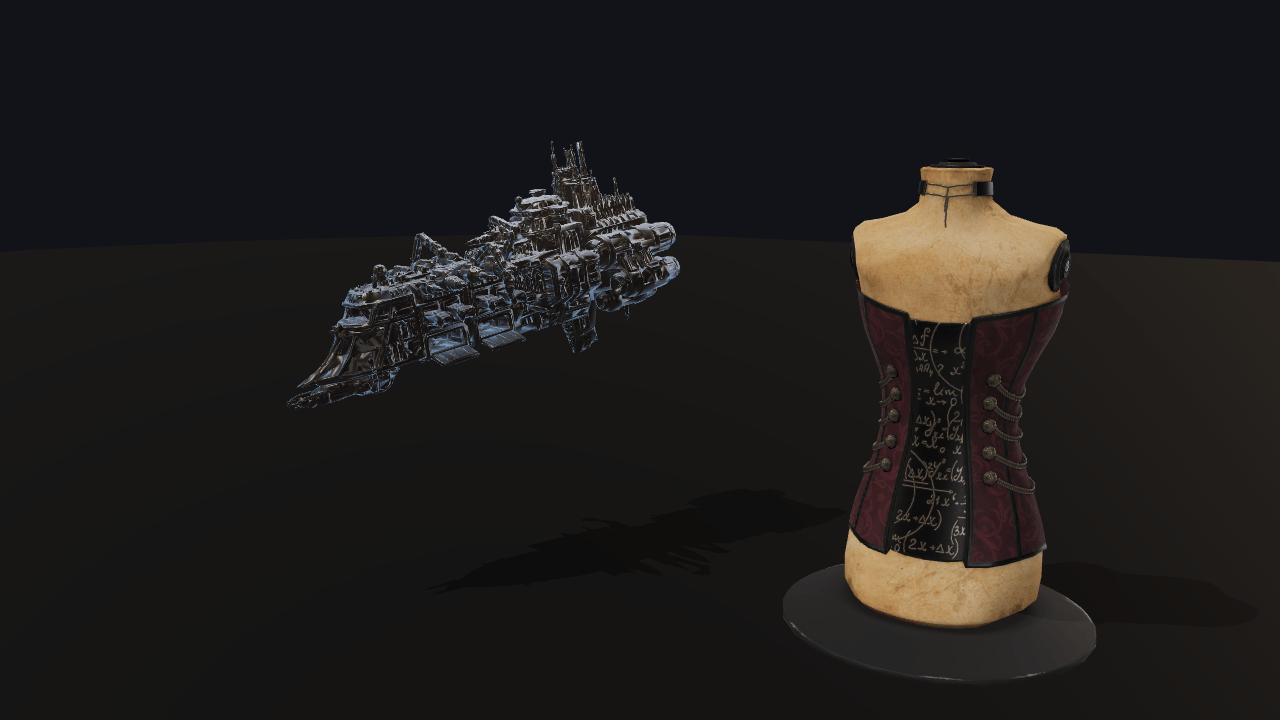
A surface shader is the other half of the custom-shader story — Unity's `surf()`, Godot's `fragment()`. Three named hooks are compiled into the engine's own PBR shader, so a custom look keeps direct lighting, shadows, image-based lighting, fog and tone mapping without the author writing a line of any of it. The two `surface` hooks here edit the base colour the lighting is then computed from, so the snow is shaded and shadowed like paint; the two `composite` hooks add to the lit result, which is why the rim light survives shadow and the hit flash reads even on a face the key light never reaches. The Corset beside the ship wears none of them: same probe, same lamp, same shadow map.
Off airLivePaused
Surface shaders
Shaders · 3D
WebGPU: checking…See browser support
Try this
- Press “Hit the ship”. The flash is one uniform driven to 1 and eased back — no material is rebuilt.
- Turn Snow off and on. That one costs a pipeline rebuild, because it changes Lite's cache key.
- Drag the water line past the snow line: wetness wins the overlap, because priority 200 runs after snow's 100.
Show source code
Source
import { Camera, createMaterialAsset, Environment, MODEL_ASSET_TYPE, Model, pbrMaterialDefinition, SHADER_ASSET_TYPE,} from "ignifx";import { bootExample } from "../_kit/boot.ts";import { attachOrbit } from "../_kit/orbit.ts";import { button, readout } from "../_kit/panel.ts";import { createBackdrop, createStudioFloor, createStudioRig, loadEnvironment } from "../_kit/stage.ts";import { HitFlash } from "./flash.ts";import { BACKDROP_DIAMETER, CLEAR_COLOR, CORSET, FLASH_SECONDS, FLOOR, HULL, shaderGroups, SHIP, SHIP_MATERIAL, SHOT, SURFACES,} from "./shot.ts";import type { SurfaceRow } from "./shot.ts";import type { ModelAsset, ShaderAsset, SurfaceShaderBinding, SurfaceShaderReference } from "ignifx";/** * Four custom looks on one hull, with the engine's own lighting untouched. * * ## What a surface shader is * * A `"shader"` material is *everything*: you own the vertex stage, the fragment stage and the * lighting, and Babylon Lite hands a custom material no light or shadow bindings at all * (`/examples/custom-shader/`). A **surface shader** is the other half — Unity's `surf()`, Godot's * `fragment()`. Three named hooks are compiled into the engine's own PBR shader, so a custom look * keeps direct lighting, shadows, image-based lighting, fog and tone mapping without the author * writing a line of any of it: * * | Hook | Where it runs | What it can do | * | ----------- | ------------------------------------ | ------------------------------------------- | * | `displace` | the vertex stage, inlined | move the vertex — and nothing else, see below | * | `surface` | before lighting | edit `baseColor`, `alpha`, `emissive`, `normal` | * | `composite` | after lighting | add to the lit colour | * * The two `surface` hooks here edit what the lighting is computed *from*, so snow is shaded by the * key light and shadowed by the shadow map like any other paint. The two `composite` hooks add to * the result, which is why the rim light survives shadow — a rim in shadow is exactly what a rim * light is for. The Corset behind it wears none of them: same probe, same lamp, same map. * * ## The three things to know * * 1. **`rendering.features.materialPlugins` has to be declared**, because Lite installs its plugin * bridges once, before the scene is registered. Without it, attaching is `IGX-0716`. * 2. **The host has to be a PBR material.** Lite 1.27.0 bakes a *Standard* host's plugin signature * from the meshes already in the scene, which is never in time, so a Standard host is refused. * 3. **`displace` cannot read a uniform, a texture or the clock** — Lite declares plugin uniforms * fragment-visible only. `/examples/vertex-animation/` shows what that leaves and what a full * shader material does instead. * * `shot.ts` holds the composition and the panel's table; `flash.ts` is the one moving part. */bootExample({ title: "Surface shaders", settings: { rendering: { clearColor: CLEAR_COLOR, msaaSamples: 4, // `materialPlugins` is the opt-in a surface shader needs; `shadows` is what proves the hooks // did not cost the host its shadow map. features: { shadows: true, materialPlugins: true }, }, time: { fixedDeltaTime: 1 / 60 }, }, async setup({ app, canvas, panel }) { const eye = app.world.createEntity("Main Camera"); eye.addComponent(Camera, { near: 0.03, far: 200, fov: SHOT.fov }); attachOrbit(app, eye, { yaw: SHOT.yaw, pitch: SHOT.pitch, // A phone held upright opens further back, so the Corset beside the ship is in the shot. distance: canvas.clientHeight > canvas.clientWidth ? SHOT.portraitDistance : SHOT.distance, target: SHOT.target, minDistance: 1, maxDistance: SHOT.maxDistance, }); createStudioRig(app, { focus: SHOT.target, shadowTechnique: "pcf", keyIntensity: 2.8, rimIntensity: 0.7 }); await createBackdrop(app, { diameter: BACKDROP_DIAMETER }); // Every load is awaited before `app.start()`: a completed load settles at once, and a material // cannot be built from a shader that has not decoded (IGX-0501). const shaders = SURFACES.map((row: SurfaceRow) => app.assets.load<ShaderAsset>(row.address, { type: SHADER_ASSET_TYPE }), ); const ship = app.assets.load<ModelAsset>(SHIP.address, { type: MODEL_ASSET_TYPE }); const corset = app.assets.load<ModelAsset>(CORSET.address, { type: MODEL_ASSET_TYPE }); const environment = loadEnvironment(app, "studio"); await Promise.all([...shaders.map((handle) => handle.promise), ship.promise, corset.promise, environment.promise]); const sky = app.world.createEntity("Environment").addComponent(Environment, { environment }); sky.imageProcessing.toneMapping = "aces"; sky.imageProcessing.exposure = SHOT.exposure; sky.blur = SHOT.blur; createStudioFloor(app, FLOOR); // The `surfaces` list is part of the material declaration, exactly as it is in a // `.material.json`: an address, the values to open on, and where in the order it sits. Lower // `priority` runs first, so the two `surface` hooks are 100 and 200 and the two `composite` // hooks 300 and 400. const surfaces: SurfaceShaderReference[] = SURFACES.map((row: SurfaceRow, index: number) => ({ shader: row.address, name: row.name, values: row.extra === undefined ? { [row.amount]: row.value } : { [row.amount]: row.value, [row.extra.name]: row.extra.value }, textures: {}, enabled: row.enabled, priority: (index + 1) * 100, })); const hull = createMaterialAsset( app, pbrMaterialDefinition({ name: "surface-shaders/hull", ...HULL, surfaces }), [], ); // One binding per shader, in the order they were declared. `set` re-uploads the host's uniform // block; `enabled` changes Lite's pipeline cache key and rebuilds — a settings operation. const bindings: readonly SurfaceShaderBinding[] = hull.value.surfaces; const decorated = app.world.createEntity("Ship"); decorated.transform.localPosition.set(SHIP.position.x, SHIP.position.y, SHIP.position.z); decorated.transform.localEulerAngles = SHIP.pose; // `materialOverrides` replaces one glTF material by the name it carries in the file, which is // how a decorated material reaches a loaded model: `Model` exposes no `MaterialAsset` of its own. decorated.addComponent(Model, { model: ship, materialOverrides: { [SHIP_MATERIAL]: hull }, castShadows: true }); const control = app.world.createEntity("Corset"); control.transform.localPosition.set(CORSET.position.x, CORSET.position.y, CORSET.position.z); control.transform.localScale.set(CORSET.scale, CORSET.scale, CORSET.scale); control.addComponent(Model, { model: corset, castShadows: true, receiveShadows: true }); app.registerComponents([HitFlash]); const flash = decorated.addComponent(HitFlash, { seconds: FLASH_SECONDS }); flash.binding = bindings[SURFACES.length - 1] ?? null; panel({ title: "Surface shaders", groups: [ { label: "Hull", controls: [ button("Hit the ship", (): void => { flash.hit(); }), readout("Shaders on", (): string => { let on = 0; for (const binding of bindings) { on += binding.enabled ? 1 : 0; } return `${String(on)} of ${String(bindings.length)}`; }), ], }, // One group per shader: its toggle and its sliders, every one bound to the live binding. ...shaderGroups(bindings), { label: "Frame", collapsed: true, controls: [readout("Draw calls", (): string => String(app.renderer.drawCalls))], }, ], }); },});/** * The stage the surface shaders are shown on, and the table that drives the panel. * * @remarks * Split out of `main.ts` for the reason `pbr-model/shot.ts` is: the placements, the lamp * intensities and the panel's bounds are numbers that were found by looking at rendered candidates, * and none of them is a lesson about surface shaders. * * ## Why the ship wears the shaders and the corset does not * * A surface shader decorates a **`MaterialAsset`**, and a glTF model's materials are Babylon Lite's, * built inside the loader — `Model` reaches them only through `materialOverrides`, which *replaces* * one by name. So the ship's single material is replaced with the one built in `main.ts`, which * carries the four shaders; the Corset beside it keeps everything the file shipped. That is what * makes the frame a comparison: the same probe, the same key light, the same shadow map, one object * decorated and one not. */import { backdropFade, backdropMaxDistance } from "../_kit/backdrop.ts";import { twoPlaces } from "../_kit/format.ts";import { bind, slider, toggle } from "../_kit/panel.ts";import type { PanelBinding, PanelControl, PanelGroup } from "../_kit/panel.ts";import type { StudioFloorOptions } from "../_kit/stage.ts";import type { ColorLike, SurfaceShaderBinding } from "ignifx";/** The near-black the frame is cleared to; the backdrop sphere covers it everywhere. */export const CLEAR_COLOR: ColorLike = { r: 0.01, g: 0.013, b: 0.02, a: 1 };/** How wide the backdrop sphere is, in metres. */export const BACKDROP_DIAMETER = 18;/** The opening shot, aimed at the ship. */export const SHOT = { fov: 34, yaw: 28, pitch: 18, distance: 2.2, /** * How far back the shot opens on a portrait canvas. The orbit camera keeps a square frame's * width there, narrower than the landscape frame this was composed in, and from the landscape * distance the Corset, the undecorated control, is cut off at the right edge. */ portraitDistance: 3.1, target: { x: -0.05, y: 0.58, z: 0 }, maxDistance: backdropMaxDistance(BACKDROP_DIAMETER), exposure: 1.05, /** How much the probe is blurred; a little turns the softboxes into reflections you can follow. */ blur: 0.25,} as const;/** The glTF material name the ship's single material answers to, from the file itself. */export const SHIP_MATERIAL = "tripo_material_fedcb3fd-2bd9-4616-af5b-e9682fee6ac0";/** Where the decorated ship sits: floating, turned side-on to the camera so the whole hull reads. */export const SHIP = { address: "models/ignifx-ship.glb", position: { x: -0.15, y: 0.6, z: 0 }, pose: { x: 0, y: -118, z: 6 },} as const;/** Where the undecorated Corset stands: on the floor behind and to the right, as the control. */export const CORSET = { address: "models/corset.glb", position: { x: 0.45, y: 0, z: 0.7 }, scale: 7,} as const;/** The plain floor, which runs into the backdrop's wall rather than ending at a line. */export const FLOOR: StudioFloorOptions = { size: 16, color: CLEAR_COLOR, fade: backdropFade(BACKDROP_DIAMETER, 4) };/** The hull the four shaders decorate: metal enough that the probe shows in it. */export const HULL = { baseColor: { r: 0.29, g: 0.24, b: 0.2, a: 1 }, metallic: 0.45, roughness: 0.4 } as const;/** How long the hit flash takes to fade back to nothing, in seconds. */export const FLASH_SECONDS = 0.32;/** One panel row: the surface shader it belongs to, and how the amount slider is drawn. */export interface SurfaceRow { /** The label on the panel group. */ readonly label: string; /** The `.surface.wgsl` address, under `examples/assets/`. */ readonly address: string; /** The name the shader answers to on the material; the address's basename by default. */ readonly name: string; /** Which hook it implements, for the panel's own caption. */ readonly hook: "surface" | "composite"; /** The uniform the amount slider writes. */ readonly amount: string; /** The slider's highest value; the lowest is always zero. */ readonly max: number; /** The value the material opens on. */ readonly value: number; /** Whether the shader is on when the example opens. */ readonly enabled: boolean; /** A second slider, when the shader has one worth showing. */ readonly extra?: { /** The visible label. */ readonly label: string; /** The uniform's name. */ readonly name: string; /** The lowest value. */ readonly min: number; /** The highest value. */ readonly max: number; /** The increment. */ readonly step: number; /** The value the material opens on. */ readonly value: number; };}/** * The four shaders, in the order they are layered onto the material. * * @remarks * Order matters: the two `surface` hooks run first and edit the base colour the lighting is then * computed from, and the two `composite` hooks run last and add to the lit result. Within a hook * the lower priority runs first, so wetness (200) darkens whatever snow (100) left: where the * water line climbs past the snow line, the snow reads as wet slush. */export const SURFACES: readonly SurfaceRow[] = [ { label: "Snow", address: "shaders/surface-shaders/snow.surface.wgsl", name: "snow", hook: "surface", amount: "amount", max: 1, value: 1, enabled: true, extra: { label: "Snow line", name: "height", min: 0.2, max: 1.4, step: 0.02, value: 0.4 }, }, { label: "Wetness", address: "shaders/surface-shaders/wetness.surface.wgsl", name: "wetness", hook: "surface", amount: "amount", max: 1, value: 0.85, enabled: true, extra: { label: "Water line", name: "waterLine", min: 0.1, max: 1.2, step: 0.02, value: 0.42 }, }, { label: "Rim light", address: "shaders/surface-shaders/rim.surface.wgsl", name: "rim", hook: "composite", amount: "strength", max: 3, value: 0.55, enabled: true, extra: { label: "Tightness", name: "power", min: 1, max: 8, step: 0.25, value: 4 }, }, { label: "Hit flash", address: "shaders/surface-shaders/hit-flash.surface.wgsl", name: "hit-flash", hook: "composite", amount: "flash", max: 1, value: 0, enabled: true, },];/** * Binds a slider to one of a surface shader's declared uniforms. * * @param binding - The shader on the hull. * @param name - The uniform, as the file declares it. * @param value - The value the hull opened on. * @returns A binding that writes with `set` and reads back with `get`, so the slider follows an edit * made in the devtools inspector too. */function uniform(binding: SurfaceShaderBinding, name: string, value: number): PanelBinding<number> { return { value, change: (next: number): void => { binding.set(name, next); }, read: (): number => { const current = binding.get(name); return typeof current === "number" ? current : value; }, };}/** * Builds one panel group per shader: its toggle, its amount and its second slider. * * @remarks * `set` re-uploads the host's uniform block, so the sliders are free to drag; `enabled` changes * Lite's pipeline cache key and rebuilds, which is why the toggles are settings, not animation. * * @param bindings - The hull material's bindings, in {@link SURFACES} order. * @returns The groups. */export function shaderGroups(bindings: readonly SurfaceShaderBinding[]): PanelGroup[] { return SURFACES.map((row: SurfaceRow, index: number): PanelGroup => { const binding = bindings[index]; const controls: PanelControl[] = []; if (binding !== undefined) { controls.push(toggle(`${row.label} (${row.hook})`, bind(binding, "enabled"))); if (row.label !== "Hit flash") { const range = { min: 0, max: row.max, step: 0.01, format: twoPlaces }; controls.push(slider("Amount", range, uniform(binding, row.amount, row.value))); } const extra = row.extra; if (extra !== undefined) { const range = { min: extra.min, max: extra.max, step: extra.step, format: twoPlaces }; controls.push(slider(extra.label, range, uniform(binding, extra.name, extra.value))); } } return { label: row.label, collapsed: index > 1, controls }; });}/** * The one moving part of this example: the script that decays the hit flash. * * @remarks * A game's damage response is exactly this — a uniform driven to 1 at the moment of the hit and * eased back to 0 over about a third of a second — and it is a `Script` rather than a tween because * `app.tweens` moves *fields on an object*, and a surface shader's uniforms live inside the host * material's uniform block and are reached through {@link SurfaceShaderBinding.set}. * * Writing a value is the cheap path: it re-uploads the host material's uniform block and recompiles * nothing. Toggling `enabled` or binding a texture is the expensive one — both change Babylon * Lite's pipeline cache key — which is why the panel's per-shader toggles are settings and this is * a per-frame animation. * * `update` is not called while `app.pause()` holds and is called with `dt === 0` under `?static=1`, * so a capture always shows the flash at rest. */import { f32, Script } from "ignifx";import type { ScriptCallbacks, SurfaceShaderBinding } from "ignifx";/** Drives one surface shader's `flash` uniform from 1 back down to 0. */export class HitFlash extends Script.define({ seconds: f32(0.32, { min: 0.05, tooltip: "How long the flash takes to fade out." }), }) implements ScriptCallbacks{ /** The namespaced registration id. */ static typeId = "ignifx-example/HitFlash"; /** The shader whose `flash` uniform this drives. Assigned after `addComponent`. */ binding: SurfaceShaderBinding | null = null; /** The uniform's name, as the `.surface.wgsl` file declares it. */ uniform = "flash"; /** How much of the flash is left, `1` at the moment of the hit. */ #level = 0; /** Starts a flash, or restarts one already in flight. */ hit(): void { this.#level = 1; this.#write(); } /** * Eases the level back to zero. * * @param dt - Seconds since the previous frame, scaled by `time.timeScale`. */ update(dt: number): void { if (this.#level <= 0) { return; } this.#level = Math.max(0, this.#level - dt / Math.max(this.seconds, 0.05)); this.#write(); } /** Writes the current level onto the shader, squared so the tail is short and the head is bright. */ #write(): void { this.binding?.set(this.uniform, this.#level * this.#level); }}// Snow: white where the surface faces up and the world height allows it, blended into whatever the
// host material's base colour already was. The host keeps its own direct lighting, shadows, IBL and
// tone mapping — that is the whole difference between a surface shader and a `"shader"` material.
// @ignifx surface
// @ignifx uniform amount: f32 = 0.85 range(0, 1) step(0.01) tooltip("How opaque the settled snow is.")
// @ignifx uniform snowColor: vec3<f32> = color(0.94, 0.96, 1.0)
// @ignifx uniform slope: f32 = 0.4 range(0, 1) step(0.01) tooltip("How steep a face still holds snow.")
// @ignifx uniform height: f32 = 0.15 range(-1, 2) step(0.05) tooltip("The world height the snow line sits at.")
fn surface(in: SurfaceInput, s: ptr<function, Surface>) {
// `geometricNormal` is world-space and unit length, so `.y` is "how far up this face looks". A
// face steeper than `slope` holds none, and one a little flatter than that is fully covered, so
// the snow sits on the decks and ledges and stops at their edges instead of greying the walls.
let edge = clamp(1.0 - surfaceUniforms.slope, 0.0, 0.85);
let facing = smoothstep(edge, edge + 0.15, in.geometricNormal.y);
let above = smoothstep(surfaceUniforms.height - 0.25, surfaceUniforms.height + 0.25, in.worldPosition.y);
// Two multiplied sines break the snow line up, so it reads as drift rather than as a contour.
let broken = 0.82 + 0.18 * sin(in.worldPosition.x * 3.5) * sin(in.worldPosition.z * 4.3);
let mask = clamp(facing * above * broken, 0.0, 1.0) * surfaceUniforms.amount;
(*s).baseColor = mix((*s).baseColor, surfaceUniforms.snowColor, mask);
// Snow is matte, whatever it settled on: without this it takes the hull's metal and reads as chrome.
(*s).metallic = mix((*s).metallic, 0.0, mask);
(*s).roughness = mix((*s).roughness, 0.9, mask);
}// Wetness: a darker, more saturated base colour in the low band of the model, which is what water
// actually does to a diffuse surface — it fills the pores and stops them scattering light back.
// @ignifx surface
// @ignifx uniform amount: f32 = 0.7 range(0, 1) step(0.01) tooltip("How wet the wet band is.")
// @ignifx uniform waterLine: f32 = 0.22 range(-0.5, 2) step(0.01) tooltip("World height the water reached.")
// @ignifx uniform fade: f32 = 0.18 range(0.01, 0.8) step(0.01) tooltip("How far the damp edge climbs.")
fn surface(in: SurfaceInput, s: ptr<function, Surface>) {
let wet = 1.0 - smoothstep(surfaceUniforms.waterLine, surfaceUniforms.waterLine + surfaceUniforms.fade, in.worldPosition.y);
let mask = clamp(wet, 0.0, 1.0) * surfaceUniforms.amount;
// Darker and slightly richer, both from the same mask.
(*s).baseColor = mix((*s).baseColor, (*s).baseColor * vec3<f32>(0.34, 0.36, 0.42), mask);
// A real wet surface is also **smoother**, and `Surface` carries `roughness` — but Babylon Lite's
// PBR template declares `roughness` as a `let`, so the write is accepted here and dropped on the
// way out (`packages/core/src/render/surface-shader-compiler.ts`). Lowering roughness is the
// first upstream ask; until it lands, wetness is an albedo effect and the sheen has to come from
// the rim shader beside it.
}// Rim light: added to the frame **after** the host has finished lighting it, which is what the
// `composite` hook is for. Doing it in `surface` would tint the base colour and then get multiplied
// by the lambert term, so a rim in shadow would vanish — the opposite of what a rim light is for.
// `composite` needs a PBR host: Babylon Lite's Standard template has no slot for it.
// @ignifx surface
// @ignifx uniform rimColor: vec3<f32> = color(0.55, 0.78, 1.0)
// @ignifx uniform strength: f32 = 0.9 range(0, 3) step(0.05) tooltip("How bright the edge burns.")
// @ignifx uniform power: f32 = 3 range(1, 8) step(0.25) tooltip("How tightly the rim hugs the silhouette.")
fn composite(in: SurfaceInput, color: vec3<f32>) -> vec3<f32> {
let facing = clamp(abs(dot(normalize(in.geometricNormal), normalize(in.viewDirection))), 0.0, 1.0);
let rim = pow(1.0 - facing, surfaceUniforms.power);
return color + surfaceUniforms.rimColor * rim * surfaceUniforms.strength;
}// Hit flash: the damage response every action game ships. A game writes `flash` from a script — a
// tween down from 1 over about a third of a second — and the whole model whitens and fades back.
// It is a `composite` hook because a flash has to survive shadow: a fragment the key light never
// reaches still flashes, which is exactly what a player needs to read a hit.
// @ignifx surface
// @ignifx uniform flash: f32 = 0 range(0, 1) step(0.01) tooltip("1 at the moment of the hit, 0 at rest.")
// @ignifx uniform flashColor: vec3<f32> = color(1.0, 0.86, 0.72)
fn composite(in: SurfaceInput, color: vec3<f32>) -> vec3<f32> {
let amount = clamp(surfaceUniforms.flash, 0.0, 1.0);
// A grazing fragment flashes hardest, so the silhouette pops first — the shape of the hit reads
// even at a frame or two of screen time.
let facing = clamp(abs(dot(normalize(in.geometricNormal), normalize(in.viewDirection))), 0.0, 1.0);
let edge = 1.0 + 1.6 * (1.0 - facing);
return mix(color, surfaceUniforms.flashColor * edge, amount);
}