Custom shader
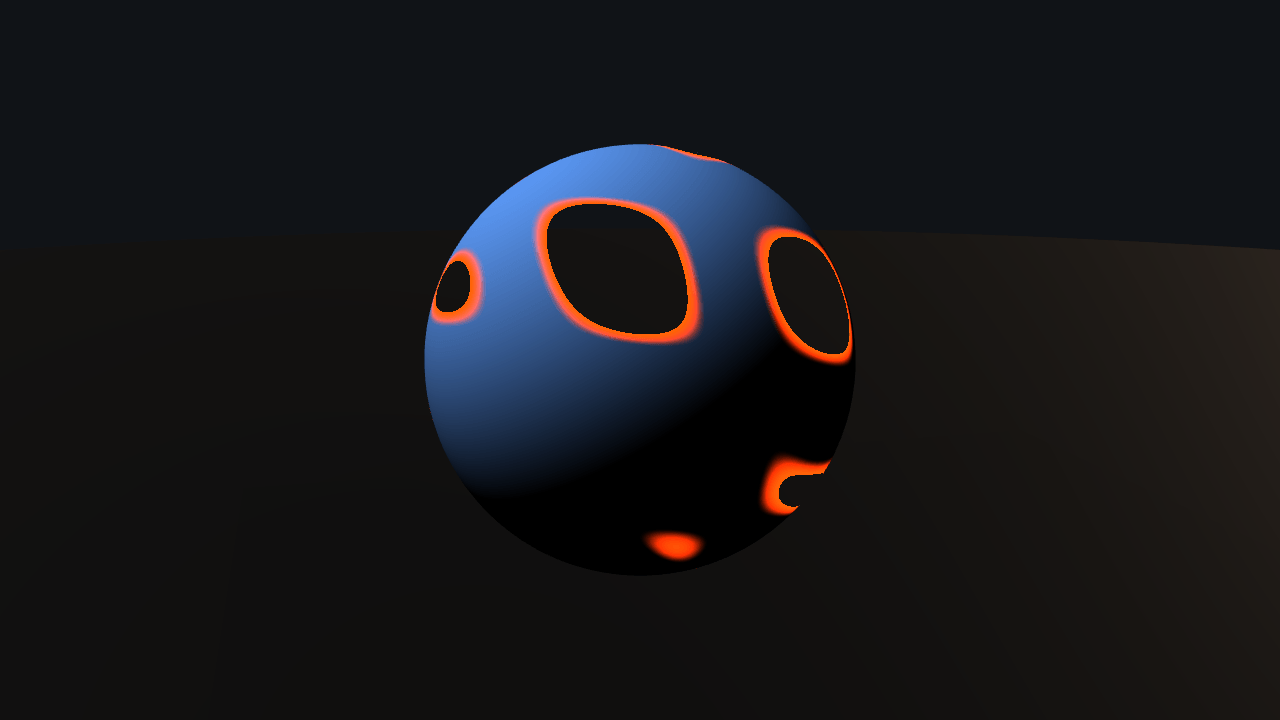
There is no material JSON here and no `uniforms: [...]` array. Each `.wgsl` file declares itself with `// @ignifx` comment pragmas — the attributes it reads, the engine values it wants, its own uniforms with a type, a default, a range and a tooltip, and the blend and cull state it draws with — so the file stays valid WGSL for every other tool and `@ignifx/vite-plugin` parses and checks it at build time: an undeclared name, a hand-written binding or a `textureSample` in a vertex path is a build failure with the line it is on. What a custom material gives up is everything the engine's PBR material does for free: Babylon Lite hands it transforms, the camera position and the screen size, and no lights, no shadow map and no probe. Toon and dissolve therefore light themselves from ignifx's own `mainLightDirection` and `ambientColor`, the studio probe's average colour, which keeps the side the light misses out of pure black.
Off airLivePaused
Custom shader
Shaders · 3D
WebGPU: checking…See browser support
Try this
- Drag Progress on the dissolve: the sphere burns away and the surviving edge glows.
- Switch to Hologram and watch the scan lines crawl — that is `shaderUniforms.time`, which Lite does not have.
- Pull Bands on the toon shader down to one. Cel shading is `floor(lambert * n) / n` and nothing else.
Show source code
Source
import { Camera, createMaterialAsset, Environment, MeshAsset, MeshRenderer, SHADER_ASSET_TYPE, shaderMaterialDefinition,} from "ignifx";import { bootExample } from "../_kit/boot.ts";import { attachOrbit } from "../_kit/orbit.ts";import { readout, select, slider } from "../_kit/panel.ts";import { createBackdrop, createStudioFloor, createStudioRig, loadEnvironment } from "../_kit/stage.ts";import { BACKDROP_DIAMETER, CLEAR_COLOR, FLOOR, SHADERS, SHOT, START_SHADER, SUBJECT } from "./shot.ts";import type { ShaderRow, UniformRow } from "./shot.ts";import type { PanelBinding, PanelGroup } from "../_kit/panel.ts";import type { AssetHandle, MaterialAsset, ShaderAsset } from "ignifx";/** * Four hand-written WGSL materials on one sphere. * * ## The file is the declaration * * There is no material JSON describing these shaders and no `uniforms: [...]` array in this file. * Each `.wgsl` declares itself with `// @ignifx` comment pragmas — the vertex attributes it reads, * the engine values it wants (`world`, `viewProjection`, `cameraPosition` from Babylon Lite; * `time`, `mainLightDirection`, `mainLightColor`, `ambientColor` from ignifx), its own uniforms with * a type, a default, a range, a step and a tooltip, and the blend and cull state it draws with. The * file stays valid WGSL for every other tool, and **`@ignifx/vite-plugin` parses and checks it at * build time**: a name the file reads but never declares, a binding written by hand, a * `textureSample` in a vertex path, a missing entry point — each is a build failure with the line it * is on, rather than a black sphere and a browser diagnostic about generated code nobody wrote. * * So loading one is `assets.load(address, { type: SHADER_ASSET_TYPE })`, building a material from * it is `shaderMaterialDefinition({ shader })`, and setting a value is `setUniform(name, value)` — * checked against the declaration, so a typo throws at the call site instead of drawing nothing. * * ## What you give up * * Everything the engine's PBR material does for free. Babylon Lite hands a custom material its * transforms, the camera position, the screen size and nothing else — no lights, no shadow map to * sample, no image-based lighting, no fog. `toon` and `dissolve` light themselves from ignifx's own * `mainLightDirection` and `ambientColor`: one directional light, and the average colour of the * studio probe, which is what keeps the side the light misses from going black. When a look only * needs to change the engine's shading rather than replace it, the answer is a surface shader * (`/examples/surface-shaders/`), which keeps all of it. * * `shot.ts` beside this file holds the stage and the panel's uniform table. *//** * Binds a slider to one of a shader material's declared uniforms. * * @param material - The material the uniform belongs to. * @param row - The panel row, which names the uniform and the value it opens on. * @returns A binding that writes with `setUniform` and reads back with `getUniform`. */function uniform(material: AssetHandle<MaterialAsset>, row: UniformRow): PanelBinding<number> { return { value: row.value, // `setUniform` re-uploads the material's own uniform block and recompiles nothing, which is // what makes a slider cheap enough to drag. change: (value: number): void => { material.value.setUniform(row.name, value); }, read: (): number => { const value = material.value.getUniform(row.name); return typeof value === "number" ? value : row.value; }, };}bootExample({ title: "Custom shader", settings: { rendering: { clearColor: CLEAR_COLOR, msaaSamples: 4 }, time: { fixedDeltaTime: 1 / 60 }, }, async setup({ app, panel }) { const eye = app.world.createEntity("Main Camera"); eye.addComponent(Camera, { near: 0.05, far: 200, fov: SHOT.fov }); attachOrbit(app, eye, { yaw: SHOT.yaw, pitch: SHOT.pitch, distance: SHOT.distance, target: SHOT.target, minDistance: 1.4, maxDistance: SHOT.maxDistance, }); // No shadow map: the only subject is a custom material, which has none to sample. createStudioRig(app, { focus: SHOT.target, keyIntensity: 2.4, rimIntensity: 0.9, shadows: false }); await createBackdrop(app, { diameter: BACKDROP_DIAMETER }); // The studio probe is what `ambientColor` reads. Without one it is zero. const environment = loadEnvironment(app, "studio"); await environment.promise; const sky = app.world.createEntity("Environment").addComponent(Environment, { environment }); sky.imageProcessing.toneMapping = "aces"; sky.imageProcessing.exposure = SHOT.exposure; createStudioFloor(app, FLOOR); // Every shader is loaded and every material built **before** `app.start()`: a load that // completes before the loop runs settles at once, and a material is *values applied to a // shader*, so the shader has to be loaded before the material can be built from it (IGX-0501 // otherwise). Four materials rather than one, so the select is an assignment and not a rebuild. const shaders = SHADERS.map((row: ShaderRow) => app.assets.load<ShaderAsset>(row.address, { type: SHADER_ASSET_TYPE }), ); await Promise.all(shaders.map((handle) => handle.promise)); const materials = new Map<string, AssetHandle<MaterialAsset>>(); for (let index = 0; index < SHADERS.length; index += 1) { const row = SHADERS[index]; const shader = shaders[index]; if (row === undefined || shader === undefined) { continue; } // The file's declared defaults apply on their own; `values` here only names the ones this // example wants to open on something other than the file's default. const values: Record<string, number> = {}; for (const value of row.uniforms) { values[value.name] = value.value; } materials.set(row.label, createMaterialAsset(app, shaderMaterialDefinition({ shader, values }), [])); } const subject = app.world.createEntity("Subject"); subject.transform.localPosition.set(0, SUBJECT.height, 0); const renderer = subject.addComponent(MeshRenderer, { mesh: MeshAsset.sphere(app, { diameter: SUBJECT.diameter, segments: SUBJECT.segments }), materials: [materials.get(START_SHADER) ?? null], castShadows: false, receiveShadows: false, }); // One group per shader, so every slider is bound to the material it belongs to whether or not // that material is the one on the mesh. const groups: PanelGroup[] = SHADERS.map((row: ShaderRow) => { const material = materials.get(row.label); return { label: row.label, collapsed: row.label !== START_SHADER, controls: material === undefined ? [] : row.uniforms.map((value: UniformRow) => slider( value.label, { min: value.min, max: value.max, step: value.step, format: value.format }, uniform(material, value), ), ), }; }); // Filled in once the panel is mounted, so the select can open the group whose sliders drive the // material it has just put on the mesh. Stays empty under `?nopanel=1`, where there is no select. const shaderGroups = new Map<string, HTMLDetailsElement>(); const mounted = panel({ title: "Custom shader", groups: [ { label: "Shader", controls: [ select( "Material", SHADERS.map((row: ShaderRow) => row.label), { value: START_SHADER, change: (label: string): void => { // Swapping a material is one assignment. The two transparent shaders declare // `depthWrite off` in their own files, so nothing here has to know which is which. renderer.materials = [materials.get(label) ?? null]; // One shader's group open at a time, and always the one on the mesh: a slider in // any other group drives a material nobody is looking at. for (const [shader, group] of shaderGroups) { group.open = shader === label; } }, }, ), ], }, ...groups, { label: "Frame", collapsed: true, controls: [readout("Draw calls", (): string => String(app.renderer.drawCalls))], }, ], }); // The panel builds one `<details>` per group, headed by the group's label, and each shader's // group is labelled with the shader's own name. for (const group of mounted?.element.querySelectorAll<HTMLDetailsElement>("details") ?? []) { const label = group.querySelector("summary")?.textContent ?? ""; if (materials.has(label)) { shaderGroups.set(label, group); } } },});/** * The stage the four shaders are shown on, and the table that says which uniforms each of them puts * on the panel. * * @remarks * A separate file for the reason `pbr-model/shot.ts` is: none of it is a lesson about custom * shaders. `main.ts` is then the four loads, the four materials, the select that swaps one onto the * mesh, and the sliders that write the files' own declared uniforms — which is all a reader came for. * * ## Why the uniform table is written out here * * A `.wgsl` file's `// @ignifx uniform` lines already carry a range, a step and a tooltip, and * `ShaderAsset.declaration` hands them back at runtime — so a real inspector builds its rows from * the file and never repeats itself. The kit's panel takes a `label` and a `format` this * declaration has no field for, so the example writes the four rows it wants out longhand and keeps * the bounds the same as the file's. Reading the bounds off `shader.value.declaration.uniforms` * instead is three lines and is what an editor would do; it is not shown here because the point of * the example is the shader, not the panel. */import { backdropFade, backdropMaxDistance } from "../_kit/backdrop.ts";import { twoPlaces } from "../_kit/format.ts";import type { StudioFloorOptions } from "../_kit/stage.ts";import type { ColorLike } from "ignifx";/** The near-black the frame is cleared to; the backdrop sphere covers it everywhere. */export const CLEAR_COLOR: ColorLike = { r: 0.012, g: 0.015, b: 0.023, a: 1 };/** How wide the backdrop sphere is, in metres. */export const BACKDROP_DIAMETER = 18;/** The opening shot: the pose every capture is taken from. */export const SHOT = { fov: 32, yaw: 24, pitch: 12, distance: 3.1, target: { x: 0, y: 0.62, z: 0 }, maxDistance: backdropMaxDistance(BACKDROP_DIAMETER), exposure: 1,} as const;/** The subject: one sphere, its centre at the orbit's target. */export const SUBJECT = { diameter: 1.05, segments: 48, height: 0.62 } as const;/** The plain floor, which runs into the backdrop's wall rather than ending at a line. */export const FLOOR: StudioFloorOptions = { size: 26, color: CLEAR_COLOR, fade: backdropFade(BACKDROP_DIAMETER, 4) };/** Writes a value with no decimals. */const whole = (value: number): string => value.toFixed(0);/** Writes a value with one decimal. */const tenths = (value: number): string => value.toFixed(1);/** One panel row: a uniform the shader file declares, and how the panel should draw it. */export interface UniformRow { /** The visible label. */ readonly label: string; /** The uniform's name, exactly as the `.wgsl` file declared it. */ readonly name: string; /** The lowest value; the same bound the file's `range(…)` states. */ readonly min: number; /** The highest value. */ readonly max: number; /** The increment; the same one the file's `step(…)` states. */ readonly step: number; /** The value the material opens on; the file's own default unless the example overrides it. */ readonly value: number; /** How the value cell writes the value. */ readonly format: (value: number) => string;}/** One shader on the select: the file to load, and the rows its uniforms get. */export interface ShaderRow { /** The label on the select and on the panel group. */ readonly label: string; /** The asset address, under `examples/assets/`. */ readonly address: string; /** The sliders the panel offers for it. */ readonly uniforms: readonly UniformRow[];}/** The four shaders, in select order. The opening frame is {@link START_SHADER}. */export const SHADERS: readonly ShaderRow[] = [ { label: "Dissolve", address: "shaders/custom-shader/dissolve.wgsl", uniforms: [ { label: "Progress", name: "progress", min: 0, max: 1, step: 0.01, value: 0.35, format: twoPlaces }, { label: "Edge width", name: "edgeWidth", min: 0.01, max: 0.3, step: 0.01, value: 0.09, format: twoPlaces }, ], }, { label: "Toon", address: "shaders/custom-shader/toon.wgsl", uniforms: [ { label: "Bands", name: "bands", min: 1, max: 8, step: 1, value: 3, format: whole }, { label: "Outline", name: "outline", min: 0, max: 0.8, step: 0.02, value: 0.28, format: twoPlaces }, ], }, { label: "Hologram", address: "shaders/custom-shader/hologram.wgsl", uniforms: [ { label: "Scan lines", name: "scanFrequency", min: 4, max: 60, step: 1, value: 14, format: whole }, { label: "Scan speed", name: "scanSpeed", min: 0, max: 3, step: 0.05, value: 0.6, format: twoPlaces }, { label: "Glow", name: "glow", min: 0.2, max: 4, step: 0.1, value: 1.4, format: tenths }, ], }, { label: "Force field", address: "shaders/custom-shader/forcefield.wgsl", uniforms: [ { label: "Cells", name: "cells", min: 3, max: 40, step: 1, value: 14, format: whole }, { label: "Pulse", name: "pulse", min: 0, max: 2, step: 0.05, value: 0.5, format: twoPlaces }, ], },];/** Which of {@link SHADERS} the example opens on, and therefore what the poster shows. */export const START_SHADER = "Dissolve";// Dissolve: discard where a noise field falls under `progress`, and burn the surviving edge.
// The field is three multiplied sine waves rather than a sampled texture, so the cut-out is
// procedural and the file needs no asset of its own.
// @ignifx shader
// @ignifx attributes position, normal
// @ignifx system world, worldViewProjection, mainLightDirection, mainLightColor, ambientColor
// @ignifx uniform baseColor: vec3<f32> = color(0.42, 0.55, 0.72)
// @ignifx uniform edgeColor: vec3<f32> = color(1.0, 0.48, 0.12)
// @ignifx uniform progress: f32 = 0.35 range(0, 1) step(0.01) tooltip("How much of the surface has burned away.")
// @ignifx uniform edgeWidth: f32 = 0.09 range(0.01, 0.3) step(0.01) tooltip("How wide the burning edge is.")
// @ignifx blend opaque cull back
struct VertexOutput {
@builtin(position) position: vec4<f32>,
@location(0) normal: vec3<f32>,
@location(1) localPosition: vec3<f32>,
}
fn field(p: vec3<f32>) -> f32 {
let waves = sin(p.x * 7.3 + p.y * 3.1) * sin(p.y * 8.7 + p.z * 2.3) * sin(p.z * 6.1 + p.x * 4.7);
return 0.5 + 0.5 * waves;
}
@vertex fn mainVertex(input: VertexInput) -> VertexOutput {
var out: VertexOutput;
out.position = shaderSystem.worldViewProjection * vec4<f32>(input.position, 1.0);
out.normal = normalize((shaderSystem.world * vec4<f32>(input.normal, 0.0)).xyz);
out.localPosition = input.position;
return out;
}
@fragment fn mainFragment(input: VertexOutput) -> @location(0) vec4<f32> {
let noise = field(input.localPosition);
if (noise < shaderUniforms.progress) { discard; }
let lambert = clamp(dot(normalize(input.normal), -normalize(shaderUniforms.mainLightDirection)), 0.0, 1.0);
let lit = shaderUniforms.baseColor * (shaderUniforms.ambientColor + shaderUniforms.mainLightColor * lambert);
// The band just above the cut glows: `edgeColor` is used as an emitter, so it survives the lambert.
let heat = 1.0 - smoothstep(shaderUniforms.progress, shaderUniforms.progress + shaderUniforms.edgeWidth, noise);
return vec4<f32>(mix(lit, shaderUniforms.edgeColor * 2.0, heat), 1.0);
}// Cel shading: the light term quantised into bands, plus a dark outline from the view angle.
// `mainLightDirection` and `ambientColor` are ignifx's, not Babylon Lite's, so they are read from
// `shaderUniforms` beside this file's own values.
// @ignifx shader
// @ignifx attributes position, normal
// @ignifx system world, worldViewProjection, cameraPosition, mainLightDirection, mainLightColor, ambientColor
// @ignifx uniform baseColor: vec3<f32> = color(0.86, 0.31, 0.24)
// @ignifx uniform bands: f32 = 3 range(1, 8) step(1) tooltip("How many steps the light is quantised into.")
// @ignifx uniform outline: f32 = 0.28 range(0, 0.8) step(0.02) tooltip("How wide the silhouette rim is.")
// @ignifx blend opaque cull back
struct VertexOutput {
@builtin(position) position: vec4<f32>,
@location(0) normal: vec3<f32>,
@location(1) worldPosition: vec3<f32>,
}
@vertex fn mainVertex(input: VertexInput) -> VertexOutput {
var out: VertexOutput;
out.position = shaderSystem.worldViewProjection * vec4<f32>(input.position, 1.0);
out.normal = normalize((shaderSystem.world * vec4<f32>(input.normal, 0.0)).xyz);
out.worldPosition = (shaderSystem.world * vec4<f32>(input.position, 1.0)).xyz;
return out;
}
@fragment fn mainFragment(input: VertexOutput) -> @location(0) vec4<f32> {
let normal = normalize(input.normal);
let toLight = -normalize(shaderUniforms.mainLightDirection);
let steps = max(shaderUniforms.bands, 1.0);
// `floor(x * n) / n` is the whole of cel shading: the smooth lambert ramp becomes n flat plateaus.
let lambert = clamp(dot(normal, toLight), 0.0, 1.0);
let stepped = floor(lambert * steps) / steps;
let lit = shaderUniforms.baseColor * (shaderUniforms.ambientColor + shaderUniforms.mainLightColor * stepped);
let toEye = normalize(shaderSystem.cameraPosition - input.worldPosition);
// The silhouette, not a post-process edge filter: a fragment whose normal turns away from the eye
// is on the rim of the shape, whatever is behind it.
let rim = 1.0 - smoothstep(shaderUniforms.outline * 0.5, shaderUniforms.outline, abs(dot(normal, toEye)));
return vec4<f32>(mix(lit, vec3<f32>(0.02, 0.02, 0.04), rim), 1.0);
}// Hologram: horizontal scan lines that crawl with `time`, a fresnel edge, and additive blending so
// the floor shows through. `time` is ignifx's clock, not Babylon Lite's — Lite ships none — and it
// freezes under `app.pause()` and under the `?static=1` capture flag.
// @ignifx shader
// @ignifx attributes position, normal
// @ignifx system world, worldViewProjection, cameraPosition, time
// @ignifx uniform tint: vec3<f32> = color(0.29, 0.82, 1.0)
// @ignifx uniform scanFrequency: f32 = 14 range(4, 60) step(1) tooltip("Scan lines per metre of height.")
// @ignifx uniform scanSpeed: f32 = 0.6 range(0, 3) step(0.05) tooltip("How fast the lines crawl, metres a second.")
// @ignifx uniform glow: f32 = 1.4 range(0.2, 4) step(0.1) tooltip("Overall brightness of the projection.")
// @ignifx blend additive cull none depthWrite off
struct VertexOutput {
@builtin(position) position: vec4<f32>,
@location(0) normal: vec3<f32>,
@location(1) worldPosition: vec3<f32>,
}
@vertex fn mainVertex(input: VertexInput) -> VertexOutput {
var out: VertexOutput;
out.position = shaderSystem.worldViewProjection * vec4<f32>(input.position, 1.0);
out.normal = normalize((shaderSystem.world * vec4<f32>(input.normal, 0.0)).xyz);
out.worldPosition = (shaderSystem.world * vec4<f32>(input.position, 1.0)).xyz;
return out;
}
@fragment fn mainFragment(input: VertexOutput) -> @location(0) vec4<f32> {
// One sine period per line, so `scanFrequency` is lines per metre.
let height = input.worldPosition.y - shaderUniforms.time * shaderUniforms.scanSpeed;
let scan = height * shaderUniforms.scanFrequency * 6.2831853;
let lines = 0.35 + 0.65 * pow(0.5 + 0.5 * sin(scan), 4.0);
let toEye = normalize(shaderSystem.cameraPosition - input.worldPosition);
// A grazing fragment is where a real projection is brightest, so the fresnel term is added, not
// multiplied: the silhouette burns and the front face stays readable.
let fresnel = pow(1.0 - clamp(abs(dot(normalize(input.normal), toEye)), 0.0, 1.0), 2.5);
let strength = (lines * 0.6 + fresnel * 1.2) * shaderUniforms.glow;
// `blend additive` ignores the alpha channel, so the colour alone carries the brightness.
return vec4<f32>(shaderUniforms.tint * strength, 1.0);
}// Force field: a fresnel shell with a square lattice on it, drawn premultiplied so the shape reads as
// glass rather than as a flat additive glow. `blend premultiplied` is the mode Babylon Lite cannot
// name — its own `"alpha"` multiplies by alpha a second time — so ignifx supplies the blend state.
// @ignifx shader
// @ignifx attributes position, normal, uv
// @ignifx system world, worldViewProjection, cameraPosition, time
// @ignifx uniform tint: vec3<f32> = color(0.35, 0.66, 1.0)
// @ignifx uniform cells: f32 = 14 range(3, 40) step(1) tooltip("How many lattice cells fit across the shell.")
// @ignifx uniform pulse: f32 = 0.5 range(0, 2) step(0.05) tooltip("How hard the lattice breathes.")
// @ignifx blend premultiplied cull none depthWrite off
struct VertexOutput {
@builtin(position) position: vec4<f32>,
@location(0) normal: vec3<f32>,
@location(1) worldPosition: vec3<f32>,
@location(2) uv: vec2<f32>,
}
@vertex fn mainVertex(input: VertexInput) -> VertexOutput {
var out: VertexOutput;
out.position = shaderSystem.worldViewProjection * vec4<f32>(input.position, 1.0);
out.normal = normalize((shaderSystem.world * vec4<f32>(input.normal, 0.0)).xyz);
out.worldPosition = (shaderSystem.world * vec4<f32>(input.position, 1.0)).xyz;
out.uv = input.uv;
return out;
}
@fragment fn mainFragment(input: VertexOutput) -> @location(0) vec4<f32> {
let grid = abs(fract(input.uv * shaderUniforms.cells) - vec2<f32>(0.5, 0.5));
// `grid` is the distance from the cell's centre, so the lines are where either axis nears 0.5.
let lattice = smoothstep(0.40, 0.47, max(grid.x, grid.y));
let toEye = normalize(shaderSystem.cameraPosition - input.worldPosition);
let fresnel = pow(1.0 - clamp(abs(dot(normalize(input.normal), toEye)), 0.0, 1.0), 2.0);
let breathe = 1.0 + shaderUniforms.pulse * sin(shaderUniforms.time * 2.4);
let alpha = clamp((fresnel * 0.85 + lattice * 0.35) * breathe, 0.0, 1.0);
// Premultiplied: the colour is already multiplied by the coverage it is written with, which is
// what lets the lattice and the rim share one draw without double-darkening the overlap.
return vec4<f32>(shaderUniforms.tint * alpha * 1.6, alpha);
}