All examples
Instancing
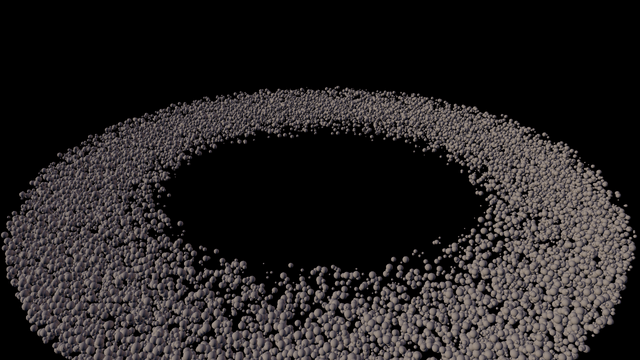
A ring of 20,000 rocks drawn from one mesh in a single draw call. Each rock is a matrix in an array the example owns, and the renderer reads that array directly instead of copying it. Draw fewer rocks without uploading anything, move the distance where a simpler mesh takes over, or switch GPU culling and the low-detail mesh on and off, which builds a new renderer because both are fixed when one is created.
This example is deliberately heavy: expect a lower frame rate on a phone or an older laptop.
Off airLivePaused
Instancing
Rendering · 3D
WebGPU: checking…See browser support
Try this
- Pull Drawn down to two thousand and back up. The draw-call count never moves.
- Turn the LOD partner off and orbit out: the far side of the belt is suddenly the full-detail mesh.
- Turn GPU culling off. The renderer is rebuilt, and the LOD partner goes off with it: its mesh is chosen in the culling pass.
Show source code
Source
import { Camera, createMaterialAsset, Environment, InstancedMeshRenderer, MeshAsset, pbrMaterialDefinition,} from "ignifx";import { bootExample } from "../_kit/boot.ts";import { thousands, wholeMetres } from "../_kit/format.ts";import { attachOrbit } from "../_kit/orbit.ts";import { readout, slider, toggle } from "../_kit/panel.ts";import { createLightRig } from "../_kit/stage.ts";import { CAPACITY, CLEAR_COLOR, layOutBelt, LOD, MESH, SHOT } from "./belt.ts";import type { AssetHandle, MaterialAsset, MeshAsset as MeshAssetType } from "ignifx";/** * Twenty thousand asteroids, one draw call. * * ## The slab is yours * * An `InstancedMeshRenderer` draws one mesh many times, each copy placed by its own matrix. The * matrices live in a `Float32Array` this file owns: sixteen floats per rock, column-major, the * layout `Transform.worldMatrix` already uses. `setMatrices` hands the renderer the array itself, * not a copy, so the array has to stay alive and stay at least `count * 16` floats long. Moving a * rock is a write into the array followed by `markDirty()`; drawing fewer is `setCount`, which * uploads nothing. * * ## Three settings fixed when the renderer is built * * `capacity`, `gpuCulling` and which mesh is the LOD partner are baked in when the renderer is first * drawn. Changing one later is refused with `IGX-0717`, and the field goes back to the value being * drawn. So the GPU-culling and LOD toggles below build a **new** renderer — which is what a * graphics-settings screen has to do too. The LOD `distance` and `band` are not in that set, so the * distance slider is an ordinary assignment. * * The two toggles are not independent. Lite picks each rock's mesh in the culling compute pass, so * a LOD partner on a renderer with `gpuCulling: false` is accepted and never used: every rock draws * the full-detail mesh. The panel keeps them honest — culling off takes the partner with it, and * the partner on brings culling back. * * `belt.ts` beside this file lays the ring out and writes the matrices. */bootExample({ title: "Instancing", settings: { rendering: { clearColor: CLEAR_COLOR, features: { shadows: false } }, }, setup({ app, panel, random, flags }) { const eye = app.world.createEntity("Main Camera"); eye.addComponent(Camera, { near: 0.5, far: 600, fov: SHOT.fov }); attachOrbit(app, eye, { yaw: SHOT.yaw, pitch: SHOT.pitch, distance: SHOT.distance, target: SHOT.target, minDistance: 6, maxDistance: 320, }); // One sun and a cool bounce: the rocks are lit, not shadowed. Shadows are off in `settings` // because a 20,000-instance caster pass is a different lesson, and a directional shadow map // fitted around a 110-metre belt would be a blur at any resolution worth paying for. createLightRig(app, { focus: SHOT.target, keyPosition: { x: -60, y: 34, z: -40 }, keyIntensity: 5.2, fillIntensity: 0.7, fillColor: { r: 0.42, g: 0.55, b: 0.9, a: 1 }, rimIntensity: 1.6, rimPosition: { x: 52, y: 12, z: 46 }, shadows: false, }); app.world.createEntity("Environment").addComponent(Environment).imageProcessing.toneMapping = "aces"; const rock: AssetHandle<MaterialAsset> = createMaterialAsset( app, pbrMaterialDefinition({ name: "instancing/rock", baseColor: { r: 0.55, g: 0.51, b: 0.46, a: 1 }, metallic: 0, roughness: 0.95, }), [], ); // This file holds the three handles for the page's life; each renderer only borrows them. const near: AssetHandle<MeshAssetType> = MeshAsset.sphere(app, { diameter: MESH.diameter, segments: MESH.segments, }); const far: AssetHandle<MeshAssetType> = MeshAsset.sphere(app, { diameter: MESH.diameter, segments: MESH.lodSegments, }); // Allocated once, filled once, and handed to Lite by reference for the life of the page. const slab = new Float32Array(CAPACITY * 16); layOutBelt(slab, CAPACITY, random); const belt = app.world.createEntity("Asteroid belt"); // The frame-time probe needs 420 rendered frames, which SwiftShader cannot rasterise at 20,000 // instances in its time limit. The engine's per-frame cost is the same for any count once the // slab is static, so a benchmark draws a tenth of the belt. let drawn = flags.isBench ? CAPACITY / 10 : CAPACITY; let gpuCulling = true; let useLod = true; let lodDistance: number = LOD.distance; let renderer = build(null); /** * Creates the renderer the current settings describe, replacing the one before it. * * @param previous - The renderer being replaced, or `null` for the first. * @returns The live component. */ function build(previous: InstancedMeshRenderer | null): InstancedMeshRenderer { // `destroy` lands at the end of the frame, so the old belt draws nothing until then. Not // `enabled = false`: that hides the entity's node, which the new renderer shares. if (previous !== null) { previous.setCount(0); previous.destroy(); } const created = belt.addComponent(InstancedMeshRenderer, { mesh: near, materials: [rock], capacity: CAPACITY, gpuCulling, castShadows: false, receiveShadows: false, lod: useLod ? { mesh: far, distance: lodDistance, band: LOD.band } : null, }); created.setMatrices(slab, drawn); return created; } panel({ title: "Instancing", groups: [ { label: "Belt", controls: [ slider( "Drawn", { min: 0, max: CAPACITY, step: 100, format: thousands }, { value: drawn, change: (value: number): void => { // No re-upload: the slab is unchanged and only the active range moves. drawn = Math.round(value); renderer.setCount(drawn); }, }, ), readout("Instances", (): string => thousands(renderer.count)), ], }, { label: "Culling and detail", controls: [ // Each toggle reads the other's variable back, so switching one moves the other with it. toggle("GPU culling", { value: gpuCulling, change: (on: boolean): void => { gpuCulling = on; useLod = useLod && on; renderer = build(renderer); }, read: (): boolean => gpuCulling, }), toggle("LOD partner", { value: useLod, change: (on: boolean): void => { useLod = on; gpuCulling = gpuCulling || on; renderer = build(renderer); }, read: (): boolean => useLod, }), // Live on the renderer that is drawing, and remembered for the next one a toggle builds; // it does nothing while the LOD partner is off. slider( "LOD distance", { min: 8, max: 160, step: 2, format: wholeMetres }, { value: lodDistance, change: (value: number): void => { lodDistance = value; const lod = renderer.lod; if (lod !== null) { lod.distance = value; } }, read: (): number => lodDistance, }, ), ], }, { label: "Frame", collapsed: true, controls: [readout("Draw calls", (): string => String(app.renderer.drawCalls))], }, ], }); },});/** * The asteroid belt's geometry: where the 20,000 rocks sit, and the matrix slab that says so. * * @remarks * Split out of `main.ts` because none of it is a lesson about instancing — it is a seeded ring of * placements and the sixteen floats each one becomes. What *is* worth reading here is the layout * rule the slab obeys, because getting it wrong is the usual first failure: **sixteen floats per * instance, column-major**, the same order `Transform.worldMatrix` and Babylon Lite's `Mat4` already * use, with the translation in elements 12, 13 and 14. * * The slab is written once, in `setup`, and never again: nothing here animates. A belt that turned * would mutate this same array in place and call `markDirty()`, which is the point of the component * handing Lite the caller's memory rather than copying it. *//** How many floats one instance matrix occupies. */const FLOATS_PER_MATRIX = 16;/** The shot the example opens on. */export const SHOT = { fov: 40, yaw: 18, pitch: 27, distance: 122, target: { x: 0, y: 0, z: 0 },} as const;/** The near-black of space the frame is cleared to. */export const CLEAR_COLOR = { r: 0.008, g: 0.009, b: 0.014, a: 1 } as const;/** How many rocks the slab holds, and the renderer's capacity. */export const CAPACITY = 20_000;/** The belt's shape, in metres. */export const BELT = { /** The radius the ring is centred on. */ radius: 44, /** How far in and out of that radius a rock may scatter. */ spread: 13, /** How far above and below the plane a rock may scatter. */ thickness: 3.4, /** The smallest rock's diameter. */ minSize: 0.22, /** The largest rock's diameter. */ maxSize: 1.15,} as const;/** The belt's inner radius, squared, in square metres. */const INNER_SQUARED = (BELT.radius - BELT.spread) ** 2;/** The belt's outer radius, squared, in square metres. */const OUTER_SQUARED = (BELT.radius + BELT.spread) ** 2;/** The prototype mesh, and the coarse partner drawn past {@link LOD.distance}. */export const MESH = { segments: 10, lodSegments: 4, diameter: 1 } as const;/** Where an instance switches to the coarse mesh, and how wide the dither window is. */export const LOD = { distance: 46, band: 12 } as const;/** * Fills a matrix slab with a seeded ring of rocks. * * @remarks * The composition is a **ring**, not a disc, because a disc at this count reads as noise: a torus * of rocks has a near edge, a far edge and a hole, which is what makes 20,000 of something legible. * Each rock gets a scale, a yaw and a pitch, so the same low-poly sphere never appears twice at the * same orientation. * * @param slab - The array to fill; at least `count * 16` floats. * @param count - How many instances to write. * @param random - The kit's seeded generator, so the same seed lays out the same belt. */export function layOutBelt(slab: Float32Array, count: number, random: () => number): void { for (let index = 0; index < count; index += 1) { const angle = random() * Math.PI * 2; // A ring's area grows with its radius, so a radius drawn uniformly would crowd the inner edge. // Drawing the squared radius uniformly between the two edges spreads the rocks evenly by area. const radius = Math.sqrt(INNER_SQUARED + random() * (OUTER_SQUARED - INNER_SQUARED)); const height = (random() - 0.5) * 2 * BELT.thickness; const size = BELT.minSize + random() * (BELT.maxSize - BELT.minSize); writeMatrix( slab, index, Math.cos(angle) * radius, height, Math.sin(angle) * radius, size, random() * Math.PI * 2, random() * Math.PI * 2, ); }}/** * Writes one instance's sixteen column-major floats: a uniform scale, a yaw, a pitch, a position. * * @param slab - The array to write into. * @param index - Which instance. * @param x - Metres along X. * @param y - Metres along Y. * @param z - Metres along Z. * @param scale - The uniform scale. * @param yaw - Rotation about Y, in radians. * @param pitch - Rotation about X, in radians. */function writeMatrix( slab: Float32Array, index: number, x: number, y: number, z: number, scale: number, yaw: number, pitch: number,): void { const base = index * FLOATS_PER_MATRIX; const cy = Math.cos(yaw); const sy = Math.sin(yaw); const cp = Math.cos(pitch); const sp = Math.sin(pitch); // R = Ry(yaw) * Rx(pitch), scaled, written column by column. slab[base] = cy * scale; slab[base + 1] = 0; slab[base + 2] = -sy * scale; slab[base + 3] = 0; slab[base + 4] = sy * sp * scale; slab[base + 5] = cp * scale; slab[base + 6] = cy * sp * scale; slab[base + 7] = 0; slab[base + 8] = sy * cp * scale; slab[base + 9] = -sp * scale; slab[base + 10] = cy * cp * scale; slab[base + 11] = 0; slab[base + 12] = x; slab[base + 13] = y; slab[base + 14] = z; slab[base + 15] = 1;}