Sculpt terrain
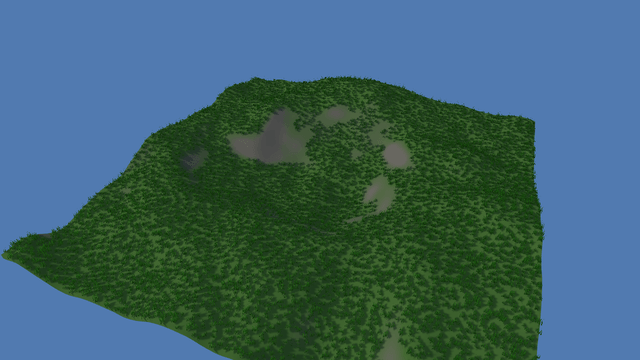
`setHeights(x, z, width, depth, heights)` is the whole editing API. It rewrites the positions and normals of every chunk the rectangle touches — one sample wider on each side, because a normal reads its neighbours — and then raises `onHeightsChanged`. Two listeners pick that up and neither knows about the other: the `HeightfieldCollider` re-reads `colliderInit()`, so a dropped ball rolls into the dent you just made, and the `TerrainScatter` re-places its grass on the new slopes. Finding what is under the pointer needs no physics at all: `Camera.screenToRay` answers in the backing-store pixels the pointer already reports, and `Terrain.raycast` marches the height field on the CPU. A drag that starts on the ground sculpts and holds the camera still; a drag that starts on the sky turns it.
This example is deliberately heavy: expect a lower frame rate on a phone or an older laptop.
Off airLivePaused
Sculpt terrain
Terrain · 3D
WebGPU: checking…See browser support
Try this
- Drag a ridge across the middle of the field, then drop a few balls and watch them roll off it.
- Switch to Smooth and scrub over your own ridge: the same call, with the mean of five samples as the target.
- Watch the grass counter while you dig. Every stroke re-places the whole scatter from its seed.
Show source code
Source
import { Camera, createFoliageMaterial, HeightfieldCollider, physics, Terrain, terrain, terrainAssetFromDefinition, TerrainScatter, TEXTURE_ASSET_TYPE,} from "ignifx";import { bootExample } from "../_kit/boot.ts";import { metres, thousands } from "../_kit/format.ts";import { fadeToHorizon } from "../_kit/horizon.ts";import { attachOrbit } from "../_kit/orbit.ts";import { bind, button, readout, select, slider } from "../_kit/panel.ts";import { createSky } from "../_kit/sky.ts";import { createApron, easedEdgeHeights, grassCard, keepOrbitAbove } from "../_kit/terrain.ts";import { createBallDropper, MAX_BALLS } from "./balls.ts";import { SCULPT_ACTIONS, SCULPT_MODES, Sculptor } from "./sculptor.ts";import type { SculptMode } from "./sculptor.ts";import type { TerrainDefinitionInput, TextureAsset } from "ignifx";/** * Reshape the ground with the pointer, and watch everything standing on it follow. * * `setHeights(x, z, width, depth, heights)` is the whole editing API. It rewrites the positions and * normals of every chunk the rectangle touches — one sample wider on each side, because a normal * reads its neighbours — and then raises `onHeightsChanged`. Two things listen: the * `HeightfieldCollider`, which re-reads `colliderInit()` so the balls roll on the new shape, and * the `TerrainScatter`, which re-places its grass by itself. * * Dragging on the ground sculpts and holds the camera still; dragging on the sky orbits. *//** The sky the field stands against, in sRGB. */const SKY = { r: 0.61, g: 0.78, b: 1, a: 1 } as const;/** The grass layer's colour, which the apron around the field continues. */const GRASS_COLOR = [0.32, 0.45, 0.22] as const;/** A 96 m field at 129 samples a side: small, because every stroke rebuilds a collider from it. */const SANDBOX: TerrainDefinitionInput = { name: "sandbox", size: { width: 96, depth: 96, height: 16 }, resolution: 129, chunks: { size: 32, lodLevels: 2, lodDistance: 70, skirtDepth: 1 }, noise: { seed: 4, octaves: 4, frequency: 0.022, persistence: 0.45 }, layers: [ { name: "grass", color: GRASS_COLOR }, { name: "rock", color: [0.46, 0.44, 0.41] }, ], splatRules: [ { layer: "grass", slope: [0, 34] }, { layer: "rock", slope: [30, 90] }, ], material: { roughness: 0.95, metallic: 0 },};bootExample({ title: "Sculpt terrain", extensions: [physics(), terrain()], settings: { rendering: { clearColor: SKY, msaaSamples: 4, features: { shadows: true } }, time: { fixedDeltaTime: 1 / 60 }, physics: { havokWasm: `${import.meta.env.BASE_URL}assets/HavokPhysics.wasm` }, }, cursor: "crosshair", async setup({ app, panel, random }) { app.registerComponents([Sculptor]); app.input.loadActions(SCULPT_ACTIONS); // The last 24 m ease down to the level of the apron around the field. const field = await terrainAssetFromDefinition(app, SANDBOX, { heights: easedEdgeHeights(SANDBOX, 24) }); // The shape the Reset button puts back. `Terrain.heights` is a live view, so this is a copy. const pristine = Float32Array.from(field.value.field.heights); const blades = await app.assets.loadAsync<TextureAsset>("terrain/grass_card.png", { type: TEXTURE_ASSET_TYPE }); const grassMaterial = await createFoliageMaterial(app, { albedo: blades, wind: { strength: 0.18, frequency: 1.3, height: 1 }, alphaCutoff: 0.45, }); createSky(app, { sky: SKY, ground: { r: 0.28, g: 0.3, b: 0.22, a: 1 }, sunPosition: { x: -30, y: 44, z: -26 }, sunIntensity: 3, shadows: { mapSize: 2048, maxDistance: 90, darkness: 0.3 }, }); const groundEntity = app.world.createEntity("Sandbox"); const ground = groundEntity.addComponent(Terrain, { definition: field }); const collider = groundEntity.addComponent(HeightfieldCollider, ground.colliderInit()); const grass = groundEntity.addComponent(TerrainScatter, { mesh: grassCard(app, "sculpt/grass-tuft", 2), material: grassMaterial, density: 0.9, layers: ["grass"], slope: { x: 0, y: 30 }, scale: { x: 0.8, y: 1.4 }, seed: 6, maxInstances: 9000, }); const eye = app.world.createEntity("Main Camera"); const camera = eye.addComponent(Camera, { near: 0.3, far: 600, fov: 50 }); const orbit = attachOrbit(app, eye, { yaw: 24, pitch: 34, distance: 96, target: { x: 0, y: 6, z: 0 }, minDistance: 25, maxDistance: 140, }); keepOrbitAbove(app, orbit, ground); // Grass is never fogged, so the fog begins past the farthest blade the camera can see. const fade = fadeToHorizon(app, { start: 210, end: 420 }); createApron(app, { size: fade.groundSize, hole: field.value.field.width, color: GRASS_COLOR }); const brush = app.world.createEntity("Brush").addComponent(Sculptor); brush.ground = ground; brush.camera = camera; brush.orbit = orbit; // The two followers. `setHeights` raises this once per stroke, and neither listener knows about // the other: a collider re-reads the terrain's own init, and a scatter re-places itself. ground.onHeightsChanged.connect( (): void => { Object.assign(collider, ground.colliderInit()); collider.rebuild(); }, { owner: brush }, ); const balls = createBallDropper(app, ground, random); panel({ title: "Sculpt terrain", groups: [ { label: "Brush", controls: [ select("Mode", [...SCULPT_MODES], { value: brush.mode, read: (): string => brush.mode, change: (value: string): void => { // The select hands back one of the strings it was given, so the narrowing is the // list itself rather than an assertion. brush.mode = SCULPT_MODES.find((mode: SculptMode): boolean => mode === value) ?? "Raise"; }, }), slider("Radius", { min: 2, max: 18, step: 0.5, format: metres }, bind(brush, "radius")), slider( "Strength", { min: 1, max: 20, step: 0.5, format: (v): string => `${v.toFixed(1)} m/s` }, bind(brush, "strength"), ), button("Reset the ground", (): void => { ground.setHeights(0, 0, ground.resolution, ground.resolution, pristine); // The counter describes the ground on screen, and that ground has no strokes in it now. brush.strokes = 0; }), ], }, { label: "What follows", controls: [ button("Drop a ball", balls.drop), readout("Balls", (): string => `${String(balls.count())} of ${String(MAX_BALLS)}`), readout("Strokes", (): string => String(brush.strokes)), readout("Grass instances", (): string => thousands(grass.count)), readout("Collider samples", (): string => `${String(collider.samplesX)} x ${String(collider.samplesZ)}`), readout("Frame draws", (): string => String(app.renderer.drawCalls)), ], }, ], }); },});/** * The brush: one action map and one `Script` that turns a drag on the canvas into `setHeights`. * * Two things make this affordable. A pointer position is already in **backing-store pixels**, which * is the space `Camera.screenToRay` takes, so no DOM conversion is needed; and `Terrain.raycast` * marches the height field on the CPU, so the ground answers where the ray meets it without a * collider, a physics step, or a GPU readback. * * A press that lands on the ground is a stroke, and the orbit camera is switched off until it ends, * so the view holds still under the brush; a press on the sky, or a second finger, orbits as usual. * * The brush is applied on a timer rather than every frame. One `setHeights` rewrites the positions * and normals of every chunk the rectangle touches, raises `onHeightsChanged`, and through that * signal rebuilds the collider and replaces the foliage — real work that a 240 Hz browser should * not do four times as often as a 60 Hz one. Each stamp is worth the time since the last one, so * the ground rises at the same rate in metres per second whatever the frame rate. */import { createRay, createTerrainHit, defineInputActions, f32, Script } from "ignifx";import type { Camera, InputAction, InputActionsDefinition, ScriptCallbacks, Terrain } from "ignifx";import type { OrbitCamera } from "../_kit/orbit.ts";/** The action map the brush reads. */export const SCULPT_ACTIONS: InputActionsDefinition = defineInputActions({ maps: [ { name: "Sculpt", actions: [ { name: "sculptPress", bindings: [{ path: "<Pointer>/press" }] }, { name: "sculptPosition", type: "vector2", bindings: [{ path: "<Pointer>/position" }] }, { name: "sculptTouches", type: "axis", bindings: [{ path: "<Touch>/touchCount" }] }, ], }, ],});/** What the brush does to the ground under it. */export const SCULPT_MODES = ["Raise", "Lower", "Smooth"] as const;/** One of {@link SCULPT_MODES}. */export type SculptMode = (typeof SCULPT_MODES)[number];/** How often the brush is applied while the pointer is down, in seconds. */const APPLY_INTERVAL = 1 / 12;/** The longest gap one stamp makes up for, in seconds, so a stalled tab does not land one huge stamp. */const MAX_STAMP = 0.25;/** * How many samples in from the field's edge the brush fades out over, so the rim stays level with * the apron around it. */const EDGE_SAMPLES = 6;/** * Raises, lowers and smooths the terrain under the pointer. * * @example * ```ts * const brush = app.world.createEntity("Brush").addComponent(Sculptor); * brush.ground = ground; * brush.camera = camera; * brush.orbit = orbit; * ``` */export class Sculptor extends Script.define({ radius: f32(7, { min: 1, tooltip: "The brush's radius on the ground, in metres." }), strength: f32(6, { min: 0, tooltip: "Metres of height change per second at the brush's centre." }), }) implements ScriptCallbacks{ /** The namespaced registration id. */ static typeId = "terrain-sculpt/Sculptor"; /** Before the orbit camera, so the frame a stroke starts in is already one the orbit sits out. */ static executionOrder = -10; /** The ground to reshape. Assigned in code. */ ground: Terrain | null = null; /** The camera the pointer ray comes from. Assigned in code. */ camera: Camera | null = null; /** The orbit camera, switched off while a stroke is in progress. Assigned in code. */ orbit: OrbitCamera | null = null; /** What the brush does. The panel writes it. */ mode: SculptMode = "Raise"; /** How many times the brush has been applied, for the panel's readout. */ strokes = 0; /** Reused so a stroke allocates nothing after the first (coding standards §7). */ readonly #ray = createRay(); /** Where the ray met the ground. */ readonly #hit = createTerrainHit(); /** The sample grid the ray hit, as `[ix, iz]`. */ readonly #sample = new Float32Array(2); /** The heights being written; grown when the brush does. */ #patch = new Float32Array(0); /** Seconds since the brush was last applied in this stroke. */ #elapsed = 0; /** Whether the current press started on the ground. */ #stroking = false; /** The map's actions, found once in `awake`. */ #press: InputAction | null = null; #position: InputAction | null = null; #touches: InputAction | null = null; /** Finds the actions; `main.ts` loads the map before it adds this component. */ awake(): void { const actions = this.app.input.actions; this.#press = actions.find("sculptPress"); this.#position = actions.find("sculptPosition"); this.#touches = actions.find("sculptTouches"); } /** * Starts, continues and ends a stroke. * * @param dt - Seconds since the previous frame. */ update(dt: number): void { const press = this.#press; // A second finger is a pinch, which belongs to the orbit camera. if (press === null || !press.isPressed || (this.#touches?.axis ?? 0) >= 2) { this.#endStroke(); return; } // The UI overlay masks the pointer while a slider is being dragged, so a drag that started on // the panel never digs a hole in the ground. if (press.wasPressedThisFrame && !this.app.input.uiHasPointer && this.#aim()) { this.#stroking = true; this.#elapsed = APPLY_INTERVAL; if (this.orbit !== null) { this.orbit.enabled = false; } } if (!this.#stroking) { return; } this.#elapsed += dt; const ground = this.ground; if (ground === null || this.#elapsed < APPLY_INTERVAL || !this.#aim()) { return; } this.#apply(ground, Math.min(this.#elapsed, MAX_STAMP)); this.#elapsed = 0; } /** Ends a stroke, if one is in progress, and hands the drag back to the orbit camera. */ #endStroke(): void { if (this.#stroking && this.orbit !== null) { this.orbit.enabled = true; } this.#stroking = false; } /** * Casts the pointer's ray at the ground. * * @returns `true` when it hit, with the point in {@link Sculptor.#hit}. */ #aim(): boolean { const ground = this.ground; const camera = this.camera; const at = this.#position; if (ground === null || camera === null || at === null || !ground.isLoaded) { return false; } return camera.screenToRay(at.vector.x, at.vector.y, this.#ray) !== null && ground.raycast(this.#ray, this.#hit); } /** * Writes one stamp of the brush into the height field. * * @param ground - The terrain being reshaped. * @param seconds - How much of a second this stamp is worth. */ #apply(ground: Terrain, seconds: number): void { ground.worldToSample(this.#hit.point.x, this.#hit.point.z, this.#sample); const spacing = ground.size.width / (ground.resolution - 1); const reach = Math.max(1, Math.round(this.radius / spacing)); const last = ground.resolution - 1; const centreX = Math.round(this.#sample[0] ?? 0); const centreZ = Math.round(this.#sample[1] ?? 0); const x0 = Math.max(0, centreX - reach); const z0 = Math.max(0, centreZ - reach); const width = Math.min(last, centreX + reach) - x0 + 1; const depth = Math.min(last, centreZ + reach) - z0 + 1; if (width <= 0 || depth <= 0) { return; } if (this.#patch.length < width * depth) { this.#patch = new Float32Array(width * depth); } const heights = ground.heights; const amount = this.strength * seconds * (this.mode === "Lower" ? -1 : 1); for (let row = 0; row < depth; row += 1) { for (let column = 0; column < width; column += 1) { const sx = x0 + column; const sz = z0 + row; const here = heights[sz * ground.resolution + sx] ?? 0; const distance = Math.hypot(sx - centreX, sz - centreZ) / reach; // A cosine falloff, so a stroke leaves a dome rather than a cylinder with a visible rim, // fading out again near the field's edge. const edge = Math.min(1, Math.min(sx, sz, last - sx, last - sz) / EDGE_SAMPLES); const falloff = distance >= 1 ? 0 : (0.5 + 0.5 * Math.cos(distance * Math.PI)) * edge; this.#patch[row * width + column] = this.mode === "Smooth" ? here + (average(heights, ground.resolution, sx, sz) - here) * falloff : here + amount * falloff; } } ground.setHeights(x0, z0, width, depth, this.#patch); this.strokes += 1; }}/** * The mean of a sample and its four neighbours, clamped at the field's edge. * * @param heights - The live height field. * @param resolution - Samples per side. * @param x - The sample column. * @param z - The sample row. * @returns The mean height, in metres. */function average(heights: Float32Array, resolution: number, x: number, z: number): number { const last = resolution - 1; const left = heights[z * resolution + Math.max(0, x - 1)] ?? 0; const right = heights[z * resolution + Math.min(last, x + 1)] ?? 0; const back = heights[Math.max(0, z - 1) * resolution + x] ?? 0; const front = heights[Math.min(last, z + 1) * resolution + x] ?? 0; const here = heights[z * resolution + x] ?? 0; return (left + right + back + front + here) / 5;}/** * The balls the visitor drops to feel the new shape: physics bodies that roll on the heightfield * collider, at most {@link MAX_BALLS} of them, so the physics cost has a ceiling. */import { createMaterialAsset, MeshAsset, MeshRenderer, pbrMaterialDefinition, Rigidbody, SphereCollider } from "ignifx";import type { App, Terrain } from "ignifx";/** The most balls in play; past it, the oldest is picked up and dropped again. */export const MAX_BALLS = 20;/** What {@link createBallDropper} returns. */export interface BallDropper { /** Drops a ball over the middle of the field, recycling the oldest once there are enough. */ readonly drop: () => void; /** How many balls exist. */ readonly count: () => number;}/** * Builds the ball mesh and material, and the function that drops one. * * @param app - The app the balls belong to. * @param ground - The terrain they fall onto. * @param random - The seeded generator, for where each one falls. * @returns The dropper. */export function createBallDropper(app: App, ground: Terrain, random: () => number): BallDropper { const mesh = MeshAsset.sphere(app, { diameter: 1.6, segments: 16 }); // `metallic: 0` is the part that matters. A PBR definition defaults to metal, as glTF does, and a // metal takes its colour from what it reflects; with no environment map here there is nothing to // reflect, and an orange metal ball reads as nearly black from across the field. const material = createMaterialAsset( app, pbrMaterialDefinition({ name: "sculpt/ball", baseColor: { r: 0.95, g: 0.42, b: 0.12, a: 1 }, metallic: 0, roughness: 0.45, }), [], ); const bodies: Rigidbody[] = []; let dropped = 0; return { drop(): void { const x = (random() - 0.5) * 24; const z = (random() - 0.5) * 24; const at = { x, y: ground.heightAt(x, z) + 22, z }; const reused = bodies[dropped % MAX_BALLS]; dropped += 1; if (reused !== undefined) { reused.teleport(at); reused.linearVelocity = { x: 0, y: 0, z: 0 }; reused.angularVelocity = { x: 0, y: 0, z: 0 }; return; } const ball = app.world.createEntity(`Ball ${String(bodies.length)}`, { position: at }); ball.addComponent(MeshRenderer, { mesh, materials: [material], castShadows: true }); ball.addComponent(SphereCollider, { radius: 0.8 }); bodies.push(ball.addComponent(Rigidbody, { mass: 4 })); }, count: (): number => bodies.length, };}