All examples
Devtools overlay
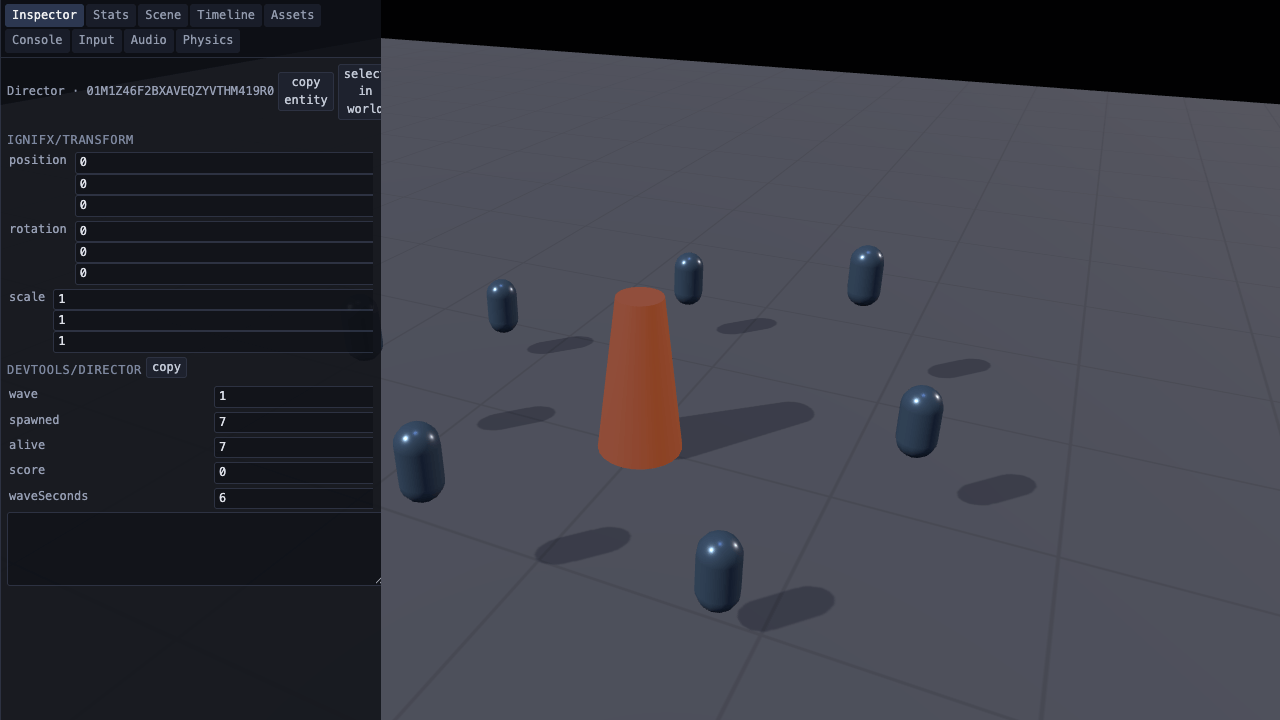
The developer tools open with this example on a wide screen; on a phone, open them from the panel and they dock along the top. Explore the scene tree, edit the Director’s fields and watch the wave timing change: the ring flies as many drones as `alive` says. Use the other tabs to inspect performance, assets, input, audio and physics.
Off airLivePaused
Devtools overlay
Platform · 3D
WebGPU: checking…See browser support
Try this
- Type a new number into the Inspector's `waveSeconds` row and watch the wave clock follow it.
- Open Stats for draw calls and engine CPU, then Timeline for the same frame, phase by phase.
- Select a drone in the Scene tab: the Inspector follows, down to its live transform.
Show source code
Source
import { Camera } from "ignifx";import { bootExample } from "../_kit/boot.ts";import { degreesPerSecond } from "../_kit/format.ts";import { attachOrbit } from "../_kit/orbit.ts";import { bind, button, readout, slider, toggle } from "../_kit/panel.ts";import { createGridGround, createLightRig } from "../_kit/stage.ts";import { Director } from "./director.ts";import { createRing, Drone, SPEED_STAGGER, START_SPEED } from "./ring.ts";import type { DevtoolsPanelName } from "ignifx";/** * The devtools overlay, open before you arrive. * * `@ignifx/devtools` is one extension and one key. Register it, press backtick, and nine tabs * appear over the canvas: frame numbers, the entity tree, a live component inspector, asset * handles, input, audio, physics, the log and a per-phase timing graph. It costs nothing while it * is closed — no system runs, no signal is subscribed to and no DOM exists until `open()` — which * is why a game registers it behind a development flag and then forgets about it. Every other * example on this site carries it too; press backtick on any of them. * * This is the one page that opens it for you, through the `devtools` settings section below. * `openOnStart` does it, `position: "left"` keeps it clear of the parameter panel, and `panels` * both re-orders and filters the tab strip — so the overlay opens on the **Inspector**, pointed at * the `Director` entity. On a frame narrower than {@link WIDE_FRAME} it leaves the opening to you * (the panel's Open toggle) and docks along the top, because there it would cover everything. * * The Inspector is where a game's own state shows up. Every `Script.define` field is a row it reads * and writes: type a number into `wave` and the next frame's `update` uses it, because the rows * write through to the live component. `director.ts` also publishes the same four numbers into * `app.diagnostics`, which is the API the Stats panel's own rows come from and the one a headless * test reads without opening anything. * * Worth knowing before copying that last part: the Stats panel draws a **fixed** list of engine * counters. A custom group is read back with `app.diagnostics.group("game")` — as the panel on the * right does — and is not a row on the overlay. *//** The nine panels, in the tab order this example wants: the Inspector first, then the rest. */const PANELS: readonly DevtoolsPanelName[] = [ "inspector", "stats", "scene", "timeline", "assets", "console", "input", "audio", "physics",];/** How many of {@link PANELS} get a "Show" button in the parameter panel. */const SHORTCUTS = 4;/** * The narrowest frame the overlay opens on by itself, in CSS pixels. * * @remarks * Docked left the overlay is 380 px wide and draws above everything else in the frame, the * parameter panel included. On a phone it would fill the frame, hide the scene, and sit on top of * the panel's Open toggle, the one control there that closes it (a phone has no backtick key). Below * this width it waits to be opened, and docks along the top instead: a band 40% of the height, with * the panel's sheet below it at the bottom and the scene between the two. */const WIDE_FRAME = 760;/** Whether this frame is wide enough for the overlay to open docked down its left side. */const isWideFrame = window.innerWidth >= WIDE_FRAME;bootExample({ title: "Devtools overlay", settings: { rendering: { clearColor: { r: 0.043, g: 0.059, b: 0.094, a: 1 }, msaaSamples: 4, features: { shadows: true }, }, devtools: { openOnStart: isWideFrame, position: isWideFrame ? "left" : "top", panels: [...PANELS], opacity: 0.94, }, time: { fixedDeltaTime: 1 / 60 }, }, async setup({ app, panel }) { app.registerComponents([Director, Drone]); const focus = { x: 0, y: 0.5, z: 0 }; const eye = app.world.createEntity("Main Camera"); eye.addComponent(Camera, { near: 0.1, far: 200, fov: 44 }); attachOrbit(app, eye, { yaw: 26, pitch: 27, distance: 4.4, target: focus, minDistance: 2, maxDistance: 14 }); const rig = createLightRig(app, { focus, shadows: true, shadowDarkness: 0.3 }); await createGridGround(app, { size: 24, fade: { subjectRadius: 1.8 } }); createRing(app); // The entity the overlay opens pointed at. `select` works before `app.start()` — the service // exists from `createApp` — so the Inspector has something to show on its first refresh. const stage = app.world.createEntity("Director"); const director = stage.addComponent(Director); app.devtools.select(stage); panel({ title: "Devtools overlay", groups: [ { label: "Overlay", controls: [ toggle("Open", { value: isWideFrame, change: (on: boolean): void => { // `open()` builds the DOM and registers the sampler; `close()` disposes the DOM. // The sampler stays registered afterwards and returns on its first line, because // core's scheduler has `registerSystem` and no `unregisterSystem`. if (on) { app.devtools.open(); } else { app.devtools.close(); } }, // Backtick and the viewer's Devtools button close it too, so the toggle reads back. read: (): boolean => app.devtools.isOpen, }), ...PANELS.slice(0, SHORTCUTS).map((name: DevtoolsPanelName) => button(`Show ${name}`, (): void => { app.devtools.panel(name).show(); }), ), ], }, { label: "Gameplay", controls: [ slider("Wave length", { min: 1, max: 12, step: 0.5 }, bind(director, "waveSeconds")), slider( "Base drone speed", { min: 0, max: 120, step: 4, format: degreesPerSecond }, { value: START_SPEED, // Each drone keeps its stagger above the base, so the ring never moves in lockstep. change: (speed: number): void => { for (const drone of app.world.components(Drone)) { drone.speed = speed + drone.index * SPEED_STAGGER; } }, read: (): number => { const first = app.world.components(Drone)[0]; return first === undefined ? START_SPEED : first.speed - first.index * SPEED_STAGGER; }, }, ), toggle("Key light casts", bind(rig.key.shadows, "enabled")), button("Next wave", (): void => { director.advanceWave(); }), ], }, { label: "app.diagnostics", collapsed: true, controls: [ readout("game/wave", (): string => director.read("wave")), readout("game/spawned", (): string => director.read("spawned")), readout("game/alive", (): string => director.read("alive")), readout("game/score", (): string => director.read("score")), readout("Scripts updated", (): string => String(app.diagnostics.frame.scriptsUpdated)), ], }, ], }); },});/** * The gameplay the overlay watches: a wave counter with four serialized fields, published once a * frame into a counter group on `app.diagnostics`. * * @remarks * It is the shape `skills/ignifx/references/recipes/show-diagnostics-in-devtools.md` recommends, * and the reason it is that shape is the per-frame path. A counter group is a **fixed list of names * over a numeric array**: register it once, resolve each name to an index once in `awake`, then * `set` by index in `update`. No string is hashed and nothing is allocated after the first frame. * * `groupOrRegister` rather than `registerGroup`, because a second registration of the same name is * `IGX-1503` and a scene reload runs `awake` again. * * The fields are declared with `Script.define`, which is what puts them in the devtools Inspector * as editable rows: `wave` typed into the overlay is `wave` in the next frame's `update`. That is * the whole reason this class has fields rather than private state. */import { f32, i32, MeshRenderer, Script } from "ignifx";import { Drone } from "./ring.ts";import type { DiagnosticsGroup, ScriptCallbacks } from "ignifx";/** The counter group's name, as `app.diagnostics.group("game")` asks for it. */export const COUNTER_GROUP = "game";/** The counters, in the order their indices are resolved. */export const COUNTER_NAMES = ["wave", "spawned", "alive", "score"] as const;/** One of {@link COUNTER_NAMES}. */export type CounterName = (typeof COUNTER_NAMES)[number];/** How many drones a wave is worth, so the numbers on screen mean something. */const SPAWNS_PER_WAVE = 7;/** * A wave director: four numbers a game would have anyway, on the clock and in the diagnostics * table. * * @example * ```ts * const stage = app.world.createEntity("Director"); * const director = stage.addComponent(Director); * app.devtools.select(stage); * ``` */export class Director extends Script.define({ wave: i32(1, { min: 1, tooltip: "Which wave is running." }), spawned: i32(0, { min: 0, tooltip: "How many drones have been spawned in total." }), alive: i32(SPAWNS_PER_WAVE, { min: 0, tooltip: "How many are still flying." }), score: i32(0, { min: 0, tooltip: "Points banked." }), waveSeconds: f32(6, { min: 0.5, tooltip: "How long one wave lasts, in seconds." }), }) implements ScriptCallbacks{ /** The namespaced registration id. */ static typeId = "devtools/Director"; /** The counter group, resolved once. */ #group: DiagnosticsGroup | null = null; /** The counters' indices, in {@link COUNTER_NAMES} order. */ readonly #indices: number[] = []; /** Seconds left in the current wave. */ #remaining = 0; /** How many drones the wave clock has brought down so far this wave. */ #cleared = 0; /** How many drones the ring was last told to show; `-1` until the first update. */ #shown = -1; /** Registers the counter group and resolves its indices — once, not per frame. */ awake(): void { const group = this.app.diagnostics.groupOrRegister(COUNTER_GROUP, [...COUNTER_NAMES]); this.#group = group; this.#indices.length = 0; for (const name of COUNTER_NAMES) { this.#indices.push(group.index(name)); } this.#remaining = this.waveSeconds; this.spawned = SPAWNS_PER_WAVE; } /** * Runs the wave clock and writes the four counters. * * @param dt - Seconds since the previous frame, scaled by `time.timeScale`. Under `?static=1` * the scale is zero, so the wave holds where it was authored and the overlay's own refresh — * which runs on the unscaled clock — keeps drawing it. */ update(dt: number): void { this.#remaining -= dt; if (this.#remaining <= 0) { this.advanceWave(); } else if (dt > 0) { // A wave thins out across its length rather than in one step, so the numbers on the overlay // move while you watch them. The clock takes drones away as they fall due, rather than // writing a count of its own over `alive`, so a number typed into the Inspector stands until // the next one falls. const share = Math.floor((1 - this.#remaining / Math.max(this.waveSeconds, 0.5)) * SPAWNS_PER_WAVE); const due = Math.max(0, Math.min(SPAWNS_PER_WAVE, share)); if (due > this.#cleared) { const downed = Math.min(this.alive, due - this.#cleared); this.alive -= downed; this.score += downed * 10; this.#cleared = due; } } this.#showAlive(); const group = this.#group; if (group === null) { return; } group.set(this.#indices[0] ?? 0, this.wave); group.set(this.#indices[1] ?? 0, this.spawned); group.set(this.#indices[2] ?? 0, this.alive); group.set(this.#indices[3] ?? 0, this.score); } /** Starts the next wave: what the panel's button and the wave clock both call. */ advanceWave(): void { this.wave += 1; this.alive = SPAWNS_PER_WAVE; this.spawned += SPAWNS_PER_WAVE; this.score += 100; this.#remaining = this.waveSeconds; this.#cleared = 0; } /** * Shows as many drones as `alive` says, so the field is what flies. * * @remarks * Only when the count changed, whether the clock changed it or the Inspector did: switching a * renderer off is a settings change, not a per-frame write. A hidden drone keeps orbiting, so one * that comes back with the next wave is where it would have been. */ #showAlive(): void { if (this.alive === this.#shown) { return; } this.#shown = this.alive; for (const drone of this.app.world.components(Drone)) { const renderer = drone.entity.getComponent(MeshRenderer); if (renderer !== null) { renderer.enabled = drone.index < this.alive; } } } /** * Reads one counter back out of the diagnostics table. * * @remarks * Through the group rather than off the field, on purpose: it is the same read a HUD, a test or * the Stats panel would do, and it proves the number reached the table. * * @param name - Which counter. * @returns The value, or `"—"` before `awake` has run. */ read(name: CounterName): string { const group = this.#group; if (group === null) { return "—"; } return String(group.get(group.index(name))); }}/** * The scene the overlay watches: a pylon and a ring of drones that keep moving, so the Stats * panel's numbers change and the Timeline graph has something to draw. * * @remarks * A separate file for the reason `pbr-model/shot.ts` is: none of it is a lesson about devtools. * `main.ts` is then the settings section that opens the overlay, the selection it opens pointed at, * and the panel that drives both. * * The loop at the bottom is exactly what the overlay's **Scene** tab shows: one entity per drone, * named, under the world's root. Selecting a row there points the Inspector at that drone, and the * Inspector's rows are this file's `Script.define` fields. */import { createMaterialAsset, f32, i32, MeshAsset, MeshRenderer, pbrMaterialDefinition, Script } from "ignifx";import type { App, ScriptCallbacks } from "ignifx";/** How many drones orbit the pylon. */export const DRONES = 7;/** The speed a drone starts at, in degrees per second, before its per-index stagger. */export const START_SPEED = 36;/** How much faster each drone flies than the one before it, in degrees per second. */export const SPEED_STAGGER = 3;/** Carries one drone around the centre. */export class Drone extends Script.define({ index: i32(0, { min: 0, tooltip: "Which drone this is; sets its phase around the ring." }), speed: f32(START_SPEED, { min: 0, tooltip: "Degrees around the ring per second." }), radius: f32(1.35, { min: 0.1, tooltip: "How far out the drone flies, in metres." }), }) implements ScriptCallbacks{ /** The namespaced registration id. */ static typeId = "devtools/Drone"; /** How far round the circle this drone has travelled, in degrees. */ #angle = 0; /** * Advances the orbit. * * @param dt - Seconds since the previous frame, scaled — so `?static=1` holds the ring still * while the overlay keeps refreshing, because the overlay runs on the **unscaled** clock. That * is what makes this example's capture reproducible with the overlay up. */ update(dt: number): void { this.#angle += this.speed * dt; const phase = ((this.index / DRONES) * 360 + this.#angle) * (Math.PI / 180); this.transform.localPosition.set( Math.cos(phase) * this.radius, 0.5 + Math.sin(phase * 2) * 0.22, Math.sin(phase) * this.radius, ); }}/** * Builds the pylon and the ring. * * @remarks * `app.registerComponents([Drone])` is the caller's job, because a game registers every component * it uses in one place. * * @param app - The app the entities and the assets belong to. * * @example * ```ts * app.registerComponents([Drone]); * createRing(app); * ``` */export function createRing(app: App): void { const shell = createMaterialAsset( app, pbrMaterialDefinition({ name: "devtools/shell", baseColor: { r: 0.3, g: 0.42, b: 0.55, a: 1 }, metallic: 0.5, roughness: 0.32, }), [], ); const core = createMaterialAsset( app, pbrMaterialDefinition({ name: "devtools/core", baseColor: { r: 0.18, g: 0.2, b: 0.24, a: 1 }, metallic: 0.2, roughness: 0.55, emissive: { r: 0.55, g: 0.24, b: 0.06, a: 1 }, }), [], ); const pylon = app.world.createEntity("Pylon"); pylon.transform.localPosition.set(0, 0.42, 0); pylon.addComponent(MeshRenderer, { mesh: MeshAsset.cylinder(app, { height: 0.84, diameterTop: 0.24, diameterBottom: 0.44, tessellation: 24 }), materials: [core], castShadows: true, }); // One mesh shared by every drone, one entity each. const droneMesh = MeshAsset.capsule(app, { height: 0.34, radius: 0.09, tessellation: 12 }); for (let index = 0; index < DRONES; index += 1) { const drone = app.world.createEntity(`Drone ${String(index + 1)}`); drone.addComponent(MeshRenderer, { mesh: droneMesh, materials: [shell], castShadows: true }); drone.addComponent(Drone, { index, speed: START_SPEED + index * SPEED_STAGGER }); }}