Terrain foliage
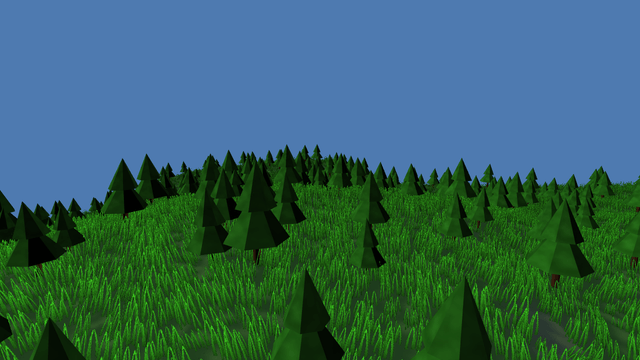
Two `TerrainScatter` components and no model file. A scatter walks a jittered grid over the field — `density` instances per square metre, capped by `maxInstances` — and keeps a candidate only if its slope, its height and the terrain's splat weight for the named layers all accept it, so the grass stops where the rock starts without a line of code saying so. Every random number is an integer hash of the cell and the seed, so a headless test asserts the same forest a device draws, and placement runs once rather than per frame. `maxInstances` also sizes the instance buffer, which is fixed when the app starts, so each scatter is sized for the top of its slider. Each scatter owns an `InstancedMeshRenderer` with GPU culling on and a cheaper mesh past `lodDistance`. The material is a `"shader"` material, not PBR: only a vertex stage the author owns can read the clock, which is what the wind sways on — and the stated price is that foliage casts shadows but receives none, and no fog either, so the fog starts past the farthest blade in view. A card casts as its whole quad, not as the blades cut out of it, so here only the trees cast; a meadow of card shadows would grey the ground it stands on.
This example is deliberately heavy: expect a lower frame rate on a phone or an older laptop.
Off airLivePaused
Terrain foliage
Terrain · 3D
WebGPU: checking…See browser support
Try this
- Pull Grass density to 3 per square metre and watch the instance counter, not the frame time.
- Push Wind to its maximum. Nothing in the frame has an `update` method; the sway is one sine in WGSL.
- Drop the grass LOD distance to 6 m: the crossed cards become flat ones and the silhouette barely changes.
Show source code
Source
import { Camera, InstancedMeshRenderer, Terrain, terrain, terrainAssetFromDefinition, TerrainScatter } from "ignifx";import { bootExample } from "../_kit/boot.ts";import { thousands, wholeMetres } from "../_kit/format.ts";import { fadeToHorizon } from "../_kit/horizon.ts";import { attachOrbit } from "../_kit/orbit.ts";import { bind, readout, slider } from "../_kit/panel.ts";import { createSky } from "../_kit/sky.ts";import { createApron, easedEdgeHeights, grassCard, keepOrbitAbove } from "../_kit/terrain.ts";import { conifer, foliageMaterials, GRASS_COLOR, MEADOW, WIND } from "./meadow.ts";import type { PanelBinding } from "../_kit/panel.ts";/** * Grass and trees on a terrain: two `TerrainScatter` components and no model file. * * ## Where an instance is allowed to stand * * A scatter walks a jittered grid over the field — `density` instances per square metre, capped by * `maxInstances` — and keeps a candidate only if its slope, its height and the terrain's **splat * weight** for the named layers all accept it. Every random number is an integer hash of the cell * and the seed, never a running generator, so the same seed places the same forest in a headless * test and on a device. Placement runs **once**, not per frame; a changed rule needs * `regenerate()`, and a sculpt triggers one by itself. `maxInstances` also sizes the GPU instance * buffer, which is fixed when the app starts, so each scatter is sized for the top of its slider. * * ## What draws them * * Each scatter owns an `InstancedMeshRenderer` with `gpuCulling` on, so Babylon Lite's compute * culling drops the instances behind the camera before the vertex stage, and a `lodMesh` partner * that takes over past `lodDistance`. One material draws every instance of a kind. * * ## Why foliage is a shader material and not PBR * * `createFoliageMaterial` builds a `"shader"` material that owns its vertex stage, because that is * the only way the wind can read the clock: Babylon Lite declares a material plugin's uniforms * fragment-visible only, so a `displace` surface hook has no time to sway with. The price is * stated plainly — the cards cast shadows but receive none, and get no image-based lighting or fog, * which is why the fog here begins past the farthest blade the camera can see. * * A card casts as the solid quad it is, not as the blades cut out of it: the shadow pass has no * alpha test. A tree's cone hides that, but a meadow of grass cards at this density would lay a * grey sheet over the ground it stands on, so only the trees cast here. *//** The sky the meadow stands against, in sRGB. */const SKY = { r: 0.6, g: 0.78, b: 1, a: 1 } as const;/** The density sliders' tops, in instances per square metre; the instance buffers are sized for them. */const MAX_DENSITY = { grass: 3, trees: 0.06 } as const;/** The opening shot: low and close, so the near grass reads as blades. */const SHOT = { yaw: 28, pitch: 11, distance: 30, x: 0, z: 10, lift: 3 } as const;bootExample({ title: "Terrain foliage", extensions: [terrain()], settings: { rendering: { clearColor: SKY, msaaSamples: 4, features: { shadows: true } }, time: { fixedDeltaTime: 1 / 60 }, }, async setup({ app, panel }) { // The field's last 40 m ease down to the level of the apron that continues it. const meadow = await terrainAssetFromDefinition(app, MEADOW, { heights: easedEdgeHeights(MEADOW, 40) }); const area = meadow.value.field.width * meadow.value.field.depth; const materials = await foliageMaterials(app); createSky(app, { sky: SKY, ground: { r: 0.26, g: 0.3, b: 0.2, a: 1 }, sunPosition: { x: -34, y: 48, z: -28 }, sunIntensity: 3.1, skyIntensity: 0.95, shadows: { mapSize: 2048, maxDistance: 90, darkness: 0.35 }, }); const groundEntity = app.world.createEntity("Meadow"); const ground = groundEntity.addComponent(Terrain, { definition: meadow }); const grass = groundEntity.addComponent(TerrainScatter, { mesh: grassCard(app, "foliage/grass-cross", 2), lodMesh: grassCard(app, "foliage/grass-card", 1), lodDistance: 26, material: materials.grass, density: 1.4, layers: ["grass"], slope: { x: 0, y: 24 }, scale: { x: 0.7, y: 1.5 }, seed: 3, maxInstances: Math.ceil(area * MAX_DENSITY.grass), }); // The scatter turns casting on when it attaches; a card's shadow is the whole card, so at 1.4 // per square metre the grass would shade most of the ground grey. The trees keep theirs. groundEntity.requireComponent(InstancedMeshRenderer).castShadows = false; // A second kind of foliage goes on a **child**: one `TerrainScatter` per entity, and a scatter // finds the terrain on itself or on any ancestor. const trees = app.world.createEntity("Conifers", { parent: groundEntity }).addComponent(TerrainScatter, { mesh: conifer(app, "foliage/conifer", 7), // Five sides and not four: a square cone is a different silhouette, and a tree changing shape // as the idle orbit carries it across the threshold is what a level of detail must not show. lodMesh: conifer(app, "foliage/conifer-far", 5), // Past the shadow's 90 m reach, so a swap never redraws a shadow, and far enough that a tree // there is a few dozen pixels tall; the field's far side is still past it from most shots. lodDistance: 110, material: materials.trees, density: 0.022, layers: ["grass"], slope: { x: 0, y: 20 }, scale: { x: 0.75, y: 1.45 }, seed: 9, maxInstances: Math.ceil(area * MAX_DENSITY.trees), }); const eye = app.world.createEntity("Main Camera"); eye.addComponent(Camera, { near: 0.3, far: 600, fov: 55 }); const orbit = attachOrbit(app, eye, { yaw: SHOT.yaw, pitch: SHOT.pitch, distance: SHOT.distance, // Framed on the ground rather than on a fixed height: the field is noise, so the only honest // way to stand the camera above the grass is to ask the height field where the grass is. target: { x: SHOT.x, y: meadow.value.field.heightAt(SHOT.x, SHOT.z) + SHOT.lift, z: SHOT.z }, minDistance: 6, maxDistance: 70, idleDegreesPerSecond: 4, }); keepOrbitAbove(app, orbit, ground); // Foliage is never fogged, so the fog begins past the farthest blade the camera can see. const fade = fadeToHorizon(app, { start: 190, end: 380 }); createApron(app, { size: fade.groundSize, hole: meadow.value.field.width, color: GRASS_COLOR }); // Kept in a field so the Wind slider can read it back. const wind: { strength: number } = { strength: WIND.strength }; /** * Binds a density slider; placement runs once, so a new density needs `regenerate()`. * * @param scatter - The scatter whose density the slider sets. * @returns The binding. */ function density(scatter: TerrainScatter): PanelBinding<number> { return { ...bind(scatter, "density"), change: (value: number): void => { scatter.density = value; scatter.regenerate(); }, }; } panel({ title: "Terrain foliage", groups: [ { label: "Scatter", controls: [ slider( "Grass density", { min: 0.1, max: MAX_DENSITY.grass, step: 0.1, commit: "release", format: (v): string => `${v.toFixed(1)}/m²`, }, density(grass), ), slider( "Tree density", { min: 0, max: MAX_DENSITY.trees, step: 0.002, commit: "release", format: (v): string => `${v.toFixed(3)}/m²`, }, density(trees), ), readout("Grass instances", (): string => thousands(grass.count)), readout("Trees", (): string => thousands(trees.count)), ], }, { label: "Wind and detail", controls: [ slider( "Wind", { min: 0, max: 0.8, step: 0.02, format: (v): string => `${v.toFixed(2)} m` }, { ...bind(wind, "strength"), change: (value: number): void => { wind.strength = value; materials.grass.value.setUniform("windStrength", value); materials.trees.value.setUniform("windStrength", value * WIND.treeShare); }, }, ), // `lodDistance` is live: the scatter hands it to its renderer's LOD pairing each frame. slider("Grass LOD distance", { min: 6, max: 90, step: 2, format: wholeMetres }, bind(grass, "lodDistance")), readout("Chunks drawn", (): string => `${String(ground.visibleChunks)} of ${String(ground.chunkCount)}`), readout("Frame draws", (): string => String(app.renderer.drawCalls)), ], }, ], }); },});/** * The meadow's parts that the panel never changes: the terrain document, the two foliage * materials, and the conifer the tree scatter draws. The grass card is the kit's * (`_kit/terrain.ts`), shared with `terrain-sculpt`. * * The conifer is built in code with `MeshAsset.fromData`, so the example ships no model file, and * is authored with its origin **at the base**, because a `TerrainScatter` places an instance at the * ground and turns it about Y there. It reads one 64x64 atlas whose top half is leaf and whose * bottom half is bark, so one material and one draw call cover a whole forest. The engine's texture * loader defaults to `invertY: true`, so `v = 1` is the image's top row — which is why the leaf band * below is the high `v` and not the low one. */import { createFoliageMaterial, MeshAsset, TEXTURE_ASSET_TYPE } from "ignifx";import type { App, AssetHandle, MaterialAsset, TerrainDefinitionInput, TextureAsset } from "ignifx";/** The grass layer's colour, which the apron beyond the field continues. */export const GRASS_COLOR = [0.29, 0.42, 0.2] as const;/** The meadow: 160 m of noise, grass on the gentle slopes and rock on the steep ones. */export const MEADOW: TerrainDefinitionInput = { name: "meadow", size: { width: 160, depth: 160, height: 18 }, resolution: 257, chunks: { size: 32, lodLevels: 3, lodDistance: 60, skirtDepth: 1 }, noise: { seed: 12, octaves: 5, frequency: 0.012, persistence: 0.48 }, layers: [ { name: "grass", color: GRASS_COLOR }, { name: "rock", color: [0.44, 0.42, 0.39] }, ], splatRules: [ { layer: "grass", slope: [0, 26] }, { layer: "rock", slope: [22, 90] }, ], material: { roughness: 0.95, metallic: 0 },};/** The wind at load, in metres of lean, and the share of it the trees take. */export const WIND = { strength: 0.22, treeShare: 0.7 } as const;/** * Loads the two cards' textures and builds their wind-blown materials. * * @param app - The app whose asset service loads and registers them. * @returns The grass and tree materials, each with one holder: the caller. */export async function foliageMaterials( app: App,): Promise<{ grass: AssetHandle<MaterialAsset>; trees: AssetHandle<MaterialAsset> }> { // Both textures are written by `_tools/make-terrain-assets.ts`; the atlas is leaf over bark. const blades = await app.assets.loadAsync<TextureAsset>("terrain/grass_card.png", { type: TEXTURE_ASSET_TYPE }); const atlas = await app.assets.loadAsync<TextureAsset>("terrain/tree_atlas.png", { type: TEXTURE_ASSET_TYPE }); const grass = await createFoliageMaterial(app, { albedo: blades, wind: { strength: WIND.strength, frequency: 1.4, height: 1 }, alphaCutoff: 0.45, }); const trees = await createFoliageMaterial(app, { albedo: atlas, // A trunk that swayed as far as a blade of grass would tear out of the ground: the lean is // quoted at `height` metres up, so a tall mesh needs a tall reference height. wind: { strength: WIND.strength * WIND.treeShare, frequency: 0.55, height: 4 }, alphaCutoff: 0.2, }); return { grass, trees };}/** The `v` of the trunk's root: the bottom row of the atlas, kept off the very edge. */const BARK_ROOT_V = 0.03;/** The `v` of the trunk's top, which is the middle of the atlas. */const BARK_TOP_V = 0.46;/** The `v` of a canopy's lower rim: just above the middle of the atlas. */const LEAF_RIM_V = 0.54;/** The `v` of a canopy's apex: the top row of the atlas. */const LEAF_APEX_V = 0.97;/** One mesh under construction: three growing lists and the writer below. */interface Builder { readonly positions: number[]; readonly normals: number[]; readonly uvs: number[]; readonly indices: number[];}/** * Appends one triangle with a flat normal. * * @param out - The mesh being built. * @param a - The first corner, as `[x, y, z, u, v]`. * @param b - The second corner. * @param c - The third corner. */function triangle(out: Builder, a: readonly number[], b: readonly number[], c: readonly number[]): void { const ux = (b[0] ?? 0) - (a[0] ?? 0); const uy = (b[1] ?? 0) - (a[1] ?? 0); const uz = (b[2] ?? 0) - (a[2] ?? 0); const vx = (c[0] ?? 0) - (a[0] ?? 0); const vy = (c[1] ?? 0) - (a[1] ?? 0); const vz = (c[2] ?? 0) - (a[2] ?? 0); const nx = uy * vz - uz * vy; const ny = uz * vx - ux * vz; const nz = ux * vy - uy * vx; const length = Math.hypot(nx, ny, nz) || 1; for (const corner of [a, b, c]) { out.indices.push(out.positions.length / 3); out.positions.push(corner[0] ?? 0, corner[1] ?? 0, corner[2] ?? 0); out.normals.push(nx / length, ny / length, nz / length); out.uvs.push(corner[3] ?? 0, corner[4] ?? 0); }}/** * Builds a small conifer: a faceted trunk and two stacked cones of foliage. * * @param app - The app whose asset service registers the mesh. * @param name - The asset name. * @param sides - Faces around the trunk and each cone; `5` is the LOD partner, `7` the near mesh. * @returns The handle, with one holder — the caller. */export function conifer(app: App, name: string, sides: number): AssetHandle<MeshAsset> { const out: Builder = { positions: [], normals: [], uvs: [], indices: [] }; const trunkRadius = 0.16; const trunkHeight = 1.5; for (let side = 0; side < sides; side += 1) { const a = (side / sides) * Math.PI * 2; const b = ((side + 1) / sides) * Math.PI * 2; const ax = Math.cos(a) * trunkRadius; const az = Math.sin(a) * trunkRadius; const bx = Math.cos(b) * trunkRadius; const bz = Math.sin(b) * trunkRadius; const u0 = side / sides; const u1 = (side + 1) / sides; triangle(out, [ax, 0, az, u0, BARK_ROOT_V], [bx, 0, bz, u1, BARK_ROOT_V], [bx, trunkHeight, bz, u1, BARK_TOP_V]); triangle( out, [ax, 0, az, u0, BARK_ROOT_V], [bx, trunkHeight, bz, u1, BARK_TOP_V], [ax, trunkHeight, az, u0, BARK_TOP_V], ); } const skirts = [ { base: 1.1, top: 3.1, radius: 1.35 }, { base: 2.4, top: 4.3, radius: 0.85 }, ]; for (const skirt of skirts) { for (let side = 0; side < sides; side += 1) { const a = (side / sides) * Math.PI * 2; const b = ((side + 1) / sides) * Math.PI * 2; triangle( out, [Math.cos(a) * skirt.radius, skirt.base, Math.sin(a) * skirt.radius, side / sides, LEAF_RIM_V], [Math.cos(b) * skirt.radius, skirt.base, Math.sin(b) * skirt.radius, (side + 1) / sides, LEAF_RIM_V], [0, skirt.top, 0, (side + 0.5) / sides, LEAF_APEX_V], ); } } return MeshAsset.fromData(app, name, { positions: new Float32Array(out.positions), normals: new Float32Array(out.normals), indices: new Uint32Array(out.indices), uvs: new Float32Array(out.uvs), });}