Procedural terrain
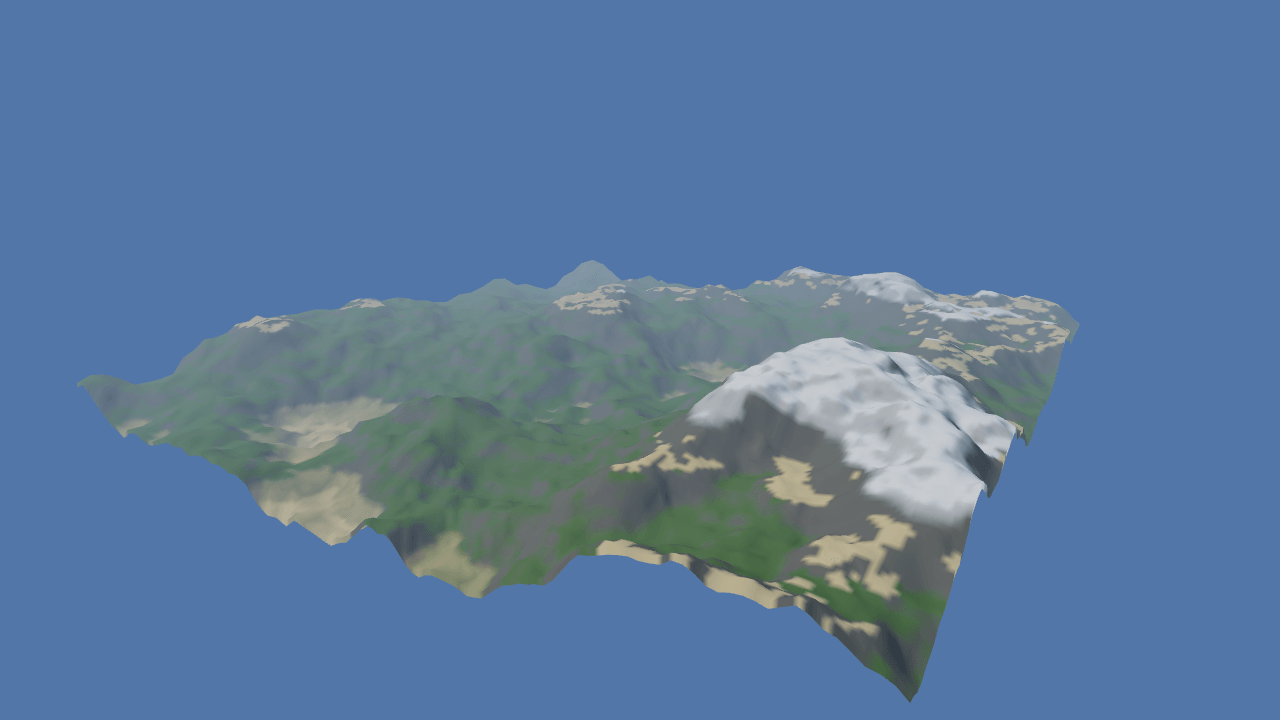
No heightmap and no file. `terrainAssetFromDefinition` builds the whole asset in memory from the object literal in `main.ts` plus whatever the sliders have done to it, so every Noise and Shape control rebuilds the field, the chunks and the splat together. The noise is fractional Brownian motion: `octaves` layers, each twice as fine and `persistence` times quieter; `ridged` folds every layer around its midpoint, which turns dunes into crests; `terraces` quantises the result into steps. The heights are eased down to sea level towards the edge, so every seed is an island. The paint is rules rather than an image — a layer claims a height band, a slope band or both, and the generator feathers each edge by a tenth of its width — which is why a new seed is a new island and not old paint on a new hill. The terrain holds its own reference to the asset it draws, so the old one is released as soon as the new one is assigned.
Off airLivePaused
Procedural terrain
Terrain · 3D
WebGPU: checking…See browser support
Try this
- Press “New island” a few times. The build time under it is the whole cost: field, chunks and splat.
- Turn Ridged on with octaves at 6. The same seed becomes mountains, and the rock rule finds the new slopes.
- Pull Terraces up to 12. Every rule still applies — the snow line now follows the steps.
Show source code
Source
import { Camera, Terrain, terrain, terrainAssetFromDefinition } from "ignifx";import { bootExample } from "../_kit/boot.ts";import { fadeToHorizon } from "../_kit/horizon.ts";import { attachOrbit } from "../_kit/orbit.ts";import { bind, button, readout, slider, toggle } from "../_kit/panel.ts";import { createSky } from "../_kit/sky.ts";import { createApron, easedEdgeHeights, keepOrbitAbove } from "../_kit/terrain.ts";import { FIELD, LAYERS, SEA, SHORE_BAND, SHOT, SKY, SPLAT_RULES } from "./recipe.ts";import type { PanelBinding } from "../_kit/panel.ts";import type { AssetHandle, TerrainAsset, TerrainDefinitionInput } from "ignifx";/** * The same terrain system with no heightmap at all: seven numbers and a seed. * * `terrainAssetFromDefinition` builds a `TerrainAsset` in memory — no file, no fetch — so the whole * document is the object literal below plus whatever the sliders have done to it. The noise is * fractional Brownian motion: `octaves` layers of it, each `lacunarity` times finer and * `persistence` times quieter. `ridged` folds each layer around its midpoint, which turns rolling * dunes into crests, and `terraces` quantises the result into steps. The noise is eased down to * sea level over its outer border, so every seed is an island with a shore. * * The splat here is **rules**, not a painted map: each rule claims a layer inside a height band, a * slope band, or both, and the generator feathers every band's edge by a tenth of its width so the * layers blend. That is the half of the terrain that regenerates with the shape, and it is why a * new seed is a new island rather than an old paint job on a new hill. * * ## Swapping the asset * * Assigning `ground.definition` does not rebuild the chunks at once; `TerrainLodSystem` does, in the * next `PreRender`. The terrain keeps its own reference to the asset it is drawing until then, so * this file releases its handle to the old one straight after assigning the new one. *//** The knobs the panel writes, which are the noise half of the document. */interface Recipe { seed: number; octaves: number; frequency: number; persistence: number; ridged: boolean; terraces: number;}bootExample({ title: "Procedural terrain", extensions: [terrain()], settings: { rendering: { clearColor: SKY, msaaSamples: 4, features: { shadows: false } }, time: { fixedDeltaTime: 1 / 60 }, }, async setup({ app, panel }) { const recipe: Recipe = { seed: 7, octaves: 6, frequency: 0.009, persistence: 0.5, ridged: false, terraces: 0 }; let buildMs = 0; /** * Builds one terrain asset from the current recipe and records how long it took. * * @returns The handle, with one holder: this file. */ async function build(): Promise<AssetHandle<TerrainAsset>> { const started = performance.now(); const definition: TerrainDefinitionInput = { name: "procedural", ...FIELD, noise: { ...recipe, lacunarity: 2 }, layers: LAYERS, splatRules: SPLAT_RULES, material: { roughness: 0.95, metallic: 0 }, }; const heights = easedEdgeHeights(definition, SHORE_BAND, true); const asset = await terrainAssetFromDefinition(app, definition, { heights }); buildMs = performance.now() - started; return asset; } createSky(app, { sky: SKY, ground: { r: 0.28, g: 0.27, b: 0.24, a: 1 }, sunPosition: { x: -50, y: 74, z: -45 }, }); const ground = app.world.createEntity("Terrain").addComponent(Terrain, { definition: await build() }); const eye = app.world.createEntity("Main Camera"); eye.addComponent(Camera, { near: 1, far: 1200, fov: 52 }); const orbit = attachOrbit(app, eye, { ...SHOT, minDistance: 120, maxDistance: 520, idleDegreesPerSecond: 3, }); keepOrbitAbove(app, orbit, ground, 8); const fade = fadeToHorizon(app, { subjectRadius: 0 }); createApron(app, { size: fade.groundSize, y: SEA.level, color: SEA.color, roughness: 0.22 }); let rebuilding = false; let again = false; /** * Replaces the terrain with one built from the current recipe. * * @remarks * One build at a time, with a trailing one, so a quick run of presses ends on the last recipe. */ function regenerate(): void { if (rebuilding) { again = true; return; } rebuilding = true; again = false; const settle = (): void => { rebuilding = false; if (again) { regenerate(); } }; void build() .then((next: AssetHandle<TerrainAsset>): void => { const previous = ground.definition; ground.definition = next; previous?.release(); settle(); }) .catch((error: unknown): void => { app.log.warn("terrain regeneration failed:", error); settle(); }); } /** * Binds a control to one recipe field, rebuilding the terrain when it changes. * * @param key - The field. * @returns The binding, which reads the field back, so "New island" moves the Seed slider. */ function rebuilds<K extends keyof Recipe>(key: K): PanelBinding<Recipe[K]> { return { ...bind(recipe, key), change: (value: Recipe[K]): void => { recipe[key] = value; regenerate(); }, }; } panel({ title: "Procedural terrain", groups: [ { label: "Noise", controls: [ slider("Seed", { min: 1, max: 60, step: 1, commit: "release" }, rebuilds("seed")), slider("Octaves", { min: 1, max: 8, step: 1, commit: "release" }, rebuilds("octaves")), slider( "Frequency", { min: 0.002, max: 0.03, step: 0.001, commit: "release", format: (v): string => v.toFixed(3) }, rebuilds("frequency"), ), slider("Persistence", { min: 0.25, max: 0.75, step: 0.01, commit: "release" }, rebuilds("persistence")), ], }, { label: "Shape", controls: [ toggle("Ridged", rebuilds("ridged")), slider( "Terraces", { min: 0, max: 24, step: 1, commit: "release", format: (v): string => (v === 0 ? "off" : v.toFixed(0)) }, rebuilds("terraces"), ), button("New island", (): void => { recipe.seed = (recipe.seed % 60) + 1; regenerate(); }), readout("Build time", (): string => `${buildMs.toFixed(0)} ms`), ], }, { label: "What it draws", collapsed: true, controls: [ readout("Chunks drawn", (): string => `${String(ground.visibleChunks)} of ${String(ground.chunkCount)}`), // `Terrain.drawCalls`, because a chunk is a renderable and not a component: Lite's own // counter includes bindings the terrain never issued. readout("Terrain draws", (): string => String(ground.drawCalls)), ], }, ], }); },});/** * The parts of the procedural terrain the panel never changes: its extent, its chunking, its four * tinted layers, the rules that paint them, the sea and the shot. * * The layers carry a `color` and no `albedo`, which is the one thing a terrain built in code cannot * have: assembling a texture array needs decoded images, and only the `.terrain.json` loader * fetches those. A tinted terrain is the right trade here — every slider rebuilds the whole asset, * and rebuilding four texture arrays each time would be the slowest thing on screen. */import type { ColorLike, TerrainChunksDefinition, TerrainLayerInput, TerrainSize, TerrainSplatRuleInput } from "ignifx";/** The field: 384 m across, 257 samples a side, eight chunks each way. */export const FIELD: { readonly size: TerrainSize; readonly resolution: number; readonly chunks: TerrainChunksDefinition;} = { size: { width: 384, depth: 384, height: 62 }, // 2^8 + 1. Small enough that a rebuild is a few tens of milliseconds, which is what makes a // slider feel like a slider rather than a button. resolution: 257, chunks: { size: 32, lodLevels: 4, lodDistance: 110, skirtDepth: 2 },};/** How wide the border is that eases the land down into the sea, in metres. */export const SHORE_BAND = 64;/** The four layers, bottom to top. Order is channel order in the generated control map. */export const LAYERS: readonly TerrainLayerInput[] = [ { name: "sand", color: [0.82, 0.74, 0.55] }, { name: "grass", color: [0.33, 0.46, 0.22] }, { name: "rock", color: [0.42, 0.41, 0.39] }, { name: "snow", color: [0.92, 0.94, 0.97] },];/** * Where each layer appears. * * @remarks * A rule claims a height band, a slope band, or both; the generator feathers every edge by a tenth * of the band's width, so the layers blend instead of stepping. A texel no rule reaches falls to * the first layer, which is why `sand` names no band at all. */export const SPLAT_RULES: readonly TerrainSplatRuleInput[] = [ { layer: "sand", height: [0, 9] }, { layer: "grass", height: [5, 48], slope: [0, 34] }, { layer: "rock", slope: [28, 90] }, { layer: "snow", height: [46, 62], slope: [0, 44] },];/** The sky the island stands against, in sRGB. */export const SKY: ColorLike = { r: 0.62, g: 0.78, b: 1, a: 1 };/** The sea: how high it stands, in metres, so the sand band above it is a beach, and its colour. */export const SEA = { level: 4, color: { r: 0.1, g: 0.24, b: 0.33, a: 1 } } as const;/** The opening shot: a slow turntable around the middle of the island. */export const SHOT = { yaw: 34, pitch: 24, distance: 390, target: { x: 0, y: 10, z: 0 } } as const;