All examples
Temporal anti-aliasing
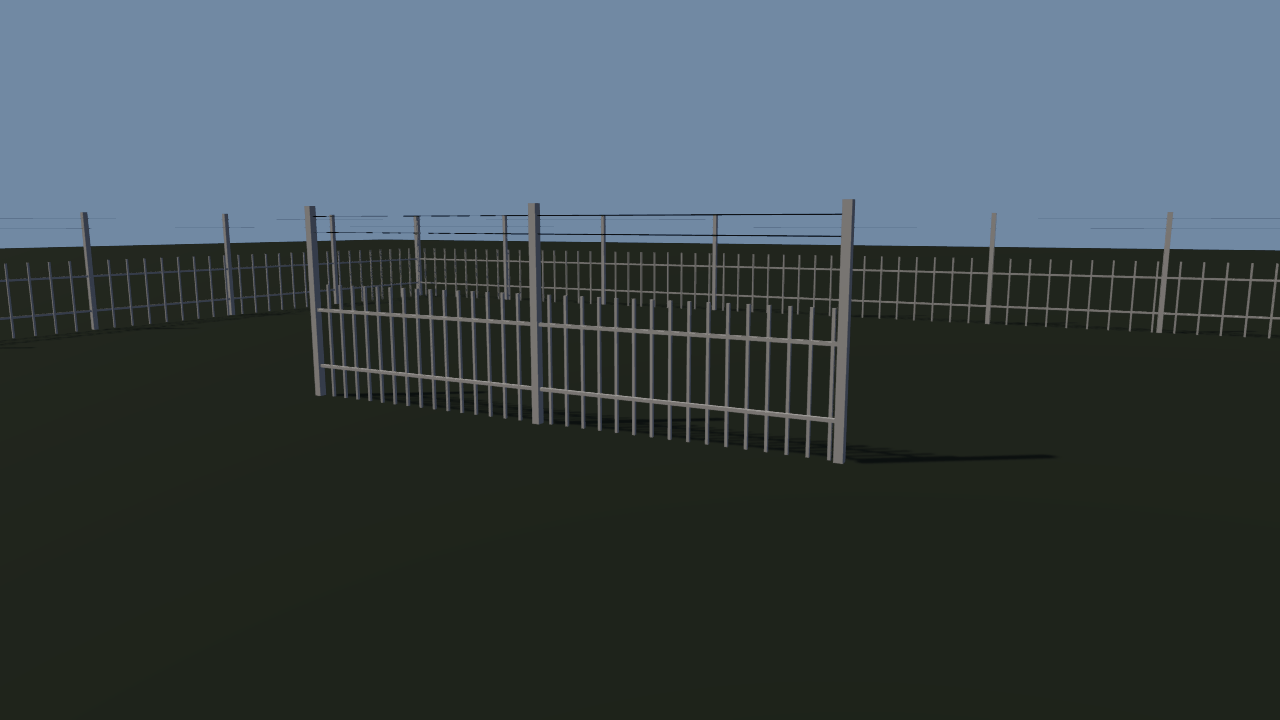
Thin pickets and wires fall below a pixel as they recede, and shimmer as the camera turns. Temporal anti-aliasing renders each frame from a slightly different sub-pixel offset and blends them. It runs on the HDR scene colour, so it needs rendering.hdr. A camera-cut button jumps to a second view and drops the history.
Off airLivePaused
Temporal anti-aliasing
Lighting & GI · 3D
WebGPU: checking…See browser support
Try this
- Turn TAA off and watch the far fence crawl as the camera turns, then turn it back on.
- Turn Reset on cut off, press Camera cut, and watch the old view smear into the new one.
- Set MSAA to 4 with TAA off and compare: the near edges smooth, the far wires still break up.
Show source code
Source
import { Camera, Environment } from "ignifx";import { bootExample } from "../_kit/boot.ts";import { degreesPerSecond, percent, twoPlaces } from "../_kit/format.ts";import { attachOrbit } from "../_kit/orbit.ts";import { bind, button, readout, slider, toggle } from "../_kit/panel.ts";import { queryFlag, queryNumber, reloadSelect, reloadSlider, reloadToggle } from "../_kit/reload.ts";import { createFences, FOCUS, MAX_DISTANCE, TURN_SPEED, VIEWS } from "./scene.ts";/** * Temporal anti-aliasing: each frame is rendered from a camera nudged by a different sub-pixel * offset, and the frames are blended over time, so thin geometry that a single sample per pixel * catches or misses at random converges on a stable, smooth image. * * `rendering.taa` is a project setting and needs `rendering.hdr`: TAA runs on the linear HDR scene * colour, between the scene pass and the output pass, and with HDR off it logs a warning and stays * off. It is read when the app starts, so its rows reload the frame. MSAA is off by default here * (`msaaSamples: 1`), which is what makes the shimmer obvious when TAA is off; set it to 4× to * compare the two anti-aliasing methods. * * History reprojection follows the camera, and a jump far enough (`cutDistance`, or a turn over * 60° in one frame) drops the history by itself. A cut smaller than that — the button below jumps * a few metres to a second view — is the case `app.renderer.resetTemporalHistory()` is for: turn * "Reset on cut" off and the old view smears into the new one for a few frames. *//** TAA and MSAA, from the query. Blend and sharpness default to the engine's defaults. */const AA = { taa: queryFlag("taa", true), blend: queryNumber("blend", 0.1, 0.02, 1), sharpness: queryNumber("sharpness", 0, 0, 1), msaa: queryNumber("msaa", 1, 1, 4) >= 4 ? 4 : 1,} as const;bootExample({ title: "Temporal anti-aliasing", settings: { rendering: { clearColor: { r: 0.52, g: 0.62, b: 0.74, a: 1 }, features: { shadows: true }, msaaSamples: AA.msaa, hdr: true, taa: { enabled: AA.taa, blend: AA.blend, sharpness: AA.sharpness }, }, }, setup({ app, panel }) { const eye = app.world.createEntity("Main Camera"); eye.addComponent(Camera, { near: 0.05, far: 200, fov: 45 }); const [first, second] = VIEWS; const orbit = attachOrbit(app, eye, { ...first, target: FOCUS, minDistance: 2, maxDistance: MAX_DISTANCE, idleDegreesPerSecond: TURN_SPEED, }); createFences(app); const grade = app.world.createEntity("Environment").addComponent(Environment); grade.imageProcessing.toneMapping = "aces"; let isSecondView = false; let isResetOnCut = true; /** Jumps straight to the other view, with no damping, and optionally drops the TAA history. */ const cut = (): void => { isSecondView = !isSecondView; const view = isSecondView ? second : first; orbit.yaw = view.yaw; orbit.pitch = view.pitch; // `frame` snaps the smoothed pose onto the new one on the next update instead of easing there. orbit.frame({ center: FOCUS, radius: 1 }); orbit.distance = view.distance; if (isResetOnCut) { app.renderer.resetTemporalHistory(); } }; panel({ title: "Temporal anti-aliasing", groups: [ { label: "Project settings", controls: [ // `rendering.taa` and `msaaSamples` are read when the app starts: each row reloads. reloadToggle("TAA", "taa", AA.taa), reloadSlider("Blend", "blend", { min: 0.02, max: 1, step: 0.02, format: twoPlaces }, AA.blend), reloadSlider("Sharpness", "sharpness", { min: 0, max: 1, step: 0.05, format: percent }, AA.sharpness), reloadSelect("MSAA", "msaa", ["1", "4"], String(AA.msaa)), ], }, { label: "Camera", controls: [ button("Camera cut", cut), toggle("Reset on cut", { value: isResetOnCut, change: (on: boolean): void => { isResetOnCut = on; }, }), slider( "Turntable", { min: 0, max: 20, step: 1, format: degreesPerSecond }, bind(orbit, "idleDegreesPerSecond"), ), ], }, { label: "Frame", collapsed: true, controls: [ readout("Anti-aliasing", (): string => { const msaa = AA.msaa === 4 ? "MSAA 4×" : "no MSAA"; return AA.taa ? `TAA, ${msaa}` : msaa; }), readout("Draw calls", (): string => String(app.renderer.drawCalls)), ], }, ], }); },});/** * The fences `taa` orbits: rows of thin pickets, rails and wires that fall below a pixel wide as * they recede, which is where aliasing lives. * * @remarks * Geometry thinner than a pixel is either hit by a pixel's one sample or missed, and which of the * two changes as the camera moves: a fence crawls, a wire breaks into dashes. MSAA takes more * samples on edges; TAA takes one sample per frame at a different sub-pixel offset and blends the * frames, so a still or slowly moving view converges on the supersampled image. */import { Light, MeshAsset } from "ignifx";import { paint, place } from "../_kit/props.ts";import type { Point3 } from "../_kit/stage.ts";import type { App, AssetHandle, MaterialAsset, MeshAsset as Mesh } from "ignifx";/** The point the camera orbits. */export const FOCUS: Point3 = { x: 0, y: 0.6, z: 0 };/** The opening shot, and the second view the camera-cut button jumps to and back from. */export const VIEWS = [ { yaw: 28, pitch: 9, distance: 7 }, { yaw: -24, pitch: 16, distance: 5.5 },] as const;/** The idle turntable, in degrees per second: slow, so the shimmer is the thing that moves. */export const TURN_SPEED = 3;/** One fence: where it starts, which way it runs, how long it is, and its picket spacing. */interface FenceRun { readonly from: Point3; /** Direction along the ground, in degrees about Y; 0 runs along +X, -90 along +Z. */ readonly yaw: number; readonly length: number; readonly spacing: number;}/** Half the side of the square paddock, in metres; larger than the camera's orbit. */const PADDOCK = 10;/** * A short fence through the middle of the shot, and a square paddock around the whole orbit, so * the camera never passes through a fence and always has one receding into the distance. */const FENCES: readonly FenceRun[] = [ { from: { x: -2.6, y: 0, z: 0.4 }, yaw: 0, length: 5.2, spacing: 0.16 }, { from: { x: -PADDOCK, y: 0, z: -PADDOCK }, yaw: 0, length: PADDOCK * 2, spacing: 0.3 }, { from: { x: PADDOCK, y: 0, z: -PADDOCK }, yaw: -90, length: PADDOCK * 2, spacing: 0.3 }, { from: { x: PADDOCK, y: 0, z: PADDOCK }, yaw: 180, length: PADDOCK * 2, spacing: 0.3 }, { from: { x: -PADDOCK, y: 0, z: PADDOCK }, yaw: 90, length: PADDOCK * 2, spacing: 0.3 },];/** The furthest the visitor can pull the camera back, so it stays inside the paddock. */export const MAX_DISTANCE = 9;/** Picket width and depth, in metres: a couple of centimetres, a pixel or less at a few metres. */const PICKET_THICKNESS = 0.025;/** Picket height, in metres. */const PICKET_HEIGHT = 1.1;/** Metres between the posts that carry the rails and the wires. */const POST_SPACING = 2.5;/** Post height, in metres: just above the upper wire. */const POST_HEIGHT = 1.85;/** Shared assets for every fence. */interface FenceKit { readonly box: AssetHandle<Mesh>; readonly wood: AssetHandle<MaterialAsset>; readonly wire: AssetHandle<MaterialAsset>;}/** * Builds one fence run: pickets, two rails, and a wire strung above it. * * @param app - The app the entities belong to. * @param kit - The shared mesh and materials. * @param run - Where it stands. */function createFence(app: App, kit: FenceKit, run: FenceRun): void { // A parent turned to the run's direction, so every part is placed along its own local X. const fence = app.world.createEntity("Fence"); fence.transform.localPosition.set(run.from.x, run.from.y, run.from.z); fence.transform.localEulerAngles = { x: 0, y: run.yaw, z: 0 }; const count = Math.floor(run.length / run.spacing); for (let index = 0; index <= count; index += 1) { place(app, "Picket", kit.box, kit.wood, { parent: fence, at: { x: index * run.spacing, y: PICKET_HEIGHT / 2, z: 0 }, scale: { x: PICKET_THICKNESS, y: PICKET_HEIGHT, z: PICKET_THICKNESS }, }); } // Posts every couple of metres, tall enough to carry the wires. const posts = Math.max(1, Math.round(run.length / POST_SPACING)); for (let index = 0; index <= posts; index += 1) { place(app, "Post", kit.box, kit.wood, { parent: fence, at: { x: (index * run.length) / posts, y: POST_HEIGHT / 2, z: -PICKET_THICKNESS }, scale: { x: 0.07, y: POST_HEIGHT, z: 0.07 }, }); } for (const [height, thickness, material] of [ [0.3, 0.03, kit.wood], [0.85, 0.03, kit.wood], [1.6, 0.008, kit.wire], [1.75, 0.008, kit.wire], ] as const) { place(app, "Rail", kit.box, material, { parent: fence, at: { x: run.length / 2, y: height, z: -PICKET_THICKNESS }, scale: { x: run.length, y: thickness, z: thickness }, castShadows: thickness > 0.01, }); }}/** * Builds the fences, the ground and the two lights. * * @param app - The app the entities and the assets belong to. */export function createFences(app: App): void { const box = MeshAsset.box(app, { size: 1 }); const kit: FenceKit = { box, wood: paint(app, "taa/picket", { r: 0.86, g: 0.84, b: 0.78, a: 1 }, { roughness: 0.6 }), wire: paint(app, "taa/wire", { r: 0.1, g: 0.1, b: 0.11, a: 1 }, { metallic: 1, roughness: 0.3 }), }; for (const run of FENCES) { createFence(app, kit, run); } place(app, "Ground", MeshAsset.ground(app, { width: 120, height: 120, subdivisions: 1 }), paint( app, "taa/ground", { r: 0.2, g: 0.24, b: 0.17, a: 1 }, { roughness: 0.95 }, ), { at: { x: 0, y: 0, z: 0 }, castShadows: false }); const sunEntity = app.world.createEntity("Sun", { position: { x: -6, y: 9, z: -4 } }); sunEntity.transform.lookAt(FOCUS); const sun = sunEntity.addComponent(Light, { type: "directional", intensity: 2.4, color: { r: 1, g: 0.95, b: 0.86, a: 1 }, }); sun.shadows.enabled = true; sun.shadows.technique = "pcf"; sun.shadows.mapSize = 2048; sun.shadows.normalBias = 0.02; app.world.createEntity("Sky").addComponent(Light, { type: "hemispheric", intensity: 0.5, color: { r: 0.72, g: 0.8, b: 1, a: 1 }, });}