All examples
HDR pipeline
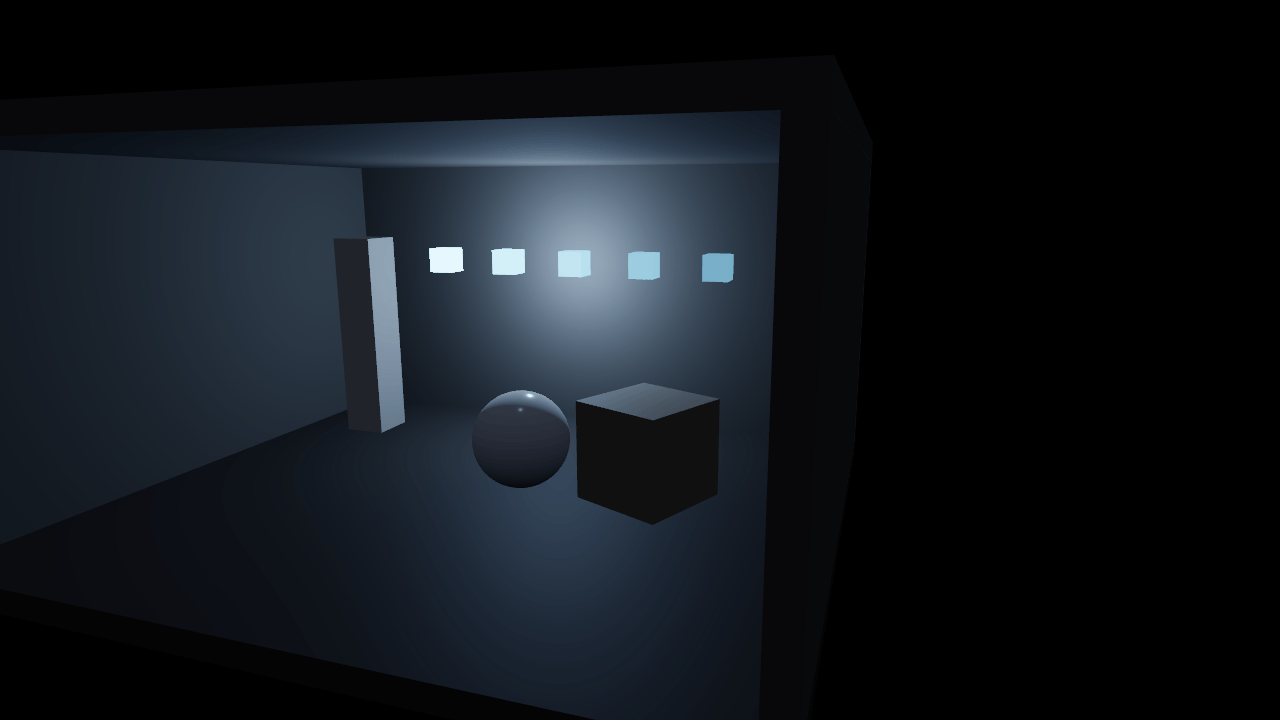
With rendering.hdr on, the scene is lit and stored in linear floating point, and one output pass applies exposure, contrast and the tone-mapping curve at the end. A dark room with emitters sixteen times brighter than white shows what each curve keeps. Auto exposure meters the HDR frame and adapts as you look around; it needs HDR.
Off airLivePaused
HDR pipeline
Lighting & GI · 3D
WebGPU: checking…See browser support
Try this
- Switch the curve from AgX to None and watch the brightest cubes clip to flat white.
- Turn Auto exposure on, then orbit until the cubes leave the frame: the room slowly brightens.
- With auto exposure on, narrow the EV range and see how far it is still allowed to adapt.
Show source code
Source
import { Camera, Environment } from "ignifx";import { bootExample } from "../_kit/boot.ts";import { twoPlaces } from "../_kit/format.ts";import { attachOrbit } from "../_kit/orbit.ts";import { bind, readout, select, slider, toggle } from "../_kit/panel.ts";import { queryFlag, queryNumber, reloadSlider, reloadToggle } from "../_kit/reload.ts";import { createRoom, CURVES, FOCUS, GRADING, SHOT, START_CURVE } from "./scene.ts";/** * The HDR pipeline: the scene is lit and stored in linear floating point, and only the last pass * turns it into colours a screen can show. * * `rendering.hdr` is a project setting, read when the app is created. With it on, every material * writes its unclamped linear colour into an `rgba16float` target, and one output pass applies the * `Environment`'s exposure, contrast and tone-mapping curve at the end. With it off, each PBR * fragment is tone mapped and clamped as it is drawn. A scene with nothing past white looks the * same either way; this one has emitters at sixteen times white, a lamp and a near-black room, and * the HDR path is what lets later passes (TAA, bloom, auto exposure) see those values at all. * * Auto exposure (`rendering.autoExposure`) needs `rendering.hdr`. It meters the HDR frame on the * GPU every frame — a luminance histogram, the darkest and brightest tenth dropped — and eases the * exposure towards the average, clamped to `[minEv, maxEv]`. Orbit until the cubes leave the frame * and the room slowly brightens; swing back and it settles down again. Both records are read once, * so their rows reload the frame with the new value. The tone-mapping curve, the exposure and the * contrast are `Environment.imageProcessing` and change live. *//** Whether this page load runs the HDR path; `?hdr=0` turns it off. */const HDR = queryFlag("hdr", true);/** Auto exposure, from the query; the defaults are the engine's own. */const AUTO_EXPOSURE = { enabled: queryFlag("autoExposure", false), minEv: queryNumber("minEv", -6, -12, 0), maxEv: queryNumber("maxEv", 6, 0, 12),} as const;/** * Writes an EV value with its sign. * * @param value - The value, in stops. * @returns E.g. `"+4 EV"`. */function ev(value: number): string { return `${value > 0 ? "+" : ""}${String(value)} EV`;}bootExample({ title: "HDR pipeline", settings: { rendering: { clearColor: { r: 0.01, g: 0.012, b: 0.016, a: 1 }, hdr: HDR, autoExposure: AUTO_EXPOSURE, }, }, async setup({ app, panel }) { const eye = app.world.createEntity("Main Camera"); eye.addComponent(Camera, { near: 0.05, far: 100, fov: SHOT.fov }); attachOrbit(app, eye, { yaw: SHOT.yaw, pitch: SHOT.pitch, distance: SHOT.distance, target: FOCUS, minDistance: 2, maxDistance: 14, }); const lights = await createRoom(app); // No `.env`: the component is only the exposure, contrast and curve. Under `rendering.hdr` // the output pass applies them; without it, the PBR shaders do. const grade = app.world.createEntity("Environment").addComponent(Environment); grade.imageProcessing.exposure = GRADING.exposure; grade.imageProcessing.contrast = GRADING.contrast; grade.imageProcessing.toneMapping = CURVES[START_CURVE] ?? "agx"; panel({ title: "HDR pipeline", groups: [ { label: "Project settings", controls: [ // Read by `createApp`, so these reload the frame. reloadToggle("HDR", "hdr", HDR), reloadToggle("Auto exposure", "autoExposure", AUTO_EXPOSURE.enabled), reloadSlider("Min EV", "minEv", { min: -12, max: 0, step: 1, format: ev }, AUTO_EXPOSURE.minEv), reloadSlider("Max EV", "maxEv", { min: 0, max: 12, step: 1, format: ev }, AUTO_EXPOSURE.maxEv), readout("Metering", (): string => { if (!AUTO_EXPOSURE.enabled) { return "off"; } return HDR ? "on" : "needs HDR"; }), ], }, { label: "Grading", controls: [ select("Tone mapping", Object.keys(CURVES), { value: START_CURVE, change: (label: string): void => { grade.imageProcessing.toneMapping = CURVES[label] ?? "agx"; }, }), slider( "Exposure", { min: 0.1, max: 4, step: 0.05, format: twoPlaces }, bind(grade.imageProcessing, "exposure"), ), slider( "Contrast", { min: 0.5, max: 2, step: 0.05, format: twoPlaces }, bind(grade.imageProcessing, "contrast"), ), ], }, { label: "Scene", collapsed: true, controls: [toggle("Lamp", bind(lights.lamp, "enabled")), toggle("Sky light", bind(lights.sky, "enabled"))], }, { label: "Frame", collapsed: true, controls: [readout("Draw calls", (): string => String(app.renderer.drawCalls))], }, ], }); },});/** * The room `hdr-pipeline` looks into: dark walls, a few props, and one wall of emitters that go * sixteen times past white. * * @remarks * The brightness range is the lesson. The cubes on the back wall are the brightest thing in the * frame by a factor of a hundred or more; the corners of the room are lit by a faint sky and a * warm lamp. A display shows neither end as it is, so what the frame looks like is decided by the * exposure and the tone-mapping curve, and, with auto exposure, by where the camera points. */import { Light, MeshAsset } from "ignifx";import { createEmissiveCubes } from "../_kit/emitters.ts";import { paint, place } from "../_kit/props.ts";import type { Point3 } from "../_kit/stage.ts";import type { App, ToneMappingCurve } from "ignifx";/** The room's inner width (X), depth (Z) and height (Y), in metres. */const ROOM = { width: 6, depth: 5, height: 3 } as const;/** How thick the walls are, in metres. */const WALL = 0.2;/** The point the camera orbits. */export const FOCUS: Point3 = { x: 0, y: 1.1, z: 0.6 };/** The opening shot: outside the open side of the room, looking in. */export const SHOT = { fov: 50, yaw: 18, pitch: 12, distance: 7.5 } as const;/** The tone-mapping curves, by the label the panel shows. */export const CURVES: Readonly<Record<string, ToneMappingCurve>> = { None: "none", Standard: "standard", ACES: "aces", Neutral: "neutral", AgX: "agx",};/** The curve the example opens on. */export const START_CURVE = "AgX";/** The grading the example opens on. */export const GRADING = { exposure: 1, contrast: 1 } as const;/** The lights the room is lit by, so the panel can switch the lamp. */export interface RoomLights { /** The warm lamp in front of the emitters, standing in for the light they would cast. */ readonly lamp: Light; /** The faint sky light that keeps the corners from going black. */ readonly sky: Light;}/** * Builds the room, its props, the emitters and the two lights. * * @param app - The app the entities and the assets belong to. * @returns The lights. */export async function createRoom(app: App): Promise<RoomLights> { const wall = paint(app, "hdr/wall", { r: 0.36, g: 0.34, b: 0.32, a: 1 }, { roughness: 0.9 }); const floorPaint = paint(app, "hdr/floor", { r: 0.22, g: 0.2, b: 0.19, a: 1 }, { roughness: 0.7 }); const box = MeshAsset.box(app, { size: 1 }); const halfW = ROOM.width / 2; const halfD = ROOM.depth / 2; // The open side faces -Z, towards the camera; the back wall, both sides and the ceiling close the rest. place(app, "Floor", box, floorPaint, { at: { x: 0, y: -WALL / 2, z: 0 }, scale: { x: ROOM.width + WALL * 2, y: WALL, z: ROOM.depth + WALL * 2 }, castShadows: false, }); place(app, "Back wall", box, wall, { at: { x: 0, y: ROOM.height / 2, z: halfD + WALL / 2 }, scale: { x: ROOM.width + WALL * 2, y: ROOM.height, z: WALL }, }); for (const side of [-1, 1]) { place(app, side < 0 ? "Left wall" : "Right wall", box, wall, { at: { x: side * (halfW + WALL / 2), y: ROOM.height / 2, z: 0 }, scale: { x: WALL, y: ROOM.height, z: ROOM.depth + WALL * 2 }, }); } place(app, "Ceiling", box, wall, { at: { x: 0, y: ROOM.height + WALL / 2, z: 0 }, scale: { x: ROOM.width + WALL * 2, y: WALL, z: ROOM.depth + WALL * 2 }, }); // Props: a matte block, a glossy sphere that catches the emitters as highlights, a pale column. const sphere = MeshAsset.sphere(app, { diameter: 1, segments: 32 }); place(app, "Block", box, paint(app, "hdr/block", { r: 0.55, g: 0.5, b: 0.44, a: 1 }), { at: { x: 1.5, y: 0.45, z: 0.3 }, scale: { x: 0.9, y: 0.9, z: 0.9 }, rotation: { x: 0, y: 24, z: 0 }, }); place(app, "Glossy sphere", sphere, paint(app, "hdr/gloss", { r: 0.8, g: 0.8, b: 0.82, a: 1 }, { roughness: 0.18, }), { at: { x: 0.3, y: 0.45, z: 0.2 }, scale: { x: 0.9, y: 0.9, z: 0.9 }, }); place(app, "Column", box, paint(app, "hdr/column", { r: 0.8, g: 0.78, b: 0.74, a: 1 }), { at: { x: -2.2, y: 1.1, z: 1.4 }, scale: { x: 0.45, y: 2.2, z: 0.45 }, }); // The emitters hang on the back wall, just in front of it. await createEmissiveCubes(app, { position: { x: 0, y: 1.9, z: halfD - 0.25 }, scale: 0.28 }); // An emissive surface lights nothing in a rasteriser, so a lamp in front of the cubes casts the // light they would. Warm and fairly strong, so the lit side of the props runs well past white. const lampEntity = app.world.createEntity("Lamp", { position: { x: 0, y: 1.9, z: halfD - 0.8 } }); const lamp = lampEntity.addComponent(Light, { type: "point", intensity: 14, range: 10, color: { r: 0.62, g: 0.8, b: 1, a: 1 }, }); const skyEntity = app.world.createEntity("Sky light"); const sky = skyEntity.addComponent(Light, { type: "hemispheric", intensity: 0.08, color: { r: 0.8, g: 0.86, b: 1, a: 1 }, }); return { lamp, sky };}