All examples
Ambient occlusion
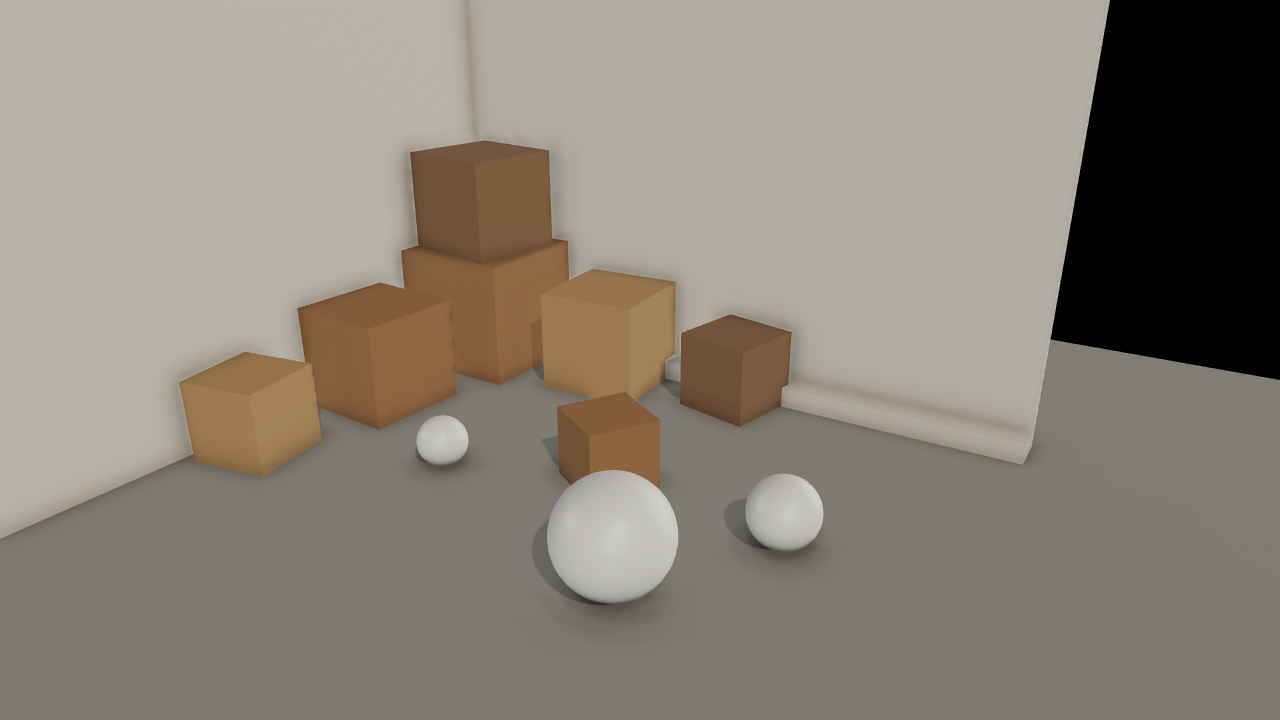
Ground-truth ambient occlusion (GTAO) estimates how much of the sky each pixel can see and darkens the environment's light by it. Crates stacked into a corner are lit by a studio probe and one sun. Only indirect light is occluded, so the sun is untouched. It works with or without rendering.hdr; the settings are read at start, so changing one reloads.
Off airLivePaused
Ambient occlusion
Lighting & GI · 3D
WebGPU: checking…See browser support
Try this
- Turn the sun off, then switch ambient occlusion off and on: the crates float, then settle.
- Raise the radius to two metres and watch the shading spread across the walls.
- Compare Half and Full quality on the crease where the stacked crates meet the wall.
Show source code
Source
import { Camera, Environment } from "ignifx";import { bootExample } from "../_kit/boot.ts";import { metres, twoPlaces } from "../_kit/format.ts";import { attachOrbit } from "../_kit/orbit.ts";import { bind, readout, slider, toggle } from "../_kit/panel.ts";import { queryChoice, queryFlag, queryNumber, reloadSelect, reloadSlider, reloadToggle } from "../_kit/reload.ts";import { loadEnvironment } from "../_kit/stage.ts";import { createCorner, FOCUS, SHOT, START_EXPOSURE } from "./scene.ts";/** * Ground-truth ambient occlusion (GTAO) on the environment's light. * * `rendering.ambientOcclusion` is a project setting. With it on, a compute pass reads the scene's * depth and normals, estimates for each pixel how much of the hemisphere above it is blocked, and * a material plugin multiplies every lit PBR material's `occlusion` by the result. `occlusion` only * scales **indirect** light — the environment's diffuse and specular — so direct lights and * emissive surfaces are untouched, and a scene with no `Environment` cube map shows no difference * at all. That is why this one is lit by the studio probe, with one sun you can switch off. It * works with and without `rendering.hdr`; this example leaves HDR off. * * The record is read once, when the app starts, so every row in its group reloads the frame. * `quality: "half"` traces at half resolution (two slices of four steps a side); `"full"` at full * resolution with three slices of six. `radius` is how far, in metres, an occluder counts, and * `intensity` is an exponent on the visibility: above one the creases darken faster. *//** The ambient-occlusion record, from the query; the defaults are the engine's own. */const AO = { enabled: queryFlag("ao", true), quality: queryChoice("quality", ["half", "full"] as const, "half"), radius: queryNumber("radius", 0.5, 0.05, 3), intensity: queryNumber("intensity", 1, 0, 4),} as const;bootExample({ title: "Ambient occlusion", settings: { rendering: { clearColor: { r: 0.05, g: 0.055, b: 0.065, a: 1 }, features: { shadows: true }, ambientOcclusion: AO, }, }, async setup({ app, panel }) { const eye = app.world.createEntity("Main Camera"); eye.addComponent(Camera, { near: 0.05, far: 100, fov: SHOT.fov }); attachOrbit(app, eye, { yaw: SHOT.yaw, pitch: SHOT.pitch, distance: SHOT.distance, target: FOCUS, minDistance: 1.5, maxDistance: 12, }); // The probe is what ambient occlusion darkens; without one there is nothing for it to act on. const studio = loadEnvironment(app, "studio"); await studio.promise; const sky = app.world.createEntity("Environment").addComponent(Environment, { environment: studio }); sky.imageProcessing.exposure = START_EXPOSURE; sky.imageProcessing.toneMapping = "aces"; const sun = createCorner(app); panel({ title: "Ambient occlusion", groups: [ { label: "Ambient occlusion", controls: [ // `rendering.ambientOcclusion` is read once, at start: each row reloads. reloadToggle("Enabled", "ao", AO.enabled), reloadSelect("Quality", "quality", ["half", "full"], AO.quality), reloadSlider("Radius", "radius", { min: 0.1, max: 2, step: 0.05, format: metres }, AO.radius), reloadSlider("Intensity", "intensity", { min: 0, max: 3, step: 0.1, format: twoPlaces }, AO.intensity), ], }, { label: "Lighting", controls: [ toggle("Sun", bind(sun, "enabled")), slider("Exposure", { min: 0.3, max: 3, step: 0.05, format: twoPlaces }, bind(sky.imageProcessing, "exposure")), slider("Probe rotation", { min: 0, max: 360, step: 5 }, bind(sky, "rotation")), ], }, { label: "Frame", collapsed: true, controls: [readout("Draw calls", (): string => String(app.renderer.drawCalls))], }, ], }); },});/** * The corner `ambient-occlusion` looks at: two walls, a floor and a stack of crates pushed against * them, which is to say a scene made of creases. * * @remarks * Ambient occlusion is about how much of the sky a point can see. Out in the open it sees half of * it; in the crease between a crate and a wall it sees a sliver. The environment probe lights every * point as if it saw all of it, which is what makes a scene lit only by a probe look flat and its * objects float. GTAO estimates the sliver from the depth buffer and darkens the probe's light by * it — and only the probe's light: a direct light still reaches into the crease unchanged. */import { Light, MeshAsset } from "ignifx";import { paint, place } from "../_kit/props.ts";import type { Point3 } from "../_kit/stage.ts";import type { App, ColorLike } from "ignifx";/** The point the camera orbits: the corner, a little above the floor. */export const FOCUS: Point3 = { x: -0.6, y: 0.7, z: 0.6 };/** The opening shot. */export const SHOT = { fov: 42, yaw: 32, pitch: 22, distance: 6.4 } as const;/** The exposure the example opens on. */export const START_EXPOSURE = 1.3;/** One crate: where it stands (its base centre), its edge length, and its turn about Y. */interface Crate { readonly at: Point3; readonly size: number; readonly yaw: number;}/** The crates, against the back wall (+Z) and the left wall (-X), some stacked. */const CRATES: readonly Crate[] = [ { at: { x: -1.95, y: 0, z: 1.95 }, size: 1, yaw: 0 }, { at: { x: -1.95, y: 1, z: 1.95 }, size: 0.8, yaw: 8 }, { at: { x: -0.75, y: 0, z: 2.05 }, size: 0.8, yaw: -4 }, { at: { x: -2.05, y: 0, z: 0.75 }, size: 0.8, yaw: 3 }, { at: { x: 0.35, y: 0, z: 2.15 }, size: 0.6, yaw: 12 }, { at: { x: -2.15, y: 0, z: -0.35 }, size: 0.6, yaw: -10 }, { at: { x: 0.2, y: 0, z: 0.6 }, size: 0.5, yaw: 30 },];/** Half the floor's side, and where the two walls stand, in metres. */const ROOM = 2.5;/** How tall the walls are, in metres. */const WALL_HEIGHT = 3.4;/** The crate colours, cycled. */const WOOD: readonly ColorLike[] = [ { r: 0.62, g: 0.46, b: 0.3, a: 1 }, { r: 0.55, g: 0.42, b: 0.3, a: 1 }, { r: 0.7, g: 0.56, b: 0.38, a: 1 },];/** * Builds the corner, the crates, a few round things on the floor, and the sun. * * @param app - The app the entities and the assets belong to. * @returns The sun, which the panel switches. */export function createCorner(app: App): Light { const box = MeshAsset.box(app, { size: 1 }); const plaster = paint(app, "ao/plaster", { r: 0.82, g: 0.8, b: 0.76, a: 1 }, { roughness: 0.92 }); const concrete = paint(app, "ao/concrete", { r: 0.6, g: 0.6, b: 0.58, a: 1 }, { roughness: 0.85 }); place(app, "Floor", box, concrete, { at: { x: 0, y: -0.05, z: 0 }, scale: { x: ROOM * 4, y: 0.1, z: ROOM * 4 }, castShadows: false, }); place(app, "Back wall", box, plaster, { at: { x: 0, y: WALL_HEIGHT / 2, z: ROOM + 0.05 }, scale: { x: ROOM * 2, y: WALL_HEIGHT, z: 0.1 }, }); place(app, "Left wall", box, plaster, { at: { x: -ROOM - 0.05, y: WALL_HEIGHT / 2, z: 0 }, scale: { x: 0.1, y: WALL_HEIGHT, z: ROOM * 2 }, }); // A skirting step along both walls, a crease the camera always sees. place(app, "Step", box, plaster, { at: { x: 0.6, y: 0.08, z: ROOM - 0.1 }, scale: { x: ROOM * 2 - 1.2, y: 0.16, z: 0.2 }, }); const woods = WOOD.map((colour: ColorLike, index: number) => paint(app, `ao/crate-${String(index)}`, colour, { roughness: 0.75 }), ); CRATES.forEach((crate: Crate, index: number) => { place(app, `Crate ${String(index + 1)}`, box, woods[index % woods.length] ?? concrete, { at: { x: crate.at.x, y: crate.at.y + crate.size / 2, z: crate.at.z }, scale: { x: crate.size, y: crate.size, z: crate.size }, rotation: { x: 0, y: crate.yaw, z: 0 }, }); }); const sphere = MeshAsset.sphere(app, { diameter: 1, segments: 32 }); const ceramic = paint(app, "ao/ceramic", { r: 0.86, g: 0.86, b: 0.86, a: 1 }, { roughness: 0.4 }); for (const [x, z, diameter] of [ [0.9, -0.4, 0.7], [1.5, 0.5, 0.45], [-0.9, 0.2, 0.35], ] as const) { place(app, "Ball", sphere, ceramic, { at: { x, y: diameter / 2, z }, scale: { x: diameter, y: diameter, z: diameter }, }); } // A low sun from the open side. Ambient occlusion leaves its light alone, so turning it off is // the clearest view of what the effect does. const sunEntity = app.world.createEntity("Sun", { position: { x: 4, y: 6, z: -3 } }); sunEntity.transform.lookAt({ x: -1, y: 0, z: 1 }); const sun = sunEntity.addComponent(Light, { type: "directional", intensity: 1.2, color: { r: 1, g: 0.94, b: 0.84, a: 1 }, }); sun.shadows.enabled = true; sun.shadows.technique = "pcf"; sun.shadows.mapSize = 2048; sun.shadows.normalBias = 0.02; sun.shadows.darkness = 0.2; return sun;}