All examples
Screen-space GI
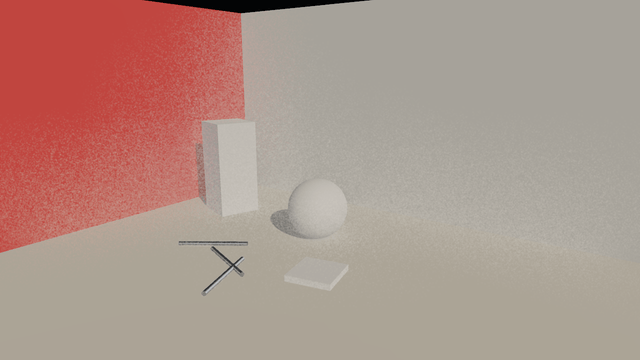
Screen-space global illumination (beta, desktop tier) traces short rays through the depth buffer and adds one bounce of the lit colour they reach: the sunlit floor lights the walls, and the red wall tints what stands beside it. Contact shadows add the fine dark line where objects touch the floor. Both run under rendering.hdr here; SSGI only sees what is on screen.
This example is deliberately heavy: expect a lower frame rate on a phone or an older laptop.
Off airLivePaused
Screen-space GI
Lighting & GI · 3D
WebGPU: checking…See browser support
Try this
- Switch SSGI off and on and watch the red tint leave the white block and the floor.
- Turn the camera until the red wall leaves the frame: its bounce goes with it.
- Switch contact shadows off and look at the steel rods lying on the floor.
Show source code
Source
import { Camera, Environment, PostProcessStack } from "ignifx";import { bootExample } from "../_kit/boot.ts";import { metres, twoPlaces } from "../_kit/format.ts";import { attachOrbit } from "../_kit/orbit.ts";import { bind, readout, slider, toggle } from "../_kit/panel.ts";import { loadEnvironment } from "../_kit/stage.ts";import { createSet, FOCUS, SHOT, START_EXPOSURE } from "./scene.ts";import type { PanelBinding } from "../_kit/panel.ts";/** * Screen-space contact shadows and screen-space global illumination (SSGI), two records on the * camera's `PostProcessStack`. * * Both need `rendering.features.postProcessing` and both read the shared scene depth. They run on * the scene colour right after the scene pass, before the HDR output pass and the rest of the * chain; under `rendering.hdr`, which this example turns on, that colour is linear, so the bounce * is added in light rather than in display values. Every field is live: toggling a record or * `ssgi.halfResolution` rebuilds its pass, the rest is written onto the pass each frame. * * **SSGI is beta and desktop tier.** It traces rays through the depth buffer and adds one bounce of * whatever lit colour they reach, which costs far more than anything else on this page, and it only * sees what is on screen: turn the camera until the red wall leaves the frame and its colour leaves * the floor. Because the probe already adds its own diffuse light, `ssgi.environmentDiffuse` keeps * only part of it while SSGI runs, so the bounce is not counted twice; that needs `rendering.hdr` * (or the `materialPlugins` feature). * * The bounce is noisy: each pixel traces a handful of rays and nothing averages them over time, * so more samples and full resolution buy a smoother result at a steep price. This example opens * at sixteen samples and full resolution; "Half resolution" and fewer samples show the cheap end. * * Contact shadows march a short way towards the first shadow-casting directional light from every * pixel. They fill in the thin dark line where an object meets the floor, which a shadow map is too * coarse to resolve — look at the steel rods lying on the floor. *//** Whether the two passes start on; also what the poster shows. */const START = { contactShadows: true, ssgi: true, ssgiIntensity: 0.6, ssgiSamples: 16 } as const;bootExample({ title: "Screen-space GI", settings: { rendering: { clearColor: { r: 0.04, g: 0.045, b: 0.055, a: 1 }, hdr: true, features: { postProcessing: true, shadows: true }, }, }, async setup({ app, panel, afterStart }) { const eye = app.world.createEntity("Main Camera"); eye.addComponent(Camera, { near: 0.05, far: 100, fov: SHOT.fov }); attachOrbit(app, eye, { yaw: SHOT.yaw, pitch: SHOT.pitch, distance: SHOT.distance, target: FOCUS, minDistance: 1.5, maxDistance: 12, }); const studio = loadEnvironment(app, "studio"); await studio.promise; const sky = app.world.createEntity("Environment").addComponent(Environment, { environment: studio }); sky.imageProcessing.exposure = START_EXPOSURE; sky.imageProcessing.toneMapping = "agx"; const sun = createSet(app); const post = eye.addComponent(PostProcessStack); // Full resolution and sixteen samples: the engine's defaults (half, eight) are cheaper and // visibly grainy, since nothing denoises the bounce over time. Halve both for a laptop. post.ssgi.intensity = START.ssgiIntensity; post.ssgi.samples = START.ssgiSamples; post.ssgi.halfResolution = false; afterStart((): void => { post.contactShadows.enabled = START.contactShadows; post.ssgi.enabled = START.ssgi; }); /** * Binds a toggle to a record's `enabled`, opening at the start value: the record itself reads * `false` until `afterStart` switches it on. * * @param record - The `contactShadows` or `ssgi` record. * @param start - The value the page opens with. * @returns The binding. */ const enabled = (record: { enabled: boolean }, start: boolean): PanelBinding<boolean> => ({ value: start, change: (on: boolean): void => { record.enabled = on; }, read: (): boolean => record.enabled, }); panel({ title: "Screen-space GI", groups: [ { label: "SSGI (beta)", controls: [ toggle("Enabled", enabled(post.ssgi, START.ssgi)), slider("Intensity", { min: 0, max: 4, step: 0.1, format: twoPlaces }, bind(post.ssgi, "intensity")), slider("Radius", { min: 0.25, max: 6, step: 0.25, format: metres }, bind(post.ssgi, "radius")), slider("Samples", { min: 2, max: 32, step: 1 }, bind(post.ssgi, "samples")), toggle("Half resolution", bind(post.ssgi, "halfResolution")), slider( "Probe diffuse kept", { min: 0, max: 1, step: 0.05, format: twoPlaces }, bind(post.ssgi, "environmentDiffuse"), ), ], }, { label: "Contact shadows", controls: [ toggle("Enabled", enabled(post.contactShadows, START.contactShadows)), slider( "Intensity", { min: 0, max: 4, step: 0.1, format: twoPlaces }, bind(post.contactShadows, "intensity"), ), slider("Length", { min: 0.05, max: 1.5, step: 0.05, format: metres }, bind(post.contactShadows, "length")), slider( "Thickness", { min: 0.02, max: 1, step: 0.02, format: metres }, bind(post.contactShadows, "thickness"), ), slider("Samples", { min: 2, max: 32, step: 1 }, bind(post.contactShadows, "samples")), ], }, { label: "Lighting", collapsed: true, controls: [ toggle("Sun", bind(sun, "enabled")), slider("Sun intensity", { min: 0, max: 6, step: 0.1, format: twoPlaces }, bind(sun, "intensity")), slider("Exposure", { min: 0.2, max: 3, step: 0.05, format: twoPlaces }, bind(sky.imageProcessing, "exposure")), ], }, { label: "Frame", collapsed: true, controls: [readout("Draw calls", (): string => String(app.renderer.drawCalls))], }, ], }); },});/** * The set `screen-space-gi` looks at: a pale floor in full sun, a red wall and a white wall * meeting at a corner, and a few objects standing on the floor. * * @remarks * Sunlight lands on the floor and on the red wall. In a real room both would throw some of it on: * the floor lights the bottom of the walls, the red wall tints the floor and the white wall beside * it. A rasteriser draws none of that — each surface sees the lamps and the probe, never its * neighbours. SSGI traces short rays through the depth buffer and adds one bounce of whatever * colour they hit. Contact shadows do the opposite job at a smaller scale: a short march towards the * sun from every pixel finds the thin contact a shadow map is too coarse to resolve. */import { Light, MeshAsset } from "ignifx";import { paint, place } from "../_kit/props.ts";import type { Point3 } from "../_kit/stage.ts";import type { App } from "ignifx";/** The point the camera orbits. */export const FOCUS: Point3 = { x: -0.4, y: 0.8, z: 0.6 };/** The opening shot. */export const SHOT = { fov: 44, yaw: 36, pitch: 14, distance: 7 } as const;/** The exposure the example opens on. */export const START_EXPOSURE = 0.9;/** Where the walls stand, in metres from the origin. */const ROOM = 2.6;/** How tall the walls are, in metres. */const WALL_HEIGHT = 3.6;/** * Builds the floor, the two walls, the props and the sun. * * @param app - The app the entities and the assets belong to. * @returns The sun, which the panel switches and which contact shadows march towards. */export function createSet(app: App): Light { const box = MeshAsset.box(app, { size: 1 }); const floor = paint(app, "ssgi/floor", { r: 0.85, g: 0.83, b: 0.78, a: 1 }, { roughness: 0.85 }); const red = paint(app, "ssgi/red-wall", { r: 0.82, g: 0.12, b: 0.08, a: 1 }, { roughness: 0.9 }); const white = paint(app, "ssgi/white-wall", { r: 0.86, g: 0.86, b: 0.84, a: 1 }, { roughness: 0.9 }); place(app, "Floor", box, floor, { at: { x: ROOM, y: -0.05, z: 0 }, scale: { x: ROOM * 6, y: 0.1, z: ROOM * 4 }, castShadows: false, }); place(app, "Red wall", box, red, { at: { x: -ROOM - 0.05, y: WALL_HEIGHT / 2, z: 0 }, scale: { x: 0.1, y: WALL_HEIGHT, z: ROOM * 2 }, }); // Wider than the room on the open side, so the camera never sees past its end. place(app, "White wall", box, white, { at: { x: ROOM, y: WALL_HEIGHT / 2, z: ROOM + 0.05 }, scale: { x: ROOM * 4, y: WALL_HEIGHT, z: 0.1 }, }); // Props: a tall white block near the red wall to catch its colour, a sphere, and small things // lying on the floor whose contact is too fine for the shadow map. const matte = paint(app, "ssgi/matte", { r: 0.9, g: 0.9, b: 0.9, a: 1 }, { roughness: 0.7 }); place(app, "Block", box, matte, { at: { x: -1.5, y: 0.8, z: 1.1 }, scale: { x: 0.7, y: 1.6, z: 0.7 }, rotation: { x: 0, y: 18, z: 0 }, }); place(app, "Ball", MeshAsset.sphere(app, { diameter: 1, segments: 32 }), matte, { at: { x: 0.6, y: 0.45, z: 0.9 }, scale: { x: 0.9, y: 0.9, z: 0.9 }, }); const rod = MeshAsset.cylinder(app, { height: 1, diameter: 0.06, tessellation: 16 }); const steel = paint(app, "ssgi/steel", { r: 0.5, g: 0.52, b: 0.55, a: 1 }, { metallic: 1, roughness: 0.35 }); for (const [x, z, yaw] of [ [0.2, -0.6, 20], [0.5, -0.9, 70], [-0.4, -0.3, -35], ] as const) { // A cylinder stands along Y: a quarter turn about Z lays it on the floor. place(app, "Rod", rod, steel, { at: { x, y: 0.03, z }, rotation: { x: 0, y: yaw, z: 90 }, }); } place(app, "Tile", box, matte, { at: { x: 1.4, y: 0.04, z: -0.2 }, scale: { x: 0.6, y: 0.08, z: 0.6 }, rotation: { x: 0, y: -12, z: 0 }, }); // A low sun from the open side, onto the floor and the red wall. const sunEntity = app.world.createEntity("Sun", { position: { x: 5, y: 5, z: -2.5 } }); sunEntity.transform.lookAt({ x: -1.5, y: 0, z: 1 }); const sun = sunEntity.addComponent(Light, { type: "directional", intensity: 3, color: { r: 1, g: 0.93, b: 0.82, a: 1 }, }); sun.shadows.enabled = true; sun.shadows.technique = "pcf"; sun.shadows.mapSize = 2048; sun.shadows.normalBias = 0.02; return sun;}