All examples
Light types
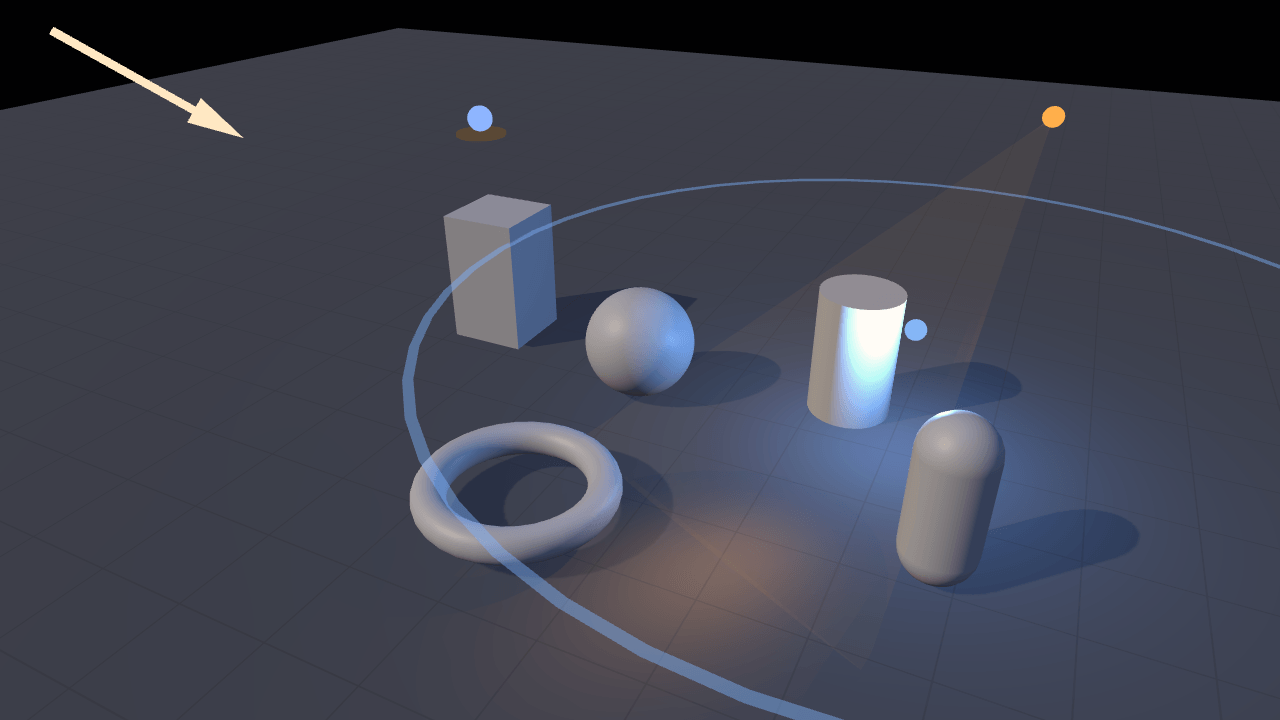
Explore directional, point, spot and hemispheric lights. Each has a visible marker showing its position, direction or range. Turn lights on and off to see how each one changes the scene.
Off airLivePaused
Light types
Lighting · 3D
WebGPU: checking…See browser support
Try this
- Turn every lamp off but one, then bring the others back one at a time.
- Widen the spot light's cone angle and soften its edge; the cone gizmo follows both.
- Drag the point light's range and watch the ring around the lamp grow with it.
Show source code
Source
import { Camera, Light } from "ignifx";import { bootExample } from "../_kit/boot.ts";import { srgbFromHex } from "../_kit/color.ts";import { degreesPerSecond, metres } from "../_kit/format.ts";import { attachOrbit } from "../_kit/orbit.ts";import { bind, color, readout, slider, toggle } from "../_kit/panel.ts";import { createArrow, createCone, createOrb, createRing, createSkyMarker } from "./gizmos.ts";import { createSubjects, degrees, FOCUS, groundColor, LAMP, lampSwitch, lightColor, paints, SHADOW_MAP_SIZE, SKY, Spinner, SPOT, SUN,} from "./scene.ts";/** * The four lights ignifx has, in one scene, each drawn with a gizmo so you can see what you are * changing. * * A `Light` is described by two things: its own fields, and **its entity's transform**. A * directional light shines along the entity's `+Z` and has no position at all; a point light sits * at the entity's origin and fades to nothing at `range`; a spot light does both and adds a cone; a * hemispheric light has neither, only a sky direction — the entity's `+Y` — and two colours it * mixes between. So every lamp below is placed, then aimed with `lookAt`, and each gizmo is simply * a child entity: it inherits the pose, and nothing has to keep the two in step. * * Two of the four can cast. Shadows come from a directional or a spot light only; a point or * hemispheric light that asks for them is refused with `IGX-0703`. What the gizmos are made of, and * what the numbers are, is `gizmos.ts` and `scene.ts` beside this file. */bootExample({ title: "Light types", settings: { rendering: { clearColor: { r: 0.043, g: 0.055, b: 0.078, a: 1 }, // Read once, when `app.start()` registers the scene; asking afterwards is `IGX-0704`. Without // it a light's `shadows.enabled` is a no-op with a logged warning. features: { shadows: true }, }, }, async setup({ app, panel }) { app.registerComponents([Spinner]); const eye = app.world.createEntity("Main Camera"); eye.addComponent(Camera, { near: 0.1, far: 200, fov: 45 }); attachOrbit(app, eye, { yaw: 26, pitch: 29, distance: 10.5, target: FOCUS, minDistance: 4, maxDistance: 20 }); await createSubjects(app); // Directional: a direction, and no position. `lookAt` is what sets it. const sunEntity = app.world.createEntity("Sun", { position: SUN.at }); sunEntity.transform.lookAt(FOCUS); const sun = sunEntity.addComponent(Light, { type: "directional", intensity: SUN.intensity }); sun.color = srgbFromHex(SUN.color); sun.shadows.enabled = true; sun.shadows.mapSize = SHADOW_MAP_SIZE; // A PCF-only offset along the surface normal, without which a map this size stripes a curved // surface with its own shadow. sun.shadows.normalBias = 0.02; sun.shadows.darkness = 0.28; const sunArrow = createArrow(app, { parent: sunEntity, size: SUN.arrow, color: srgbFromHex(SUN.color) }); // Point: a position and a range. The pivot is what walks it around the scene. const pivot = app.world.createEntity("Lamp Pivot"); const lampEntity = app.world.createEntity("Lamp", { parent: pivot, position: LAMP.at }); const lamp = lampEntity.addComponent(Light, { type: "point", intensity: LAMP.intensity, range: LAMP.range }); lamp.color = srgbFromHex(LAMP.color); const lampOrb = createOrb(app, { parent: lampEntity, size: 0.22, color: srgbFromHex(LAMP.color) }); const lampRing = createRing(app, { parent: lampEntity, size: LAMP.range, color: srgbFromHex(LAMP.color) }); const spinner = pivot.addComponent(Spinner, { speed: LAMP.spin }); // The ring is the range, so the two move together. const setRange = (value: number): void => { lamp.range = value; lampRing.setRadius(value); }; // Spot: a position, a direction, a range and a cone. const spotEntity = app.world.createEntity("Spot", { position: SPOT.at }); spotEntity.transform.lookAt(SPOT.aim); const spot = spotEntity.addComponent(Light, { type: "spot", intensity: SPOT.intensity, range: SPOT.range, spotAngle: SPOT.angle, spotExponent: SPOT.exponent, }); spot.color = srgbFromHex(SPOT.color); // Lite gives a spot light one shadow generator, PCF, and ignores whatever `technique` says. spot.shadows.enabled = true; spot.shadows.mapSize = SHADOW_MAP_SIZE; spot.shadows.normalBias = 0.02; spot.shadows.darkness = 0.28; const spotOrb = createOrb(app, { parent: spotEntity, size: 0.2, color: srgbFromHex(SPOT.color) }); const cone = { parent: spotEntity, length: SPOT.cone, angleDegrees: SPOT.angle, color: srgbFromHex(SPOT.color) }; const spotCone = createCone(app, cone); // The cone gizmo is the `spotAngle`, drawn. const setAngle = (value: number): void => { spot.spotAngle = value; spotCone.setAngle(value); }; // Hemispheric: two colours and an up axis. Ambient, and it cannot cast. const skyEntity = app.world.createEntity("Ambient", { position: SKY.at }); const ambient = skyEntity.addComponent(Light, { type: "hemispheric", intensity: SKY.intensity }); ambient.color = srgbFromHex(SKY.color); ambient.groundColor = srgbFromHex(SKY.ground); const skyMarker = createSkyMarker(app, { parent: skyEntity, size: 0.8, color: srgbFromHex(SKY.color) }); skyMarker.setGroundColor(srgbFromHex(SKY.ground)); panel({ title: "Light types", groups: [ { label: "Lamps", controls: [ // `Light.enabled`, with each lamp's gizmos hidden alongside it. toggle("Directional", lampSwitch(sun, [sunArrow.entity])), toggle("Point", lampSwitch(lamp, [lampOrb.entity, lampRing.entity])), toggle("Spot", lampSwitch(spot, [spotOrb.entity, spotCone.entity])), toggle("Hemispheric", lampSwitch(ambient, [skyMarker.entity])), ], }, { label: "Directional", collapsed: true, controls: [ slider("Intensity", { min: 0, max: 6, step: 0.1 }, bind(sun, "intensity")), color("Colour", { value: SUN.color, change: paints(lightColor(sun), sunArrow.setColor) }), toggle("Casts shadows", bind(sun.shadows, "enabled")), ], }, { label: "Point", collapsed: true, controls: [ slider("Intensity", { min: 0, max: 30, step: 0.5 }, bind(lamp, "intensity")), color("Colour", { value: LAMP.color, change: paints(lightColor(lamp), lampOrb.setColor, lampRing.setColor), }), slider("Range", { min: 1, max: 16, step: 0.5, format: metres }, { value: LAMP.range, change: setRange }), slider("Orbit", { min: 0, max: 60, step: 2, format: degreesPerSecond }, bind(spinner, "speed")), ], }, { label: "Spot", collapsed: true, controls: [ slider("Intensity", { min: 0, max: 400, step: 5 }, bind(spot, "intensity")), color("Colour", { value: SPOT.color, change: paints(lightColor(spot), spotOrb.setColor, spotCone.setColor), }), slider( "Cone angle", { min: 6, max: 120, step: 1, format: degrees }, { value: SPOT.angle, change: setAngle }, ), slider("Edge falloff", { min: 0, max: 8, step: 0.1 }, bind(spot, "spotExponent")), toggle("Casts shadows", bind(spot.shadows, "enabled")), ], }, { label: "Hemispheric", collapsed: true, controls: [ slider("Intensity", { min: 0, max: 2, step: 0.05 }, bind(ambient, "intensity")), color("Sky", { value: SKY.color, change: paints(lightColor(ambient), skyMarker.setSkyColor) }), color("Ground", { value: SKY.ground, change: paints(groundColor(ambient), skyMarker.setGroundColor) }), ], }, { label: "Frame", collapsed: true, controls: [ readout("Draw calls", (): string => String(app.renderer.drawCalls)), // A switched-off lamp releases its map, so this counts the lamps and toggles above. readout("Shadow maps", (): string => String(Number(sun.isCastingShadows) + Number(spot.isCastingShadows))), ], }, ], }); },});/** * The light gizmos `lights` draws: the small unlit shapes that show where a light is, which way it * points, how far it reaches and how wide its cone is. * * @remarks * A light is invisible. That is the whole difficulty of a lighting example — you can see what a * light does and not what it is, so a slider moves and nothing on screen says *which* lamp moved. * Every editor answers that with gizmos, and this file is the handful of primitives that draw them, * built from `MeshAsset` factories in code so the example still loads no assets. * * ## Why the gizmos are `unlit`, not emissive * * A material's `emissive` is fixed when the material is built: `MaterialAsset` exposes * `setBaseColor`, `setMetallicRoughness` and `setAlpha`, and nothing for emissive. A gizmo has to * repaint itself whenever the visitor moves a colour picker, so it is `unlit: true` instead — an * unlit surface draws its base colour and nothing else, whatever the lights do, and `setBaseColor` * is one uniform write with no pipeline rebuild. * * ## The one rotation worth stating * * `MeshAsset.cylinder` stands along **+Y**, and a light points along its entity's **+Z** * (`skills/ignifx/references/concepts/rendering.md` §1). So every gizmo that has to lie along the * light's direction — the arrow and the cone — is parented to the light's entity and pitched by * {@link ALIGN_Y_TO_Z} about X, which maps the mesh's +Y onto the parent's +Z. ignifx is * left-handed, so that rotation is `+90` and not `-90`. */import { createMaterialAsset, degToRad, MeshAsset, MeshRenderer, pbrMaterialDefinition } from "ignifx";import type { App, AssetHandle, ColorLike, Entity, MaterialAsset } from "ignifx";/** The X rotation, in degrees, that puts a `MeshAsset.cylinder`'s +Y axis along its parent's +Z. */const ALIGN_Y_TO_Z = 90;/** How much of an arrow's length is shaft; the rest is the head. */const SHAFT_FRACTION = 0.72;/** An arrow's shaft diameter, as a fraction of its length. */const SHAFT_THICKNESS = 0.045;/** An arrow's head diameter, as a fraction of its length. */const HEAD_THICKNESS = 0.16;/** How many radial segments a gizmo cone or disc is built from. Enough that no facet shows. */const SEGMENTS = 24;/** How opaque a spot light's cone is drawn. Low: it is a hint, and the subject is behind it. */const CONE_ALPHA = 0.16;/** The tube thickness of a range ring, in metres, before the entity's scale is applied. */const RING_THICKNESS = 0.02;/** How opaque a range ring is drawn: a hint on the floor, not a pipe around the scene. */const RING_ALPHA = 0.5;/** A hemispheric marker's ball, as a fraction of the marker's width. */const SKY_BALL_FRACTION = 0.5;/** How far the ball floats above the disc, as a fraction of the marker's width. */const SKY_BALL_LIFT = 0.3;/** The ground disc's thickness, as a fraction of the marker's width. */const SKY_DISC_THICKNESS = 0.06;/** A gizmo: some geometry under one entity, and one material the example repaints. */export interface Gizmo { /** The gizmo's root entity, so an example can hide it with `active = false`. */ readonly entity: Entity; /** * Repaints the gizmo, so it keeps matching the light it stands for. * * @param color - The new sRGB colour. */ readonly setColor: (color: ColorLike) => void;}/** A range ring, which also follows its light's `range`. */export interface RingGizmo extends Gizmo { /** * Resizes the ring. * * @param radius - The new radius, in metres. */ readonly setRadius: (radius: number) => void;}/** A spot light's cone, which also follows its `spotAngle`. */export interface ConeGizmo extends Gizmo { /** * Reshapes the cone. * * @param angleDegrees - The light's full cone angle, in degrees. */ readonly setAngle: (angleDegrees: number) => void;}/** A hemispheric light's two-tone marker, which has a colour above and a colour below. */export interface SkyGizmo { /** The marker's root entity. */ readonly entity: Entity; /** * Repaints the upper disc. * * @param color - The light's sRGB sky colour. */ readonly setSkyColor: (color: ColorLike) => void; /** * Repaints the lower disc. * * @param color - The light's sRGB ground colour. */ readonly setGroundColor: (color: ColorLike) => void;}/** What the orb, arrow, ring and sky-marker factories take. */export interface GizmoOptions { /** The entity the gizmo hangs under — the light's entity, so it inherits its pose. */ readonly parent: Entity; /** The gizmo's size in metres: an orb's diameter, an arrow's length, a ring's radius. */ readonly size: number; /** The colour it opens on, in sRGB. */ readonly color: ColorLike;}/** What {@link createCone} takes. */export interface ConeGizmoOptions { /** The spot light's entity. */ readonly parent: Entity; /** How far down the beam the cone is drawn, in metres. */ readonly length: number; /** The light's full cone angle, in degrees. */ readonly angleDegrees: number; /** The colour it opens on, in sRGB. */ readonly color: ColorLike;}/** * Builds one unlit material, which is what makes a gizmo read as a lamp rather than as an object. * * @param app - The app the material belongs to. * @param name - The material's name, which the devtools inspector shows. * @param color - The sRGB colour. * @param alpha - The opacity; below 1 the material is alpha-blended and double-sided. * @returns The material's handle. */function unlitMaterial(app: App, name: string, color: ColorLike, alpha = 1): AssetHandle<MaterialAsset> { return createMaterialAsset( app, pbrMaterialDefinition({ name, baseColor: { r: color.r, g: color.g, b: color.b, a: alpha }, metallic: 0, roughness: 1, unlit: true, alpha, // A cone is a hint drawn over the scene, so it blends and shows both of its faces; an orb or // an arrow is a solid object and neither. alphaMode: alpha < 1 ? "blend" : "opaque", doubleSided: alpha < 1, }), [], );}/** * Adds one gizmo mesh to an entity: never a caster, never a receiver, never pickable. * * @param entity - The entity to draw it on. * @param mesh - The geometry's handle. * @param material - The material's handle. */function addGizmoMesh(entity: Entity, mesh: AssetHandle<MeshAsset>, material: AssetHandle<MaterialAsset>): void { entity.addComponent(MeshRenderer, { mesh, materials: [material], castShadows: false, receiveShadows: false, pickable: false, });}/** * A small glowing ball where a light sits: the gizmo for a point or spot light. * * @param app - The app the entities and assets belong to. * @param options - The parent, the diameter and the colour. * @returns The gizmo. * * @example * ```ts * const orb = createOrb(app, { parent: lamp, size: 0.18, color: { r: 1, g: 0.8, b: 0.5, a: 1 } }); * orb.setColor({ r: 0.4, g: 0.7, b: 1, a: 1 }); * ``` */export function createOrb(app: App, options: GizmoOptions): Gizmo { const material = unlitMaterial(app, "gizmo/orb", options.color); const entity = app.world.createEntity("Light Orb", { parent: options.parent }); addGizmoMesh(entity, MeshAsset.sphere(app, { diameter: options.size, segments: 16 }), material); return { entity, setColor: (color: ColorLike): void => { material.value.setBaseColor(color); }, };}/** * An arrow along its parent's forward axis: the gizmo for a directional light, which has a * direction and no position at all. * * @param app - The app the entities and assets belong to. * @param options - The parent, the total length and the colour. * @returns The gizmo. * * @example * ```ts * createArrow(app, { parent: sunEntity, size: 1.4, color: { r: 1, g: 0.95, b: 0.86, a: 1 } }); * ``` */export function createArrow(app: App, options: GizmoOptions): Gizmo { const length = options.size; const material = unlitMaterial(app, "gizmo/arrow", options.color); // The root carries the one rotation this file exists to state: mesh +Y onto the parent's +Z. const entity = app.world.createEntity("Light Arrow", { parent: options.parent }); entity.transform.localEulerAngles = { x: ALIGN_Y_TO_Z, y: 0, z: 0 }; const shaft = app.world.createEntity("Arrow Shaft", { parent: entity }); shaft.transform.localPosition.set(0, (length * SHAFT_FRACTION) / 2, 0); addGizmoMesh( shaft, MeshAsset.cylinder(app, { height: length * SHAFT_FRACTION, diameter: length * SHAFT_THICKNESS, tessellation: 10, }), material, ); const head = app.world.createEntity("Arrow Head", { parent: entity }); head.transform.localPosition.set(0, length * (1 - (1 - SHAFT_FRACTION) / 2), 0); addGizmoMesh( head, MeshAsset.cylinder(app, { height: length * (1 - SHAFT_FRACTION), diameterTop: 0, diameterBottom: length * HEAD_THICKNESS, tessellation: 12, }), material, ); return { entity, setColor: (color: ColorLike): void => { material.value.setBaseColor(color); }, };}/** * A horizontal ring at a light's `range`: the distance at which a point or spot light reaches zero. * * @remarks * The mesh is built at unit radius and the entity is **scaled**, so dragging the range slider * resizes the ring with one write and no new geometry. `MeshAsset.torus` lies in the XZ plane, and * `localScale` is applied before the entity's rotation, so scaling X and Z is scaling the radius. * * @param app - The app the entities and assets belong to. * @param options - The parent, the starting radius and the colour. * @returns The gizmo, with {@link RingGizmo.setRadius}. * * @example * ```ts * const ring = createRing(app, { parent: lamp, size: light.range, color: warm }); * ring.setRadius(12); * ``` */export function createRing(app: App, options: GizmoOptions): RingGizmo { const material = unlitMaterial(app, "gizmo/ring", options.color, RING_ALPHA); const entity = app.world.createEntity("Range Ring", { parent: options.parent }); // `diameter` is the ring's outer diameter, so 2 is a radius of 1 — the unit the scale multiplies. addGizmoMesh( entity, MeshAsset.torus(app, { diameter: 2, thickness: RING_THICKNESS, tessellation: SEGMENTS * 2 }), material, ); const setRadius = (radius: number): void => { // Y is left at 1: a thicker tube would read as a change in the range, which it is not. entity.transform.localScale.set(radius, 1, radius); }; setRadius(options.size); return { entity, setColor: (color: ColorLike): void => { material.value.setBaseColor(color); }, setRadius, };}/** * The cone a spot light throws: apex at the lamp, opening along the light's forward axis. * * @remarks * Built at unit base radius over `length` metres, and reshaped by scaling X and Z to * `length × tan(spotAngle / 2)` — the radius the cone's mouth actually has at that distance. The * apex sits on the lamp because the mesh is pushed back half its length along the rotated axis; a * cone centred on the lamp instead of starting there points the wrong way half the time. * * @param app - The app the entities and assets belong to. * @param options - The parent, the cone's length, its starting angle and the colour. * @returns The gizmo, with {@link ConeGizmo.setAngle}. * * @example * ```ts * const cone = createCone(app, { parent: lamp, length: 4, angleDegrees: 34, color: warm }); * cone.setAngle(spot.spotAngle); * ``` */export function createCone(app: App, options: ConeGizmoOptions): ConeGizmo { const length = options.length; const material = unlitMaterial(app, "gizmo/cone", options.color, CONE_ALPHA); const entity = app.world.createEntity("Spot Cone", { parent: options.parent }); entity.transform.localEulerAngles = { x: ALIGN_Y_TO_Z, y: 0, z: 0 }; const shape = app.world.createEntity("Cone Shape", { parent: entity }); // `diameterTop: 2, diameterBottom: 0` puts the apex at the mesh's **-Y** end, and the mesh spans // -length/2 to +length/2 about its own origin — so pushing it half its length **along** the // rotated axis puts the apex on the lamp and the mouth `length` metres down the beam. shape.transform.localPosition.set(0, length / 2, 0); addGizmoMesh( shape, MeshAsset.cylinder(app, { height: length, diameterTop: 2, diameterBottom: 0, tessellation: SEGMENTS }), material, ); const setAngle = (angleDegrees: number): void => { const radius = length * Math.tan(degToRad(angleDegrees) / 2); shape.transform.localScale.set(radius, 1, radius); }; setAngle(options.angleDegrees); return { entity, setColor: (color: ColorLike): void => { material.value.setBaseColor(color); }, setAngle, };}/** * The marker for a hemispheric light: a ball in the sky colour sitting on a disc in the ground * colour. * * @remarks * A hemispheric light has **no position** — only a sky direction, which is its entity's +Y — so * this marker is a legend rather than a location: the two colours the light mixes between, stacked * along that axis. The disc is wider than the ball so both read from a camera looking down at it, * which is where an example's camera usually is. Moving its entity changes nothing about the light * except which way "up" is. * * @param app - The app the entities and assets belong to. * @param options - The parent, the disc's diameter and the starting sky colour. * @returns The gizmo. * * @example * ```ts * const sky = createSkyMarker(app, { parent: ambient, size: 0.8, color: skyBlue }); * sky.setGroundColor({ r: 0.3, g: 0.22, b: 0.16, a: 1 }); * ``` */export function createSkyMarker(app: App, options: GizmoOptions): SkyGizmo { const upper = unlitMaterial(app, "gizmo/sky", options.color); const lower = unlitMaterial(app, "gizmo/ground", { r: 0.18, g: 0.15, b: 0.13, a: 1 }); const entity = app.world.createEntity("Hemispheric Marker", { parent: options.parent }); const ball = app.world.createEntity("Sky Ball", { parent: entity }); ball.transform.localPosition.set(0, options.size * SKY_BALL_LIFT, 0); addGizmoMesh(ball, MeshAsset.sphere(app, { diameter: options.size * SKY_BALL_FRACTION, segments: 16 }), upper); const disc = app.world.createEntity("Ground Disc", { parent: entity }); addGizmoMesh( disc, MeshAsset.cylinder(app, { height: options.size * SKY_DISC_THICKNESS, diameter: options.size, tessellation: SEGMENTS, }), lower, ); return { entity, setSkyColor: (color: ColorLike): void => { upper.value.setBaseColor(color); }, setGroundColor: (color: ColorLike): void => { lower.value.setBaseColor(color); }, };}/** * Everything in `lights` that is not a light: the numbers each lamp is tuned to, the shapes the * light falls on, the script that walks the lamp around them, and the plumbing the parameter panel * needs to drive a light from a slider and a colour picker. * * @remarks * Split out for the reason `pbr-model/shot.ts` is: what a reader wants from `main.ts` is the four * lights and their fields, not a scene file with four lights somewhere in it. Every number here is * a composition choice and none of it is a lesson about ignifx. */import { createMaterialAsset, f32, MeshAsset, MeshRenderer, pbrMaterialDefinition, Script } from "ignifx";import { srgbFromHex } from "../_kit/color.ts";import { createGridGround } from "../_kit/stage.ts";import type { PanelBinding } from "../_kit/panel.ts";import type { App, AssetHandle, ColorLike, Entity, Light, ScriptCallbacks } from "ignifx";/** The point the directional and spot lights are aimed at, and what the camera looks at. */export const FOCUS = { x: 0, y: 0.4, z: 0 } as const;/** * The directional light: a warm sun from the front upper left, and the one that casts by default. * * @remarks * A directional light has a direction and no position, so `at` only places its arrow gizmo: on the * line from {@link FOCUS} towards the sun, close enough to sit inside the opening shot. */export const SUN = { color: "#ffe9c4", intensity: 2, at: { x: -2.34, y: 3, z: -2.34 }, arrow: 1.6 } as const;/** The point light: a cool lamp that walks a circle around the subjects. */export const LAMP = { color: "#7fb8ff", intensity: 22, range: 5, at: { x: 3.1, y: 1.5, z: 0 }, spin: 16 } as const;/** The spot light: warm, tight, from above and to the right, aimed just off the centre sphere. */export const SPOT = { color: "#ffb04a", intensity: 250, range: 14, angle: 34, exponent: 2, at: { x: 3.9, y: 3.5, z: 1 }, aim: { x: 1.9, y: 0, z: -2.8 }, /** How far down the beam the cone gizmo is drawn: just short of the floor. */ cone: 5.2,} as const;/** The hemispheric light: pale sky above, warm bounce below, and no position that matters. */export const SKY = { color: "#8fb6ff", ground: "#5a4632", intensity: 0.3, at: { x: -4.4, y: 1.9, z: 3.2 } } as const;/** The shadow map both casters use, in texels per side. `shadows` is the example that tunes it. */export const SHADOW_MAP_SIZE = 1024;/** The matte off-white every subject is drawn in, so the light is the only thing that varies. */const SUBJECT_COLOR: ColorLike = { r: 0.79, g: 0.8, b: 0.83, a: 1 };/** How rough the subjects are: high enough that the shape reads, low enough to catch a highlight. */const SUBJECT_ROUGHNESS = 0.52;/** How many radial segments a subject is built from. */const SUBJECT_SEGMENTS = 32;/** * Turns one colour picker into a write to each thing that has to change colour with it. * * @remarks * A lamp and its gizmo are two objects with one colour between them, and the panel should not have * to say so four times. This is what makes each `color` row in `main.ts` a single line. * * @param setters - Everything to repaint, in any order. * @returns The `change` callback a `color` control takes. * * @example * ```ts * color("Colour", { value: SUN.color, change: paints(lightColor(sun), arrow.setColor) }); * ``` */export function paints(...setters: readonly ((color: ColorLike) => void)[]): (hex: string) => void { return (hex: string): void => { const value = srgbFromHex(hex); for (const set of setters) { set(value); } };}/** * A setter that writes one light's own colour, for {@link paints}. * * @param light - The light to repaint. * @returns The setter. */export function lightColor(light: Light): (color: ColorLike) => void { return (color: ColorLike): void => { light.color = color; };}/** * A setter that writes one hemispheric light's `groundColor` — the colour it lights from below. * * @param light - The hemispheric light. * @returns The setter. */export function groundColor(light: Light): (color: ColorLike) => void { return (color: ColorLike): void => { light.groundColor = color; };}/** * Writes a slider's value as an angle. * * @param value - Degrees. * @returns The text for the slider's value cell. */export function degrees(value: number): string { return `${String(value)}°`;}/** Walks its entity around the world Y axis, in degrees per second. */export class Spinner extends Script.define({ speed: f32(0) }) implements ScriptCallbacks { /** The namespaced registration id. */ static typeId = "lights/Spinner"; /** Reused so the per-frame path allocates nothing (coding standards §7). */ readonly #step = { x: 0, y: 0, z: 0 }; /** * Advances the rotation. * * @param dt - Seconds since the previous frame, already scaled by `time.timeScale`. Under * `?static=1` the scale is zero, so the lamp holds the angle it was authored at. */ update(dt: number): void { this.#step.y = this.speed * dt; this.transform.rotate(this.#step); }}/** * The panel binding that switches a lamp and its gizmos together. * * @remarks * A disabled light lights nothing and releases its shadow map; enabling it again restores both on * the next frame. The gizmos are meshes and follow `active`, so they are hidden the ordinary way. * * @param light - The light to switch. * @param gizmos - The gizmo roots to hide with it. * @returns What the lamp's toggle reads and writes. * * @example * ```ts * toggle("Directional", lampSwitch(sun, [arrow.entity])); * ``` */export function lampSwitch(light: Light, gizmos: readonly Entity[]): PanelBinding<boolean> { return { value: light.enabled, change: (on: boolean): void => { light.enabled = on; for (const gizmo of gizmos) { gizmo.active = on; } }, read: (): boolean => light.enabled, };}/** * Builds the ground and the five primitives the lights fall on. * * @remarks * Five different shapes on purpose: a sphere shows a highlight's shape, a box shows three faces at * three brightnesses, a cylinder shows a gradient wrapping away from the light, a torus shows a * surface shadowing itself, and a capsule shows both at once. Every one of them is a `MeshAsset` * factory call, so the example loads no geometry. * * The ground is the kit's grid, faded into the clear colour so it has no edge to see. Attach the * orbit camera first, because the fade is sized from how far it can pull back. The grid texture is * awaited before `app.start()`: a material binds its textures once, and a still-loading handle * binds as none at all. * * @param app - The app the entities and assets belong to. * @returns A promise that resolves once the ground's texture has loaded. * * @example * ```ts * await createSubjects(app); * ``` */export async function createSubjects(app: App): Promise<void> { await createGridGround(app, { fade: true }); const matte = createMaterialAsset( app, pbrMaterialDefinition({ name: "lights/matte", baseColor: SUBJECT_COLOR, metallic: 0.04, roughness: SUBJECT_ROUGHNESS, // No environment is loaded here — the four lights are the whole of the lighting — so this // only states the intent: nothing in this scene is lit by a probe. environmentIntensity: 0, }), [], ); const place = (name: string, mesh: AssetHandle<MeshAsset>, x: number, y: number, z: number): void => { const entity = app.world.createEntity(name, { position: { x, y, z } }); entity.addComponent(MeshRenderer, { mesh, materials: [matte], castShadows: true, receiveShadows: true }); }; const segments = SUBJECT_SEGMENTS; place("Sphere", MeshAsset.sphere(app, { diameter: 1.3, segments }), 0, 0.65, 0); place("Box", MeshAsset.box(app, { width: 1, height: 1.7, depth: 1 }), -2.4, 0.85, 0.7); place("Cylinder", MeshAsset.cylinder(app, { height: 1.5, diameter: 0.95, tessellation: segments }), 2.4, 0.75, 0.7); place("Torus", MeshAsset.torus(app, { diameter: 1.7, thickness: 0.34, tessellation: segments }), 0, 0.34, -2.7); place("Capsule", MeshAsset.capsule(app, { height: 1.7, radius: 0.36, tessellation: segments }), 3.8, 0.85, -1.8);}