All examples
Bloom
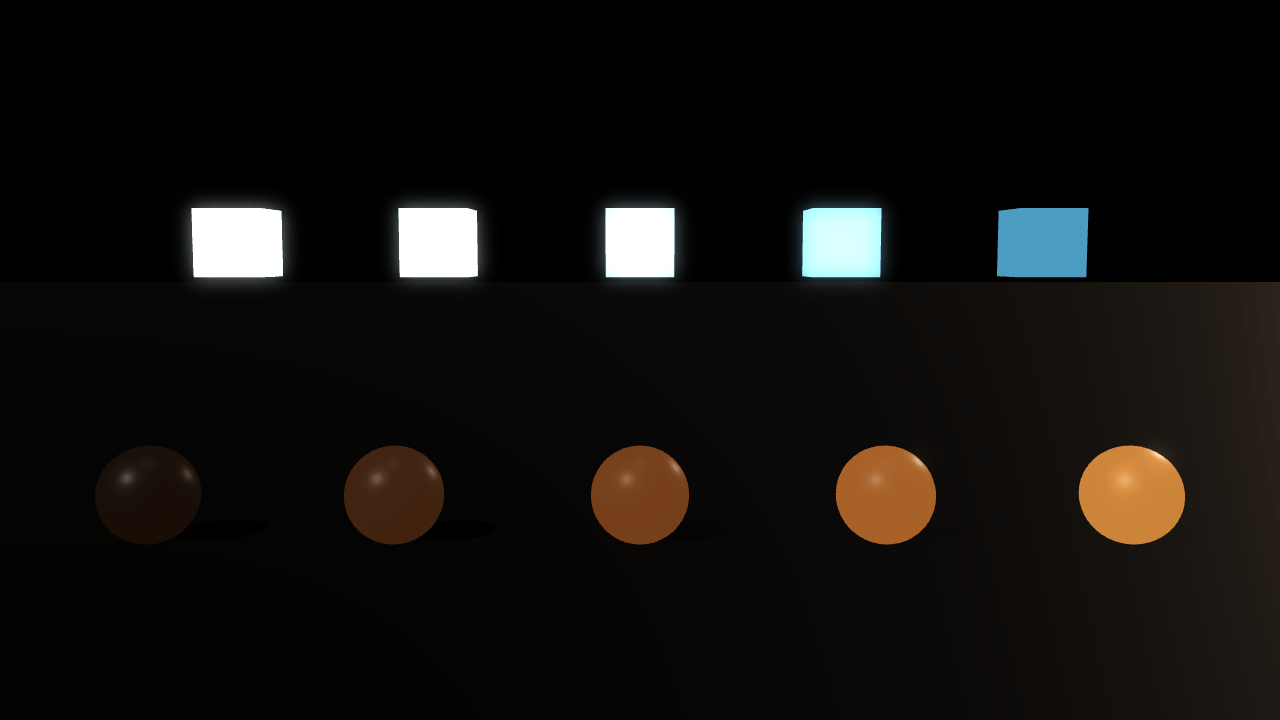
Bloom adds a glow around bright surfaces. Compare glowing cubes loaded from a glTF model with spheres created in code. Adjust the threshold to choose which surfaces glow, then change the strength and spread of the effect.
Off airLivePaused
Bloom
Post-processing · 3D
WebGPU: checking…See browser support
Try this
- Pull Threshold down and watch the dim spheres join the glow; the cubes never leave it.
- Set Kernel to 128 for a wider glow, then set Scale to 25%: the glow barely changes, and the blur buffer shrinks to a sixteenth of the pixels.
- Turn Lamps off to see the glowing materials without the scene lights.
Show source code
Source
import { Camera, Environment, PostProcessStack } from "ignifx";import { bootExample } from "../_kit/boot.ts";import { twoPlaces } from "../_kit/format.ts";import { attachOrbit } from "../_kit/orbit.ts";import { bind, readout, select, slider, toggle } from "../_kit/panel.ts";import { createLightRig, createStudioFloor } from "../_kit/stage.ts";import { CLEAR_COLOR, createEmissiveRow, createSphereRow, FLOOR_COLOR, SHOT, START_BLOOM } from "./rows.ts";import type { App } from "ignifx";/** * Bloom spreads the brightest parts of the frame into a glow around them. It is a post-process: a * `PostProcessStack` on the camera, fed by the `postProcessing` rendering feature, which has to be * declared before the app starts. The effect itself is switched on in `afterStart`, once the scene * is registered. * * Threshold, weight and kernel are live: a slider changes them on the next frame. Scale is not. * It sets the resolution the glow is computed at, as a fraction of the frame, and changing it * rebuilds the effect chain, so the panel offers three sizes rather than a slider. The threshold is * compared against linear light, the kernel is in pixels. * * Scale is a cost knob, not a look. A glow is soft by nature, so a blur run over a quarter of the * pixels and stretched back up is all but indistinguishable from one run over all of them; at 25% * the frame changes by a few levels in a handful of pixels, while the blur touches a sixteenth of * the pixels it does at 100%. The readout under it is that pixel count, which is what the select * really changes. *//** * Writes the size of the buffer the blur runs over. * * @param app - The app, whose canvas the buffer is a fraction of. * @param scale - The bloom's scale. * @returns The width and height in pixels, or a dash before the canvas has a size. */function blurBuffer(app: App, scale: number): string { const surface = app.renderer.surface; if (surface === null || surface.width <= 0) { return "—"; } return `${String(Math.round(surface.width * scale))} × ${String(Math.round(surface.height * scale))} px`;}/** * Writes a slider's value as a pixel count. * * @param value - The value, in pixels. * @returns The text for the value cell. */function pixels(value: number): string { return `${String(value)} px`;}/** The bloom resolutions the panel offers, by label: a quarter, half and all of the frame. */const SCALES: Readonly<Record<string, number>> = { "25%": 0.25, "50%": 0.5, "100%": 1 };bootExample({ title: "Bloom", settings: { rendering: { clearColor: CLEAR_COLOR, features: { shadows: true, postProcessing: true } }, }, async setup({ app, canvas, panel, afterStart }) { const eye = app.world.createEntity("Main Camera"); eye.addComponent(Camera, { near: 0.05, far: 200, fov: SHOT.fov }); attachOrbit(app, eye, { yaw: SHOT.yaw, pitch: SHOT.pitch, // A phone held upright opens further back, so both rows fit across it. distance: canvas.clientHeight > canvas.clientWidth ? SHOT.portraitDistance : SHOT.distance, target: SHOT.target, minDistance: 1.6, maxDistance: 12, }); // A quiet rig: the lamps give the geometry an edge, and the emissive surfaces light the frame. const rig = createLightRig(app, { focus: SHOT.target, keyIntensity: 1.1, fillIntensity: 0.16, rimIntensity: 0.5, shadows: true, shadowDarkness: 0.4, }); // One `Environment` per world, and it needs no `.env`: with `environment` left null the // component is only the exposure, contrast and tone-mapping path the PBR shaders themselves // compile — which is what decides how far past white a pixel is before bloom sees it. const sky = app.world.createEntity("Environment").addComponent(Environment); sky.imageProcessing.exposure = SHOT.exposure; sky.imageProcessing.toneMapping = "aces"; // After the `Environment`, so the floor's fade reuses it. The floor is near-black, there // only to catch the emitters' light and shadows. createStudioFloor(app, { color: FLOOR_COLOR, roughness: 0.62, fade: true }); createSphereRow(app); await createEmissiveRow(app); const post = eye.addComponent(PostProcessStack); post.bloom.threshold = START_BLOOM.threshold; post.bloom.weight = START_BLOOM.weight; post.bloom.kernel = START_BLOOM.kernel; post.bloom.scale = START_BLOOM.scale; afterStart((): void => { post.bloom.enabled = true; }); panel({ title: "Bloom", groups: [ { label: "Bloom", controls: [ // The component's `enabled`, not `bloom.enabled`: the chain stays recorded and is // skipped, which is a branch a frame rather than a rebuild per click. It also reads // `true` here, during `setup`, while `bloom.enabled` is still false until `afterStart`. toggle("Enabled", bind(post, "enabled")), slider("Threshold", { min: 0, max: 1, step: 0.02, format: twoPlaces }, bind(post.bloom, "threshold")), slider("Weight", { min: 0, max: 1.5, step: 0.05, format: twoPlaces }, bind(post.bloom, "weight")), slider("Kernel", { min: 8, max: 128, step: 4, format: pixels }, bind(post.bloom, "kernel")), select("Scale", Object.keys(SCALES), { value: "50%", change: (label: string): void => { post.bloom.scale = SCALES[label] ?? START_BLOOM.scale; }, }), readout("Blur buffer", (): string => blurBuffer(app, post.bloom.scale)), ], }, { label: "Scene", controls: [ // Exposure multiplies the whole frame before tone mapping, so it moves what crosses // the threshold as surely as the threshold does. slider( "Exposure", { min: 0.2, max: 2, step: 0.05, format: twoPlaces }, bind(sky.imageProcessing, "exposure"), ), // All three lamps, so what is left when they are off is the light the emitters make. toggle("Lamps", { value: true, change: (on: boolean): void => { rig.key.enabled = on; rig.fill.enabled = on; rig.rim.enabled = on; }, read: (): boolean => rig.key.enabled, }), ], }, { label: "Frame", collapsed: true, controls: [ readout("Draw calls", (): string => String(app.renderer.drawCalls)), readout("Post-process tasks", (): string => String(post.taskCount)), ], }, ], }); },});/** * The two rows of emitters `bloom` looks at, and the composition they are arranged in. * * @remarks * A separate file for the reason `pbr-model/shot.ts` is: none of it is a lesson about bloom. * `main.ts` is then the two rendering features, the four sliders and the `afterStart` that switches * the pass on — which is all a reader came for. * * ## The two rows are the point * * The **back** row is Khronos's `EmissiveStrengthTest`: five unit cubes whose glTF materials all * declare the same emissive colour, `[0.1, 0.5, 0.9]`, and whose * `KHR_materials_emissive_strength` multipliers run 1x, 2x, 4x, 8x, 16x. Babylon Lite 1.27.0 reads * that extension (its `setPbrEmissive` documents emissive "values may exceed 1.0 for HDR emissive, * e.g. `KHR_materials_emissive_strength`"), so the strongest cubes — on the left from this camera — * sit far above white and are exactly what a bloom threshold is looking for. * * The **front** row is five spheres built in code, the same hue ramped over the range * `pbrMaterialDefinition`'s `emissive` accepts. That range stops at 1.0: the field is **sRGB** and * is decoded with `Color.srgbToLinear`, which clamps its input, so a hand-written ignifx material * cannot express an HDR emitter today. Both rows bloom; only the cubes can go past white. That * contrast is the honest version of "emissive surfaces bleed light", and it is why the example * ships both rather than only the model. */import { createMaterialAsset, MeshAsset, MeshRenderer, MODEL_ASSET_TYPE, Model, pbrMaterialDefinition } from "ignifx";import type { App, AssetHandle, ColorLike, ModelAsset } from "ignifx";/** How many spheres the generated row holds — one per cube in the model's row. */export const STEPS = 5;/** Black, which the frame is cleared to and the floor fades into, so bloom has something to bleed into. */export const CLEAR_COLOR: ColorLike = { r: 0, g: 0, b: 0, a: 1 };/** The floor's albedo: near-black, there only to catch the emitters' light and shadows. */export const FLOOR_COLOR: ColorLike = { r: 0.008, g: 0.01, b: 0.016, a: 1 };/** * The generated row's hue at full brightness, in sRGB; each sphere gets a fraction of it. * * @remarks * Warmer than it looks, and deliberately not a saturated orange. Bloom thresholds on **luminance**, * and luminance is 0.21R + 0.72G + 0.07B: a fully saturated red at 1.0 has a luminance of 0.21 and * would never cross a threshold the cubes clear five times over. This hue reaches about 0.46, which * is what puts the top of the sphere row just above {@link START_BLOOM}'s threshold and the bottom * of it below — the ramp is the lesson, and it has to straddle the line to show one. */const EMBER: ColorLike = { r: 1, g: 0.62, b: 0.28, a: 1 };/** The spheres' diameter, in metres. */const SPHERE_DIAMETER = 0.24;/** Metres between one sphere and the next, matched to the model's cube spacing. */const SPHERE_SPACING = 0.6;/** How high the sphere row's centres sit above the floor, in metres. */const SPHERE_HEIGHT = 0.12;/** How far towards the camera the sphere row sits, in metres. */const SPHERE_DEPTH = -0.35;/** * The scale the model is drawn at. * * @remarks * The file is authored in test units: unit cubes three units apart on a 16 x 10 reference card * (measured by `_tools/compress-model.ts`, which prints the extents on every run). At 0.2 the * cubes are 20 cm across and 60 cm apart, which is a scene rather than a diagram — and the same * spacing as the sphere row in front of it, so each sphere sits under a cube. */export const MODEL_SCALE = 0.2;/** How high the model's origin — the middle cube's centre — sits above the floor, in metres. */export const MODEL_HEIGHT = 0.74;/** How far from the camera the model's row sits, in metres. */export const MODEL_DEPTH = 0.35;/** The opening shot: the pose and the grading every capture is taken from. */export const SHOT = { fov: 34, yaw: 0, pitch: 5, distance: 4, /** * How far back the shot opens on a portrait canvas. The orbit camera keeps a square frame's * width there, narrower than the landscape frame the rows were composed in, and from the * landscape distance the outer cube and sphere of each row fall off its two edges. */ portraitDistance: 5.2, target: { x: 0, y: 0.42, z: 0 }, /** Low on purpose: the emissive surfaces should be what clips, not the lit geometry. */ exposure: 0.9,} as const;/** The bloom the example opens on, and what the poster shows. */export const START_BLOOM = { threshold: 0.32, weight: 0.6, kernel: 56, scale: 0.5 } as const;/** * Builds the generated row: one mesh shared by {@link STEPS} entities, one material each, emissive * ramped over the 0-1 range the material format can express. * * @param app - The app the entities and the assets belong to. */export function createSphereRow(app: App): void { const mesh = MeshAsset.sphere(app, { diameter: SPHERE_DIAMETER, segments: 24 }); for (let step = 0; step < STEPS; step += 1) { // Brightest on the left, under the cubes that go furthest past white. const level = (STEPS - step) / STEPS; const material = createMaterialAsset( app, pbrMaterialDefinition({ name: `bloom/ember-${String(STEPS - step)}`, baseColor: { r: 0.07, g: 0.07, b: 0.08, a: 1 }, metallic: 0, roughness: 0.4, emissive: { r: EMBER.r * level, g: EMBER.g * level, b: EMBER.b * level, a: 1 }, }), [], ); const sphere = app.world.createEntity(`Sphere ${String(step + 1)}`); sphere.transform.localPosition.set((step - (STEPS - 1) / 2) * SPHERE_SPACING, SPHERE_HEIGHT, SPHERE_DEPTH); sphere.addComponent(MeshRenderer, { mesh, materials: [material], castShadows: true }); }}/** * Loads and places the back row. * * @remarks * The load is awaited **before** `app.start()`: a load that completes before the loop runs settles * at once, while one awaited afterwards waits for a frame's `PreUpdate`. * * The file ships a reference card and grid around its cubes. `materialOverrides` replaces one glTF * material by the name it carries in the file — here the card's `FlatBackdrop`, with a fully * transparent one, which takes it out of the frame and leaves this example's floor as the stage. * * @param app - The app the entity and the assets belong to. * @returns Nothing; the entity is the world's. */export async function createEmissiveRow(app: App): Promise<void> { const cubes: AssetHandle<ModelAsset> = app.assets.load("models/emissive-strength-test.glb", { type: MODEL_ASSET_TYPE, }); await cubes.promise; // `alphaMode: "blend"` with `alpha: 0` takes the card out of the frame entirely; an opaque dark // card would still be lit, and read as five dark rectangles behind the cubes. The // cubes keep their own materials, which is the point of overriding one glTF material by name // rather than replacing the model. const card = createMaterialAsset( app, pbrMaterialDefinition({ name: "bloom/card", baseColor: CLEAR_COLOR, alphaMode: "blend", alpha: 0 }), [], ); const row = app.world.createEntity("Emissive strength test"); row.transform.localPosition.set(0, MODEL_HEIGHT, MODEL_DEPTH); row.transform.localScale.set(MODEL_SCALE, MODEL_SCALE, MODEL_SCALE); row.addComponent(Model, { model: cubes, materialOverrides: { FlatBackdrop: card }, castShadows: false, receiveShadows: false, });}