All examples
Image-based lighting
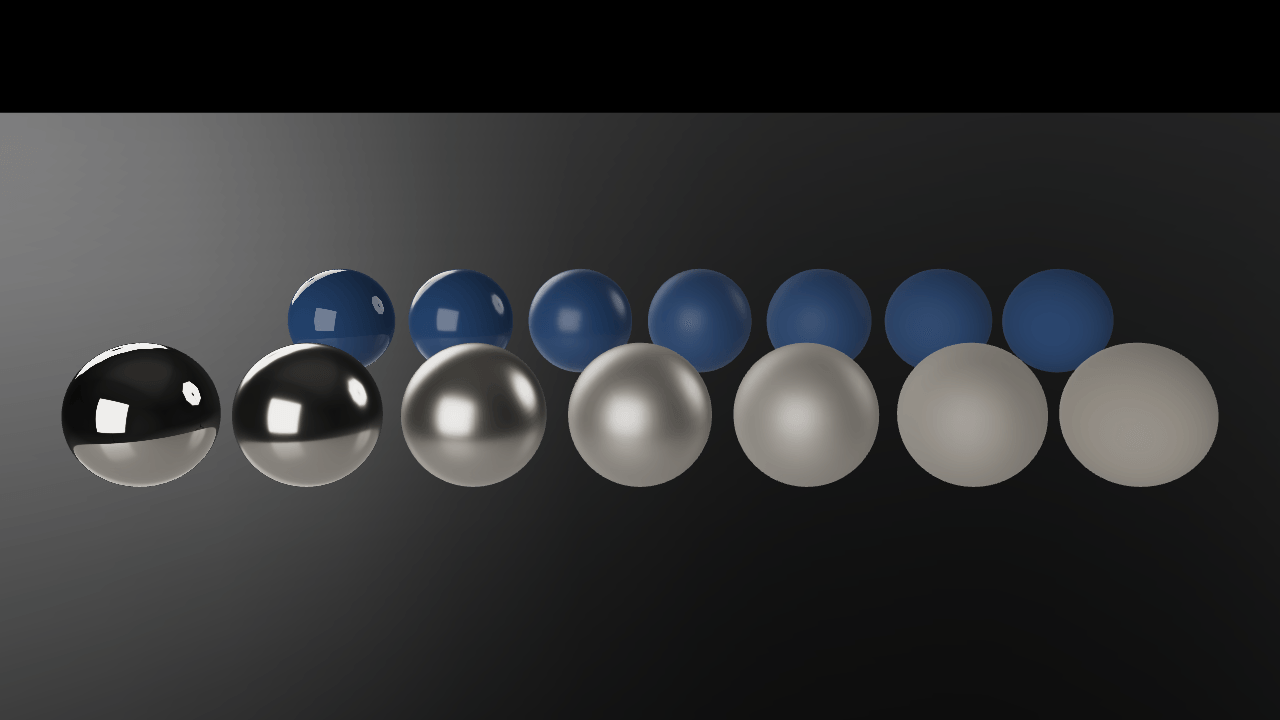
The lighting in this scene comes from environment images. Compare metal and painted spheres at different roughness levels. Switch environments or rotate them to see how the reflections change.
Off airLivePaused
Image-based lighting
Lighting · 3D
WebGPU: checking…See browser support
Try this
- Switch the environment from Studio to Bridge and compare the lighting.
- Rotate the environment and watch every reflection in the row turn with it.
- Compare the smoothest metal sphere with the roughest: the same probe, sharp at one end and a soft wash at the other.
Show source code
Source
import { Camera, Environment, ENVIRONMENT_ASSET_TYPE } from "ignifx";import { bootExample } from "../_kit/boot.ts";import { twoPlaces } from "../_kit/format.ts";import { attachOrbit } from "../_kit/orbit.ts";import { bind, readout, select, slider } from "../_kit/panel.ts";import { createStudioFloor } from "../_kit/stage.ts";import { createSphereGrid, degrees, GRID, SHOT, START_EXPOSURE, START_ROTATION } from "./scene.ts";import type { AssetHandle, EnvironmentAsset } from "ignifx";/** * Image-based lighting: a prefiltered environment is the **only** light in this scene. * * There is no `Light` component anywhere below. Every highlight, every gradient and every * reflection comes from one `.env` file — a cube map that was convolved offline into a mip chain, * one level per roughness, plus the spherical harmonics that carry the diffuse term. That is what * `Environment` installs, and it is why a metal sphere in ignifx looks like metal without anyone * placing a lamp. * * Two rows of spheres, because a probe shows itself differently in each. The front row is metal * (`metallic: 1`): it has no diffuse colour at all, so what you see *is* the environment — three * softbox panels in a dark room, sharp at roughness zero and diffused into a soft wash by the time * roughness reaches one. The back row is dielectric (`metallic: 0`): the same probe arrives as a * broad diffuse tint with a bright rim where the grazing reflection climbs. * * ## Switching probes, and the two things that do not follow * * An `.env` is installed **onto the scene** by the asset loader, because that is the only shape * Lite's `loadEnvironment` has. So all three are loaded before `app.start()` and their handles are * kept: assigning one to `Environment.environment` installs it, the diffuse term changes on that * frame, and the reflections follow on the next coalesced renderable rebuild — a frame or two, and * switching back costs nothing at all. * * Two things do not follow a switch. The **background** does not: Lite builds the skybox inside * `loadEnvironment` as a renderable it owns and offers no way to remove or re-aim one, so all three * `.environment.json` files here load with `skyboxEnabled: false`, the frame is cleared to a flat * near-black, and this example draws a floor that fades into it instead of a sky. And **`Environment.skybox`** is not a * live control: setting it asks for something the installed environment cannot deliver and logs * `IGX-0711`. `rotation`, the exposure and the contrast *are* live, and they are what a game * actually reaches for. `Environment.blur` is not among them here: it softens the visible skybox, * and with the skybox off there is nothing on screen for it to soften — the reflections' softness * is each material's roughness, which is what the rows are for. *//** * The vendored environments, by the label the panel shows them under. * * @remarks * Three probes that disagree about everything a probe can disagree about: a neutral softbox studio * with almost no colour in it, a warm canal at San Giuseppe bridge with a low sun, and the cool * overcast square in front of Ulm Minster. Switch between them and the whole frame changes * temperature, because the probe is the only light there is. */const ENVIRONMENTS: Readonly<Record<string, string>> = { Studio: "environments/studio.environment.json", Bridge: "environments/sanGiuseppeBridge.environment.json", Cathedral: "environments/ulmerMuenster.environment.json",};/** The label the example opens on, and the one every capture shows. */const START_ENVIRONMENT = "Studio";/** * The panel label for an installed environment's address. * * @param address - The address `Environment.installed` reports, or an empty string. * @returns The label {@link ENVIRONMENTS} shows it under, or `"none"`. */function probeName(address: string): string { return Object.keys(ENVIRONMENTS).find((label: string) => ENVIRONMENTS[label] === address) ?? "none";}bootExample({ title: "Image-based lighting", settings: { rendering: { clearColor: { r: 0.02, g: 0.025, b: 0.035, a: 1 } }, }, async setup({ app, panel }) { const focus = { x: 0, y: GRID.height, z: 0 }; const eye = app.world.createEntity("Main Camera"); eye.addComponent(Camera, { near: 0.05, far: 200, fov: SHOT.fov }); attachOrbit(app, eye, { yaw: SHOT.yaw, pitch: SHOT.pitch, distance: SHOT.distance, target: focus, minDistance: 2, maxDistance: 24, }); // Every probe is loaded and awaited **before** `app.start()`, for two reasons. A load that // finishes before the loop runs settles at once, while one awaited afterwards waits for a // frame's `PreUpdate`; and an environment loaded after start gets no background at all, which // would make the three disagree about more than their lighting. Each `.env` also pulls the BRDF // lookup table Lite requires, from the `rendering.brdfLut` default address, once. const probes = new Map<string, AssetHandle<EnvironmentAsset>>(); for (const [label, address] of Object.entries(ENVIRONMENTS)) { probes.set(label, app.assets.load<EnvironmentAsset>(address, { type: ENVIRONMENT_ASSET_TYPE })); } await Promise.all([...probes.values()].map((handle: AssetHandle<EnvironmentAsset>) => handle.promise)); const environment = probes.get(START_ENVIRONMENT) ?? null; // One `Environment` per world; a second logs `IGX-0705`. Its `imageProcessing` record is the // exposure and tone-mapping path the PBR shaders themselves compile, which is why changing the // curve recompiles a pipeline and changing the exposure is nearly free. const sky = app.world.createEntity("Environment").addComponent(Environment, { environment }); sky.rotation = START_ROTATION; sky.imageProcessing.exposure = START_EXPOSURE; sky.imageProcessing.toneMapping = "aces"; // Switching a probe is one assignment. The handles stay retained for the page's life, so the // GPU resources of the one you switched away from are still there when you switch back. const install = (label: string): void => { sky.environment = probes.get(label) ?? null; }; // A semi-gloss floor, so the probe shows in it too, fading into the clear colour before its edge. createStudioFloor(app, { fade: true, environmentIntensity: 0.6, roughness: 0.42 }); createSphereGrid(app); panel({ title: "Image-based lighting", groups: [ { label: "Environment", controls: [ select("Probe", Object.keys(ENVIRONMENTS), { value: START_ENVIRONMENT, change: install }), // Rotating the probe moves every reflection at once: the cheapest lighting control a // game can offer. slider("Rotation", { min: 0, max: 360, step: 1, format: degrees }, bind(sky, "rotation")), ], }, { label: "Grading", controls: [ slider( "Exposure", { min: 0.2, max: 3, step: 0.05, format: twoPlaces }, bind(sky.imageProcessing, "exposure"), ), slider( "Contrast", { min: 0.5, max: 2, step: 0.05, format: twoPlaces }, bind(sky.imageProcessing, "contrast"), ), ], }, { label: "Frame", collapsed: true, controls: [ // `installed` is the asset the *scene* is actually lit by, which is the honest readout: // it only changes once the install has happened, not when the select was clicked. readout("Installed", (): string => probeName(sky.installed?.address ?? "")), readout("Draw calls", (): string => String(app.renderer.drawCalls)), ], }, ], }); },});/** * The numbers `ibl` is composed with, and the sphere grid the probe is judged on. * * @remarks * Split out for the reason `pbr-model/shot.ts` is: what a reader wants from `main.ts` is the * `Environment` component and the three lines that switch a probe, not ten material declarations. * Every number here is a composition choice. */import { createMaterialAsset, MeshAsset, MeshRenderer, pbrMaterialDefinition } from "ignifx";import type { App, ColorLike } from "ignifx";/** * How the spheres are laid out: five per row — roughness 0, 0.25, 0.5, 0.75 and 1 — a metre apart, * half a diameter above the floor. Five, so both rows fit beside the parameter panel. */export const GRID = { count: 5, spacing: 1.06, diameter: 0.92, height: 0.52, rowGap: 1.35 } as const;/** The opening shot: high enough that the floor, not the horizon, is behind the rows. */export const SHOT = { fov: 38, yaw: 0, pitch: 20, distance: 8 } as const;/** How many segments a sphere is built from. High: a facet edge reads as a scratch in a mirror. */const SPHERE_SEGMENTS = 48;/** The exposure the example opens on. */export const START_EXPOSURE = 1.25;/** The probe's rotation when the page loads, in degrees. */export const START_ROTATION = 180;/** The metal row's base colour: a warm steel, so the row is not a mirror of nothing. */const METAL_COLOR = { r: 0.78, g: 0.76, b: 0.73, a: 1 };/** The dielectric row's base colour. */const PAINT_COLOR = { r: 0.24, g: 0.36, b: 0.52, a: 1 };/** * Writes a slider's value as an angle. * * @param value - Degrees. * @returns The text for the slider's value cell. */export function degrees(value: number): string { return `${String(value)}°`;}/** * Builds the two rows of spheres: metal in front, dielectric behind, roughness zero to one. * * @remarks * One mesh and ten materials: roughness and metalness are material factors, so the whole grid is * one sphere's worth of geometry drawn ten times. The rows are offset by half a step so the back one * is not hidden behind the front one, and nothing casts or receives a shadow because nothing here * is a light that could throw one. * * @param app - The app the entities and assets belong to. * * @example * ```ts * createSphereGrid(app); * ``` */export function createSphereGrid(app: App): void { const mesh = MeshAsset.sphere(app, { diameter: GRID.diameter, segments: SPHERE_SEGMENTS }); const row = (name: string, metallic: number, baseColor: ColorLike, z: number, shift: number): void => { for (let index = 0; index < GRID.count; index += 1) { const roughness = index / (GRID.count - 1); const material = createMaterialAsset( app, pbrMaterialDefinition({ name: `ibl/${name}-${String(index)}`, baseColor, metallic, roughness }), [], ); const x = (index - (GRID.count - 1) / 2) * GRID.spacing + shift; const entity = app.world.createEntity(`${name} ${String(index)}`, { position: { x, y: GRID.height, z } }); entity.addComponent(MeshRenderer, { mesh, materials: [material], castShadows: false, receiveShadows: false }); } }; // A quarter step each way, so the staggered pair is centred on the camera's target. row("Metal", 1, METAL_COLOR, -GRID.rowGap, -GRID.spacing / 4); row("Paint", 0, PAINT_COLOR, GRID.rowGap, GRID.spacing / 4);}