All examples
UI overlay
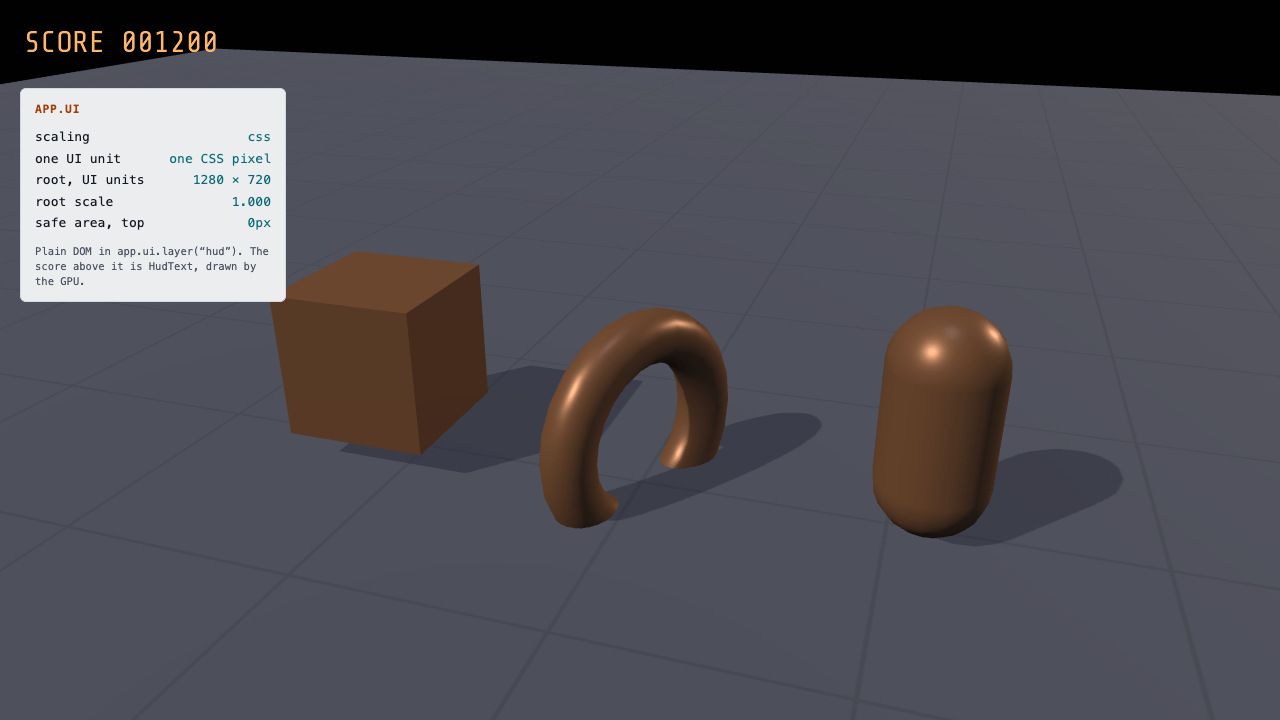
This interface combines HTML controls with text drawn on the game canvas. Change the layout scale, simulate a phone’s safe area or open a dialog that pauses the game. Notifications can still expire while gameplay is paused.
Off airLivePaused
UI overlay
UI · 3D
WebGPU: checking…See browser support
Try this
- Switch Scaling to fit: every HTML part of the overlay rescales together, and the GPU score does not.
- Turn on “Simulate a notch” and watch the HUD move inside the four safe-area insets.
- Open the dialog. It pauses the game, and the “Game paused” toast still expires: that script runs while paused.
Show source code
Source
import { Camera, Dialog, FONT_ASSET_TYPE, HudText, Script, Toast } from "ignifx";import { bootExample } from "../_kit/boot.ts";import { attachOrbit, frameInset } from "../_kit/orbit.ts";import { button, readout, select, toggle } from "../_kit/panel.ts";import { createGridGround, createLightRig } from "../_kit/stage.ts";import { createHud } from "./hud.ts";import { createProps, Spinner } from "./props.ts";import type { Hud } from "./hud.ts";import type { AssetHandle, FontAsset, ScriptCallbacks, UiScalingMode } from "ignifx";/** * Show DOM layers alongside GPU HUD text. DOM scaling follows `app.ui.pixelMapping`; * `HudText` positions stay in backing-store pixels and appear in renderer captures. * Advance toasts with unscaled time from a script that updates while paused so dialog messages expire. *//** The font `HudText` draws with. Vendored, OFL-1.1; see `assets/ATTRIBUTION.md`. */const FONT_ADDRESS = "fonts/share-tech-mono.ttf";/** The reference resolution `"fit"` letterboxes to: the size this HUD was drawn for. */const REFERENCE: readonly [number, number] = [960, 540];/** The scaling modes, in the order the select offers them. */const MODES: readonly UiScalingMode[] = ["css", "fit", "dpi"];/** What the score reads before anything has been scored. */const START_SCORE = 1200;/** * Advances the toasts and re-reads the HUD's figures, whether the game is running or not. * * @remarks * `updateWhenPaused` is the whole point of the class. `app.pause()` stops `update` for every * ordinary script, so the "Game paused" toast the dialog raises would sit on screen for as long as the * dialog stays open — and the HUD's figures would freeze with it. */class OverlayClock extends Script implements ScriptCallbacks { /** The namespaced registration id. */ static typeId = "ui-overlay/OverlayClock"; /** Keeps running while the game is paused, which is when a menu raises a toast. */ static updateWhenPaused = true; /** The toast stack to advance. Assigned in code; not something a scene file could carry. */ toasts: Toast | null = null; /** The HUD to refresh, or `null` on an app with no overlay. */ hud: Hud | null = null; /** How far the toast stack was last lifted, in UI units, so the style is written on a change only. */ #lift = -1; /** Advances every message's timer, rewrites the HUD's figures and keeps the toasts in view. */ update(): void { this.toasts?.advance(this.app.time.unscaledDeltaTime); this.hud?.update(this.app.ui.layout); this.#liftToasts(); } /** * Lifts the toast stack over whatever the kit's overlays cover along the bottom of the frame. * * @remarks * On a narrow frame the expanded parameter panel is a sheet along the bottom, which would bury the * stack's bottom-left corner as surely as the side panel buries the bottom-right one. The kit * reports what it covers in CSS pixels; the stack is inside the overlay root, which `"fit"` scales, * so the figure is divided back into UI units. */ #liftToasts(): void { const stack = this.toasts?.element ?? null; if (stack === null) { return; } const lift = Math.round(frameInset(this.app).bottom / Math.max(this.app.ui.layout.scale, 0.01)); if (lift !== this.#lift) { this.#lift = lift; stack.style.setProperty("bottom", `calc(16px + var(--ignifx-safe-bottom, 0px) + ${String(lift)}px)`); } }}bootExample({ title: "UI overlay", settings: { rendering: { clearColor: { r: 0.043, g: 0.059, b: 0.094, a: 1 }, msaaSamples: 4, features: { shadows: true }, }, // The overlay's own settings section. Both are live on `app.ui` as well, which is what the // Scaling select writes. ui: { scaling: "css", referenceResolution: [...REFERENCE] }, time: { fixedDeltaTime: 1 / 60 }, }, async setup({ app, panel }) { app.registerComponents([OverlayClock, Spinner]); const focus = { x: 0, y: 0.55, z: 0 }; const eye = app.world.createEntity("Main Camera"); eye.addComponent(Camera, { near: 0.1, far: 200, fov: 40 }); attachOrbit(app, eye, { yaw: 18, pitch: 24, distance: 3.9, target: focus, minDistance: 2, maxDistance: 12 }); createLightRig(app, { focus, shadows: true, shadowDarkness: 0.3 }); await createGridGround(app, { size: 24, fade: { subjectRadius: 1.5 } }); createProps(app); // Awaited before `app.start()`, so the glyphs are shaped for the first frame rather than a // frame or two later — which is what makes a capture of this example reproducible. const font: AssetHandle<FontAsset> = app.assets.load(FONT_ADDRESS, { type: FONT_ASSET_TYPE }); await font.promise; const score = app.world.createEntity("Score").addComponent(HudText, { font, text: `SCORE ${String(START_SCORE).padStart(6, "0")}`, anchor: "topLeft", position: { x: 24, y: 22 }, fontSize: 30, color: { r: 1, g: 0.72, b: 0.42, a: 1 }, }); const hud = createHud(app.ui); const toasts = new Toast(app.ui, { duration: 3, maxVisible: 3 }); // The stack's own corner is the bottom right, which is where the expanded parameter panel sits, // so "Game paused" would land half under it. Bottom left instead, on the HUD card's margin. // `element` is exposed for exactly this; `OverlayClock` keeps it clear of a bottom sheet. const stack = toasts.element; if (stack !== null) { stack.style.setProperty("right", "auto"); stack.style.setProperty("left", "calc(20px + var(--ignifx-safe-left, 0px))"); stack.style.setProperty("align-items", "flex-start"); } // Re-used rather than rebuilt per question: a `Dialog` is always above the other roots of its // layer, and one per question leaves a stack of modals in the document. const dialog = new Dialog(app.ui, { title: "Leave the run?", message: "Progress since the last checkpoint is lost. A Dialog is plain DOM with no styling opinions.", buttons: [ { id: "stay", label: "Keep playing" }, { id: "leave", label: "Leave" }, ], dismissOnBackdrop: true, visible: false, }); dialog.onChosen.connect((id: string): void => { dialog.hide(); toasts.show(id === "leave" ? "Run abandoned" : "Back in"); }); // Every way out resumes: a button hides the dialog above, and a click on the backdrop hides it // without choosing anything. Both end in `hide`, and `hide` is what emits this. dialog.onDismissed.connect((): void => { app.resume(); }); const clock = app.world.createEntity("Overlay").addComponent(OverlayClock); clock.toasts = toasts; clock.hud = hud; panel({ title: "UI overlay", groups: [ { label: "Overlay", controls: [ // One assignment is the whole switch: the host re-lays out the root, republishes the // scale and emits `onLayoutChanged`. select("Scaling", [...MODES], { value: app.ui.scaling, change: (mode: string): void => { app.ui.scaling = MODES.find((name: UiScalingMode): boolean => name === mode) ?? "css"; }, }), toggle("Simulate a notch", { value: false, change: (on: boolean): void => { hud?.setNotch(on); }, }), // One layer, not the whole overlay: `app.ui.visible = false` would take the parameter // panel with it — it is mounted in a layer of its own — and leave nothing to turn it // back on with. Hiding a layer is what a game does for a cutscene anyway. toggle("HUD layer", { value: true, change: (on: boolean): void => { app.ui.layer("hud").visible = on; }, }), ], }, { label: "Widgets", controls: [ button("Open the dialog", (): void => { // A modal question is what a game pauses for, and the widget does not do it for you. // The toast still counts down behind it, on the overlay's own clock. app.pause(); dialog.show(); toasts.show("Game paused"); }), button("Show a toast", (): void => { toasts.show("Checkpoint reached"); }), button("Score +50", (): void => { // Changing `text` re-shapes the block and nothing else; changing `fontSize` would // rebuild it, which is why a per-frame counter is cheap and a per-frame size is not. const next = Number(score.text.slice(6)) + 50; score.text = `SCORE ${String(next).padStart(6, "0")}`; }), ], }, { label: "Focus", collapsed: true, controls: [ readout("Toasts on screen", (): string => String(toasts.messages.length)), readout("Pointer over UI", (): string => (app.ui.pointerOverUi ? "yes" : "no")), readout("Keyboard captured", (): string => (app.ui.keyboardHasFocus ? "yes" : "no")), ], }, ], }); },});/** * The DOM half of the overlay: the HUD panel `app.ui.layer("hud")` carries, and the safe-area * override the "Simulate a notch" toggle writes. * * @remarks * **This is not the kit reaching into the document.** `04-examples-platform.md` §4 says the kit is * the only place an example touches the DOM, and `@ignifx/ui` is the one exception the rule was * written around: game UI in ignifx *is* HTML, and `app.ui.layer(name).element` is the engine * handing a game the `<div>` it is meant to build into. Everything below goes through that element. * * Two things are worth reading before copying it. * * `ignifx-ui-interactive` is what turns pointer events back on. The overlay root and its layers are * `pointer-events: none` so a click reaches the canvas; a HUD that carries a button says so with that * class, from `UI_CLASS_NAMES` rather than a string literal. This one only reads, so it leaves it off. * * The four safe-area insets are published by the host as CSS custom properties on the overlay root * — `env(safe-area-inset-*)` with a `0px` fallback — so game CSS reads a notch with * `var(--ignifx-safe-top)` and never measures anything. A desktop browser reports zero for all * four, which is why this example can set them on its own subtree: the same declarations, the same * cascade, and a laptop can see what a phone would do. */import { UI_CSS_VARIABLES } from "ignifx";import type { UiHost, UiLayout } from "ignifx";/** The inset a simulated notch reports on the top and bottom edges. */const NOTCH_BLOCK = "34px";/** The inset a simulated notch reports on the left and right edges. */const NOTCH_INLINE = "18px";/** The HUD, mounted, with the two things `main.ts` drives from the panel. */export interface Hud { /** The outermost element, so a caller can read it in a test. */ readonly element: HTMLElement; /** * Writes the live figures. Called every frame, and a no-op on a frame where nothing changed. * * @param layout - What `app.ui.layout` currently says. */ readonly update: (layout: UiLayout) => void; /** * Overrides the four safe-area insets on this subtree, or gives them back to the host. * * @param on - `true` to report a notch, `false` to inherit the device's own insets. */ readonly setNotch: (on: boolean) => void; /** Removes the HUD. */ readonly dispose: () => void;}/** * Builds one labelled figure. * * @param label - The label text. * @returns The row, and the cell {@link Hud.update} rewrites. */function buildRow(label: string): { row: HTMLElement; value: HTMLElement } { const row = document.createElement("div"); row.className = "hud-row"; const name = document.createElement("span"); name.textContent = label; const value = document.createElement("span"); value.className = "hud-value"; row.append(name, value); return { row, value };}/** * Mounts the HUD into the overlay's `hud` layer. * * @remarks * Returns `null` on an app with no DOM overlay — a headless app — so the caller needs no branch. * The layer is created for you: `layer(name)` is get-or-create. * * @param ui - The overlay host, normally `app.ui`. * @returns The HUD, or `null` when there is no overlay to mount into. * * @example * ```ts * const hud = createHud(app.ui); * hud?.update(app.ui.layout); * ``` */export function createHud(ui: UiHost): Hud | null { const host = ui.layer("hud").element; if (host === null) { return null; } const element = document.createElement("section"); // Not interactive: this HUD only reads, so a drag that starts over it still // reaches the game and orbits the camera. element.className = "hud"; element.setAttribute("aria-label", "Heads-up display"); const title = document.createElement("h2"); title.className = "hud-title"; title.textContent = "app.ui"; element.append(title); const mode = buildRow("scaling"); const unit = buildRow("one UI unit"); const size = buildRow("root, UI units"); const scale = buildRow("root scale"); const inset = buildRow("safe area, top"); element.append(mode.row, unit.row, size.row, scale.row, inset.row); const note = document.createElement("p"); note.className = "hud-note"; note.textContent = "Plain DOM in app.ui.layer(“hud”). The score above it is HudText, drawn by the GPU."; element.append(note); host.append(element); const words: Readonly<Record<UiLayout["mode"], string>> = { css: "one CSS pixel", fit: "one reference pixel", dpi: "one backing-store pixel", }; /** * Reads the resolved top inset back out of the cascade. * * @remarks * Called when the notch toggle moves and once at mount, never per frame: `getComputedStyle` * forces a style recalculation, and a HUD that did it every frame would be the most expensive * thing on the page. It is read back rather than remembered so the figure is what the cascade * resolved — `env(safe-area-inset-top, 0px)` on a desktop, the override when one is set. * * @returns The inset as CSS wrote it, e.g. `"0px"`. */ const readInset = (): string => getComputedStyle(element).getPropertyValue(UI_CSS_VARIABLES.safeTop).trim() || "0px"; // The last layout written, so a per-frame refresh with nothing to say touches no DOM at all. const written: { mode: UiLayout["mode"] | null; width: number; height: number; scale: number } = { mode: null, width: 0, height: 0, scale: 0, }; inset.value.textContent = readInset(); return { element, update(layout: UiLayout): void { if ( layout.mode === written.mode && layout.width === written.width && layout.height === written.height && layout.scale === written.scale ) { return; } written.mode = layout.mode; written.width = layout.width; written.height = layout.height; written.scale = layout.scale; mode.value.textContent = layout.mode; unit.value.textContent = words[layout.mode]; size.value.textContent = `${String(Math.round(layout.width))} × ${String(Math.round(layout.height))}`; scale.value.textContent = layout.scale.toFixed(3); }, setNotch(on: boolean): void { const style = element.style; for (const [name, value] of [ [UI_CSS_VARIABLES.safeTop, NOTCH_BLOCK], [UI_CSS_VARIABLES.safeBottom, NOTCH_BLOCK], [UI_CSS_VARIABLES.safeLeft, NOTCH_INLINE], [UI_CSS_VARIABLES.safeRight, NOTCH_INLINE], ] as const) { if (on) { style.setProperty(name, value); } else { style.removeProperty(name); } } inset.value.textContent = readInset(); }, dispose(): void { element.remove(); }, };}/** * The scene behind the overlay: three shapes turning on the grid, so the overlay has something to * sit in front of and the point of an overlay is visible. * * @remarks * A separate file for the reason `pbr-model/shot.ts` is: none of it is a lesson about UI. */import { createMaterialAsset, f32, MeshAsset, MeshRenderer, pbrMaterialDefinition, Script } from "ignifx";import type { App, ScriptCallbacks } from "ignifx";/** * Spins its entity about the world's Y axis, in degrees per second. * * @remarks * The world's axis, not the entity's own: the torus stands on its edge, so its own Y axis is its * axis of symmetry, and a turn about that changes nothing on screen. */export class Spinner extends Script.define({ speed: f32(30, { tooltip: "Degrees per second about the world's Y axis." }) }) implements ScriptCallbacks{ /** The namespaced registration id. */ static typeId = "ui-overlay/Spinner"; /** Reused so the per-frame path allocates nothing (coding standards §7). */ readonly #step = { x: 0, y: 0, z: 0 }; /** * Advances the rotation. * * @param dt - Seconds since the previous frame, scaled — so `?static=1` holds the pose and a * capture of this example is the same frame every time. */ update(dt: number): void { this.#step.y = this.speed * dt; this.transform.rotate(this.#step, "world"); }}/** * How high each prop's centre sits, in metres, so that it stands on the floor: half the box's * 0.62 m, the torus's ring radius plus half its tube (it stands on its edge, 0.4 + 0.11 m) with a * centimetre to spare, and half the capsule's 0.9 m. */const STANDING_HEIGHTS: readonly number[] = [0.31, 0.52, 0.45];/** * Builds the three props. * * @remarks * `app.registerComponents([Spinner])` is the caller's job, because a game registers every component * it uses in one place. * * @param app - The app the entities and the assets belong to. * * @example * ```ts * app.registerComponents([Spinner]); * createProps(app); * ``` */export function createProps(app: App): void { const material = createMaterialAsset( app, pbrMaterialDefinition({ name: "ui-overlay/prop", baseColor: { r: 0.55, g: 0.36, b: 0.22, a: 1 }, metallic: 0.35, roughness: 0.4, }), [], ); const meshes = [ MeshAsset.box(app, { size: 0.62 }), MeshAsset.torus(app, { diameter: 0.8, thickness: 0.22, tessellation: 24 }), MeshAsset.capsule(app, { height: 0.9, radius: 0.22, tessellation: 16 }), ]; for (const [index, mesh] of meshes.entries()) { const prop = app.world.createEntity(`Prop ${String(index + 1)}`); prop.transform.localPosition.set((index - 1) * 1.15, STANDING_HEIGHTS[index] ?? 0.5, 0); prop.transform.localEulerAngles = { x: 0, y: 25 * index, z: index === 1 ? 90 : 0 }; prop.addComponent(MeshRenderer, { mesh, materials: [material], castShadows: true }); prop.addComponent(Spinner, { speed: 18 + index * 14 }); }}/*
* The HUD panel's own styling, in the site's tokens (`02-design-system.md` §2.3), transcribed for
* the same reason `_kit/kit.css` transcribes them: a frame is a separate document and the site's
* stylesheet is emitted with a content hash this build cannot know.
*
* One deviation from `08-execution.md` §4.2, which asks that every `<slug>/index.html` be identical
* in shape: this example links a second stylesheet. It is the one example whose subject is DOM UI,
* and the alternative — thirty `element.style.setProperty` calls in `hud.ts` — would bury the
* lesson under styling. The frames' CSP allows `style-src 'self'`, so a linked stylesheet needs no
* relaxation.
*
* The four `--ignifx-safe-*` custom properties are published by `@ignifx/ui` on the overlay root
* from `env(safe-area-inset-*)`. Reading them here, rather than reading `env()` directly, is what
* lets the panel's "Simulate a notch" toggle show a laptop what a phone would do.
*/
.hud {
position: absolute;
top: calc(88px + var(--ignifx-safe-top, 0px));
left: calc(20px + var(--ignifx-safe-left, 0px));
box-sizing: border-box;
width: 19rem;
max-width: calc(100% - 40px);
padding: 12px 14px;
border: 1px solid #262d38;
border-radius: 6px;
background: rgb(20 24 31 / 88%);
color: #e7eaf0;
font:
13px/1.5 ui-monospace,
sfmono-regular,
"SF Mono",
menlo,
consolas,
monospace;
}
@media (prefers-color-scheme: light) {
.hud {
border-color: #d2d8e2;
background: rgb(250 251 252 / 92%);
color: #14181f;
}
}
.hud-title {
margin: 0 0 8px;
color: #ff9e4a;
font-size: 0.8125rem;
font-weight: 600;
letter-spacing: 0.06em;
text-transform: uppercase;
}
@media (prefers-color-scheme: light) {
.hud-title {
color: #a63d07;
}
}
.hud-row {
display: flex;
align-items: baseline;
justify-content: space-between;
gap: 12px;
padding: 1px 0;
}
.hud-value {
color: #5ad1c8;
font-variant-numeric: tabular-nums;
text-align: right;
}
@media (prefers-color-scheme: light) {
.hud-value {
color: #0b6a78;
}
}
.hud-note {
margin: 10px 0 0;
color: #98a2b3;
font-size: 0.75rem;
line-height: 1.45;
}
@media (prefers-color-scheme: light) {
.hud-note {
color: #4b5464;
}
}