All examples
Third-person
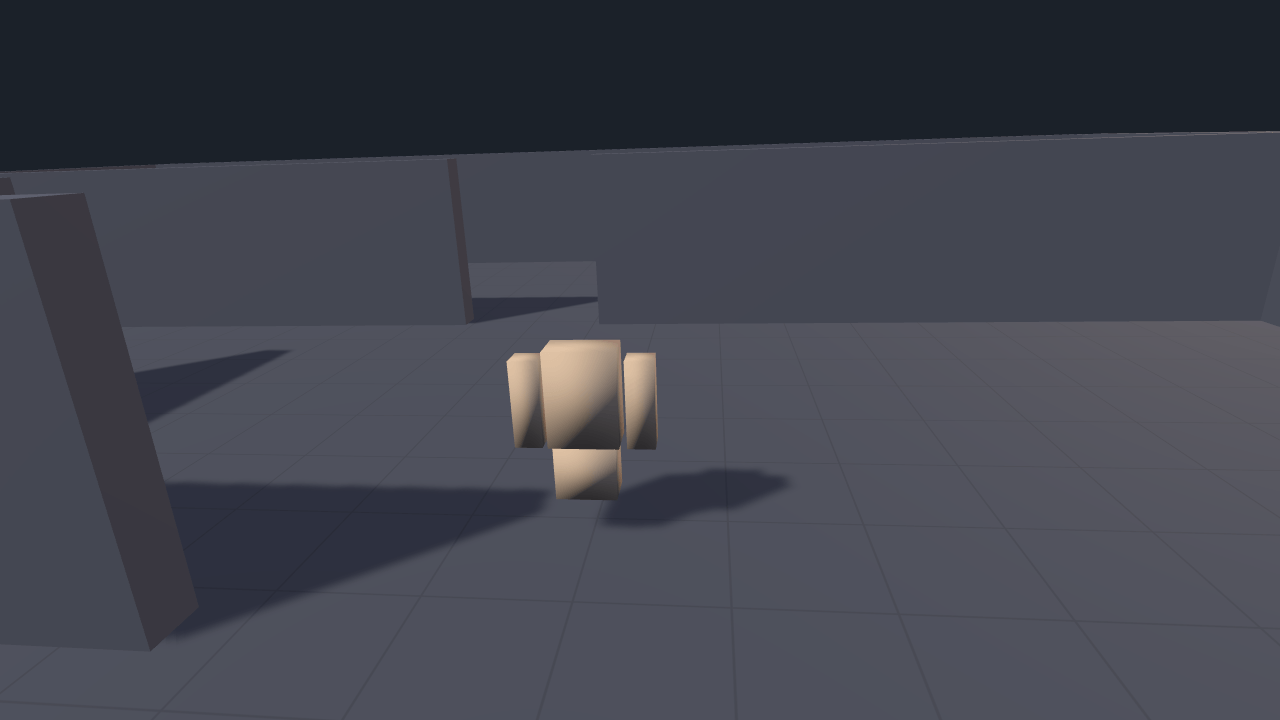
Explore a small yard with third-person controls. The orbit camera moves closer when a wall gets in the way and eases back when the view clears. Try walking and sprinting with keyboard, gamepad or touch controls.
Off airLivePaused
Third-person
Gameplay · 3D
WebGPU: checking…See browser support
Try this
- Back into the left corner. Watch the camera move closer and the Boom now value decrease.
- Turn Wall collision off, back into the same corner, and see what the camera does without it.
- Hold Shift and run in a circle: the character turns to face the way it is going, and the camera keeps up.
Show source code
Source
import { Camera, CharacterController, MODEL_ASSET_TYPE, Model, physics, Script, ThirdPersonCamera, ThirdPersonController, threeD,} from "ignifx";import { bootExample } from "../_kit/boot.ts";import { metres } from "../_kit/format.ts";import { bind, readout, slider, toggle } from "../_kit/panel.ts";import { createGridGround, createLightRig } from "../_kit/stage.ts";import { attachTouchControls, DragToLook, hasTouch, PLAYER_ACTIONS } from "./controls.ts";import { buildLevel, FADE, GROUND_SIZE, SKY } from "./level.ts";import type { ModelAsset, ScriptCallbacks } from "ignifx";/** * A third-person character and a camera that will not clip through a wall: the two components * every 3D ignifx game starts from, and little else. * * `ThirdPersonController` moves a `CharacterController` in `fixedUpdate` — camera-relative, with * its own gravity, coyote time, jump buffering and step-up — so 30 fps and 240 fps produce the * same trajectory. `ThirdPersonCamera` orbits in `lateUpdate`, after animation, so it frames the * character where this frame's pose actually left it; and it sphere-casts along its boom, pulling * in the moment something on its `collisionLayers` gets between the camera and the character. * * `level.ts` is the yard they stand in and `controls.ts` is where the input comes from. Neither is * the lesson, and both sit next to this file on the example's page. * * Two numbers below are worth knowing. `collisionLayers` is `["Level"]`, not empty: an **empty * list sweeps every layer**, so the character's own capsule shortens the boom the moment it drifts * behind the camera and the shot jams at its nose. And `damping` is a time constant in seconds, not * a fraction — `0` snaps, `0.07` keeps up, and anything past about `0.2` is a camera on a rope. *//** The character capsule's height, in metres. The rig's boxes reach 1.45 m above its origin. */const CAPSULE_HEIGHT = 1.6;/** How far above its origin the rig's lowest box starts, in metres. */const RIG_SOLE = 0.35;/** The character capsule's radius, in metres: wider than the camera's sweep sphere, deliberately. */const CAPSULE_RADIUS = 0.32;/** Where the character stands: south of the wall across the yard, with the doorway ahead of it. */const SPAWN = { x: 2, y: CAPSULE_HEIGHT / 2, z: -1.2 } as const;/** The camera's opening yaw, in degrees. Zero looks down `+Z`; this looks a little left of it. */const START_YAW = -6;/** The camera's opening pitch, in degrees: above the character, looking down at it. */const START_PITCH = 18;/** * Where the boom pivots, relative to the character: over its right shoulder, at head height. * * @remarks * In the **character's own space**, so it turns with the character — which is what keeps it clear * of walls, since the rig sweeps its collision sphere from this point and a sweep starting inside * geometry reports no distance at all. Turning `rotateToMovement` off — a strafing shooter — means * keeping `|offset.x| + collisionRadius` inside the capsule's radius instead. */const SHOULDER = { x: 0.4, y: 0.55, z: 0 } as const;/** The address of the repository's own rigged "box-man". */const RIG_ADDRESS = "models/rig.glb";/** * Below how long a boom the character's model is hidden, and above how long it shows again, in * metres. Two numbers, so a boom resting on the threshold does not flicker the model on and off. */const CLOSE_UP = { hide: 0.9, show: 1 } as const;/** * Hides the character's model while a wall has pulled the camera in close enough to be inside it. * * @remarks * Backed into a corner, the boom's collision shortens it towards nothing, and the camera ends up in * the box-man's arm, looking at the inside of his torso. Third-person games hide (or fade) the * character at that range; this does the hiding, from the boom's live length after collision. */class HideWhenClose extends Script implements ScriptCallbacks { /** The namespaced registration id. */ static typeId = "third-person/HideWhenClose"; /** The boom to read. Assigned when the scene is built. */ boom: ThirdPersonCamera | null = null; /** The model to hide. Assigned when the scene is built. */ model: Model | null = null; /** Shows or hides the model from this frame's boom length. */ lateUpdate(): void { const boom = this.boom; const model = this.model; if (boom === null || model === null) { return; } const distance = boom.currentDistance; if (model.enabled && distance < CLOSE_UP.hide) { model.enabled = false; } else if (!model.enabled && distance > CLOSE_UP.show) { model.enabled = true; } }}bootExample({ title: "Third-person", // `threeD()` requires `physics()` and `input()` before it; the kit registers `input()` first. extensions: [physics(), threeD()], settings: { rendering: { clearColor: SKY, msaaSamples: 4, features: { shadows: true } }, time: { fixedDeltaTime: 1 / 60 }, // `Level` is what the camera's boom sweeps against. `level.ts` tags every wall and the floor. layers: { layers: ["Default", "Level"] }, }, async setup({ app, panel, flags, afterStart }) { app.registerComponents([DragToLook, HideWhenClose]); app.input.loadActions(PLAYER_ACTIONS); // Awaited before `app.start()`: a load that finishes before the loop runs settles at once, // while one awaited afterwards waits for a frame's `PreUpdate`. const rig = app.assets.load<ModelAsset>(RIG_ADDRESS, { type: MODEL_ASSET_TYPE }); // No orbit camera here, so the fade takes its distances; the ground grows to reach past them. await createGridGround(app, { size: GROUND_SIZE, fade: FADE }); await rig.promise; createLightRig(app, { focus: { x: 0, y: 1, z: 0 }, keyPosition: { x: -6, y: 9, z: -5 } }); buildLevel(app, app.world.layers.requireIndex("Level")); const character = app.world.createEntity("Character", { position: SPAWN }); character.addComponent(CharacterController, { height: CAPSULE_HEIGHT, radius: CAPSULE_RADIUS, slopeLimit: 50 }); const controller = character.addComponent(ThirdPersonController, { walkSpeed: 3.4, sprintSpeed: 6.4, jumpHeight: 1.1, stepHeight: 0.3, rotateToMovement: true, }); character.addComponent(DragToLook); // The model hangs off a **child**: a `CharacterController`'s capsule is centred on its own // entity, so sharing one transform would bury the character to the waist. The rig's boxes start // {@link RIG_SOLE} above its origin, so the origin hangs that far below the capsule's foot. const body = app.world.createEntity("Character Body", { parent: character }); body.transform.localPosition.set(0, -CAPSULE_HEIGHT / 2 - RIG_SOLE, 0); const model = body.addComponent(Model, { model: rig.retain(), castShadows: true, receiveShadows: true }); const eye = app.world.createEntity("Main Camera"); eye.addComponent(Camera, { near: 0.1, far: 200, fov: 56 }); // `ThirdPersonCamera.awake` reads the entity's current facing as its opening orbit, so the // shot is authored on the transform rather than in a field. eye.transform.localEulerAngles = { x: START_PITCH, y: START_YAW, z: 0 }; const boom = eye.addComponent(ThirdPersonCamera, { target: character, distance: 4.6, shoulderOffset: SHOULDER, damping: 0.07, minPitch: -15, maxPitch: 55, sensitivity: 0.2, collisionEnabled: true, // Smaller than the capsule's radius, so the sweep starts in the clear space the character // controller keeps around itself rather than in the floor it is standing on. collisionRadius: 0.22, collisionLayers: ["Level"], }); const closeUp = eye.addComponent(HideWhenClose); closeUp.boom = boom; closeUp.model = model; // `snap()` puts the rig at its ideal pose with no damping — what a teleport, a cut and a frozen // capture all need. Under `?static=1` the frame delta is zero, so nothing would ever damp. afterStart((): void => { boom.snap(); }); if (!flags.isStatic && hasTouch()) { const widgets = attachTouchControls(app); window.addEventListener("pagehide", (event: PageTransitionEvent): void => { if (!event.persisted) { for (const widget of widgets) { widget.dispose(); } } }); } panel({ title: "Third-person", groups: [ { label: "Camera", controls: [ slider("Boom", { min: 1.5, max: 8, step: 0.1, format: metres }, bind(boom, "distance")), // The live length after collision — the whole point of the component. readout("Boom now", (): string => metres(boom.currentDistance)), toggle("Wall collision", bind(boom, "collisionEnabled")), slider("Sensitivity", { min: 0.05, max: 0.6, step: 0.01 }, bind(boom, "sensitivity")), ], }, { label: "Character", controls: [ slider("Walk", { min: 1, max: 7, step: 0.1, format: metresPerSecond }, bind(controller, "walkSpeed")), slider("Sprint", { min: 2, max: 12, step: 0.1, format: metresPerSecond }, bind(controller, "sprintSpeed")), slider("Jump", { min: 0.2, max: 3, step: 0.05, format: metres }, bind(controller, "jumpHeight")), readout("Speed", (): string => metresPerSecond(controller.speed)), readout("Grounded", (): string => (controller.isGrounded ? "yes" : "no")), ], }, { label: "Frame", collapsed: true, controls: [readout("Draw calls", (): string => String(app.renderer.drawCalls))], }, ], }); },});/** * Writes a speed. * * @param value - Metres per second. * @returns The text for a slider's or a readout's value cell. */function metresPerSecond(value: number): string { return `${value.toFixed(1)} m/s`;}import { BoxCollider, createMaterialAsset, MeshAsset, MeshRenderer, pbrMaterialDefinition } from "ignifx";import type { App, AssetHandle } from "ignifx";/** * The little level the character walks in: a walled yard, a doorway through the wall across it, and * one interior corner. * * It is here rather than in `main.ts` because none of it is the lesson. Every wall is the same * four lines — a box mesh, the shared material, a `MeshRenderer` and a `BoxCollider` — and the only * thing that matters about them is that they are on the **`Level` layer**, because that is the * layer the camera's boom sweeps against in `main.ts`. * * ## Why the yard is closed and the doorway is interior * * The floor is finite, so the perimeter is solid: a doorway in the *outer* wall is a hole in the * world, and a character that walks through it falls for ever. The doorway is therefore in a wall * across the middle of the yard, which is also where a doorway is interesting — it is the thing the * camera's boom has to pass through behind you. * * ## Why a collider with no `Rigidbody` * * A collider on its own is placed once as an implicit **static** body, which is exactly right for * scenery that never moves. Moving one afterwards reports `IGX-0901`; anything that has to move * needs a kinematic `Rigidbody` as well. * * ## Why a mesh per wall rather than one scaled box * * The physics runtime multiplies a collider's size by its entity's scale, so a shared unit box * under a scaled transform needs a unit collider and reads as a puzzle. Eight `MeshAsset.box` * calls are cheaper to understand and cost one template each. *//** How tall every wall is, in metres: over the character's head, so the camera cannot see past it. */const WALL_HEIGHT = 2.6;/** How thick every wall is, in metres. */const WALL_THICKNESS = 0.4;/** The dusk above the walls, in sRGB; the floor fades into it rather than ending at an edge. */export const SKY = { r: 0.106, g: 0.129, b: 0.165, a: 1 } as const;/** The yard's half-width, in metres: the perimeter stands at ±{@link YARD_HALF} on both axes. */export const YARD_HALF = 11;/** * Where the fade into the sky begins and ends, in metres from the camera: past the far side of the * yard from anywhere in it, so the walls stay clear and the ground beyond them dissolves. */export const FADE = { start: 22, end: 50 } as const;/** * The ground plane's edge length, in metres: from a camera at the yard's edge with the boom at its * longest, the plane still reaches past the end of the fade, so its edge is never seen. */export const GROUND_SIZE = 2 * (FADE.end + YARD_HALF + 8);/** Half the doorway's width, in metres. Narrow enough to have to aim at. */const DOOR_HALF = 1.1;/** How thick the floor slab is, in metres. Sunk, so its top face is exactly `y = 0`. */const FLOOR_DEPTH = 1;/** Where the wall across the yard stands, in metres along z. */const DIVIDER_Z = 5;/** How far the floor slab reaches past the perimeter, in metres. See {@link buildLevel}. */const FLOOR_APRON = 2;/** One wall: where its centre is and how big it is, both in metres. */interface Wall { /** The centre's x. */ readonly x: number; /** The centre's z. */ readonly z: number; /** The size along x. */ readonly width: number; /** The size along z. */ readonly depth: number;}/** * Every wall in the yard, in metres. * * @remarks * Four make the perimeter, two more are the wall across the middle with the doorway between them, * and the last two meet at an interior corner behind the character's spawn — which is what there * is to back the camera into. */const WALLS: readonly Wall[] = Object.freeze([ // The perimeter: four solid sides, so the walkable square has no way out of it. { x: 0, z: -YARD_HALF, width: YARD_HALF * 2, depth: WALL_THICKNESS }, { x: 0, z: YARD_HALF, width: YARD_HALF * 2, depth: WALL_THICKNESS }, // The two returns stop short of the other pair rather than crossing them: two static boxes that // overlap give the corner between them two contact normals, and a capsule wedged into that corner // is depenetrated along their sum — which points out of the level. { x: -YARD_HALF, z: 0, width: WALL_THICKNESS, depth: YARD_HALF * 2 - WALL_THICKNESS * 2 }, { x: YARD_HALF, z: 0, width: WALL_THICKNESS, depth: YARD_HALF * 2 - WALL_THICKNESS * 2 }, // The wall across the yard, split by the doorway. { x: -(YARD_HALF + DOOR_HALF) / 2, z: DIVIDER_Z, width: YARD_HALF - DOOR_HALF, depth: WALL_THICKNESS }, { x: (YARD_HALF + DOOR_HALF) / 2, z: DIVIDER_Z, width: YARD_HALF - DOOR_HALF, depth: WALL_THICKNESS }, // The interior corner: two stubs that meet, and the thing the boom shortens against. { x: -3, z: -2.4, width: 5.2, depth: WALL_THICKNESS }, { x: -5.4, z: -0.4, width: WALL_THICKNESS, depth: 4.4 },]);/** * Builds the walls, all of them on the `Level` layer. * * @remarks * The mesh and material handles stay held for the page's lifetime, which is what level geometry * wants: nothing here is ever swapped, so there is no release to call and no bookkeeping to read. * * @param app - The running app; needs `physics()` for the colliders. * @param layer - The layer index the floor and every wall is tagged with. * * @example * ```ts * buildLevel(app, app.world.layers.requireIndex("Level")); * ``` */export function buildLevel(app: App, layer: number): void { // The floor the kit drew is a `MeshRenderer` and nothing else, so the level owns what the // character stands on. A thick slab rather than a plane: Havok has no plane shape in this build, // and depth is what stops a fast faller tunnelling through. It reaches FLOOR_APRON metres *past* // the perimeter, because a capsule pressed into a wall is depenetrated by a few centimetres and a // floor that stopped at the wall would let it step off the edge of the world. const reach = YARD_HALF + FLOOR_APRON; const floor = app.world.createEntity("Floor Collider", { position: { x: 0, y: -FLOOR_DEPTH / 2, z: 0 } }); floor.layer = layer; floor.addComponent(BoxCollider, { size: { x: reach * 2, y: FLOOR_DEPTH, z: reach * 2 } }); const material = createMaterialAsset( app, pbrMaterialDefinition({ name: "third-person/wall", baseColor: { r: 0.36, g: 0.38, b: 0.44, a: 1 }, metallic: 0, roughness: 0.85, }), [], ); for (let index = 0; index < WALLS.length; index += 1) { const wall = WALLS[index]; if (wall === undefined) { continue; } const mesh: AssetHandle<MeshAsset> = MeshAsset.box(app, { width: wall.width, height: WALL_HEIGHT, depth: wall.depth, }); const entity = app.world.createEntity(`Wall ${String(index)}`, { position: { x: wall.x, y: WALL_HEIGHT / 2, z: wall.z }, }); entity.layer = layer; entity.addComponent(MeshRenderer, { mesh, materials: [material.retain()], castShadows: true, receiveShadows: true, }); entity.addComponent(BoxCollider, { size: { x: wall.width, y: WALL_HEIGHT, z: wall.depth } }); }}import { defineInputActions, Script, VirtualButton, VirtualJoystick } from "ignifx";import type { App, InputAction, ScriptCallbacks } from "ignifx";/** * Where the character's input comes from: one action map, one gate, and the on-screen controls. * * `ThirdPersonController` reads `Move`, `Jump` and `Sprint`; `ThirdPersonCamera` reads `Look`. All * four names are **fields** on those components — `controller.moveAction = "Walk"` then * `rebind()` — so a project renames them without subclassing, and an action no loaded map declares * is reported once as `IGX-1212` and then treated as absent. * * ## Why the mouse look is drag-gated * * A full-screen game binds `Look` to the mouse and locks the pointer. A frame on a web page cannot: * the visitor has to be able to reach the parameter panel, and a camera that spun every time the * mouse crossed the canvas would read as broken. So `Look` is bound to `<Pointer>/delta` and * {@link DragToLook} switches the whole action off unless the pointer is down or a stick is * pushed. `InputAction.enabled` is the switch — one assignment, and the action resolves to zero * with every binding on it left in place. * * A gamepad and a thumb pad need no gate, so {@link PLAYER_ACTIONS} carries a second action, * `LookStick`, whose only job is to say whether one of them is being pushed. It cannot be the * `Look` action itself: a disabled action reads as zero, so it could never re-arm itself. *//** Below this magnitude a stick counts as centred, and the mouse look stays switched off. */const STICK_EPSILON = 0.001;/** * How far to the right of the safe area the two buttons sit, in CSS units. * * @remarks * Clear of the right thumb pad, which is 8 rem wide at its default radius. */const BUTTON_RIGHT = "9.5rem";/** * The action map the character and its camera read. * * @remarks * The two stick bindings carry a dead zone and nothing else. `ThirdPersonCamera` reads a stick as a * **rate** — `stickLookSpeed` degrees per second at full deflection — and a pointer delta as a * displacement in CSS pixels, and it normalises the pitch axis per device so that "up is up" on * both. A `scale(…)` here would therefore double-count the rate, and a sign flip would invert the * stick against the mouse. The on-screen pads apply their own dead zone, so theirs carry none. */export const PLAYER_ACTIONS = defineInputActions({ maps: [ { name: "Player", actions: [ { name: "Move", type: "vector2", bindings: [ { composite: "2DVector", up: "<Keyboard>/w", down: "<Keyboard>/s", left: "<Keyboard>/a", right: "<Keyboard>/d", }, { composite: "2DVector", up: "<Keyboard>/arrowUp", down: "<Keyboard>/arrowDown", left: "<Keyboard>/arrowLeft", right: "<Keyboard>/arrowRight", }, { path: "<Gamepad>/leftStick", processors: ["deadzone(0.2)"] }, { path: "<Gamepad>/dpad" }, { path: "<Virtual>/joystick" }, ], }, { name: "Look", type: "vector2", bindings: [ { path: "<Pointer>/delta" }, { path: "<Gamepad>/rightStick", processors: ["deadzone(0.2)"] }, { path: "<Virtual>/look" }, ], }, { name: "LookStick", type: "vector2", bindings: [{ path: "<Gamepad>/rightStick", processors: ["deadzone(0.2)"] }, { path: "<Virtual>/look" }], }, { name: "Drag", bindings: [{ path: "<Pointer>/press" }] }, { name: "Jump", bindings: [{ path: "<Keyboard>/space" }, { path: "<Gamepad>/buttonSouth" }, { path: "<Virtual>/jump" }], }, { name: "Sprint", bindings: [ { path: "<Keyboard>/shiftLeft" }, { path: "<Keyboard>/shiftRight" }, { path: "<Gamepad>/leftStickPress" }, { path: "<Virtual>/sprint" }, ], }, ], }, ],});/** * Arms the `Look` action only while the pointer is down or a stick is pushed. * * @remarks * A pointer action is masked for the frame while the UI overlay holds the pointer * (`app.input.uiHasPointer`), so `Drag` reads as released while a slider or a thumb pad is being * dragged — which is why dragging one never also turns the camera, with nothing here to say so. * The flag lands one frame later, because actions resolve once at the top of a frame. */export class DragToLook extends Script implements ScriptCallbacks { /** The namespaced registration id. */ static typeId = "third-person/DragToLook"; #look: InputAction | null = null; #drag: InputAction | null = null; #stick: InputAction | null = null; /** Looks the three actions up once, so the frame does no string lookups. */ awake(): void { this.#look = this.app.input.actions.find("Look"); this.#drag = this.app.input.actions.find("Drag"); this.#stick = this.app.input.actions.find("LookStick"); } /** Reads this frame's gate and writes it onto the action the camera rig reads. */ update(): void { const look = this.#look; const drag = this.#drag; const stick = this.#stick; if (look === null || drag === null || stick === null) { return; } look.enabled = drag.isPressed || stick.magnitude > STICK_EPSILON; }}/** * Reports whether this device is likely to want on-screen controls. * * @returns `true` when the browser reports at least one touch point. */export function hasTouch(): boolean { return navigator.maxTouchPoints > 0;}/** * Mounts two thumb pads and two buttons, which write the `<Virtual>/…` controls * {@link PLAYER_ACTIONS} already binds. * * @remarks * The widgets are `@ignifx/ui`'s, not this example's: they own the DOM, the safe area and the 44 px * touch targets, and nothing else in the example knows a touch happened. * * @param app - The running app; needs the `ui()` extension, which the kit always registers. * @returns The widgets, so a caller can dispose them. */export function attachTouchControls(app: App): readonly { dispose(): void }[] { const bottom = "calc(1.5rem + var(--ignifx-safe-bottom, 0px))"; return [ new VirtualJoystick(app, { control: "joystick", ariaLabel: "Move", style: { left: "1.5rem", bottom } }), new VirtualJoystick(app, { control: "look", ariaLabel: "Look", style: { right: "1.5rem", bottom } }), new VirtualButton(app, { control: "jump", label: "▲", ariaLabel: "Jump", style: { right: BUTTON_RIGHT, bottom } }), new VirtualButton(app, { control: "sprint", label: "»", ariaLabel: "Sprint", style: { right: BUTTON_RIGHT, bottom: "calc(6.5rem + var(--ignifx-safe-bottom, 0px))" }, }), ];}