All examples
Physics playground
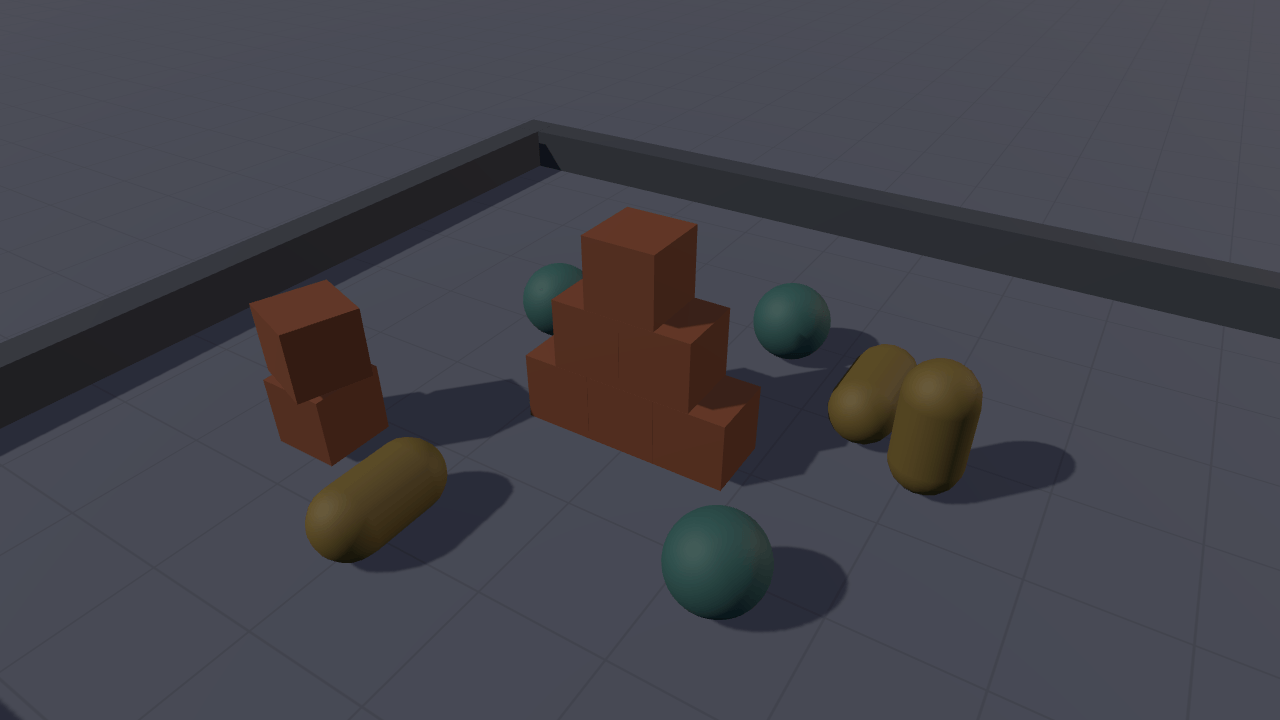
Drop objects into a pit to try Havok physics. Adjust friction and bounce for newly created bodies, or drop the whole pile again with those settings. Objects dim when they settle and brighten when something moves them again.
Off airLivePaused
Physics playground
Physics · 3D
WebGPU: checking…See browser support
Try this
- Click anywhere on the floor: the click is a ray, and the ray is where the body lands.
- Raise Bounce to 0.8, then press Reset: the whole pile drops again and bounces on the new surface.
- Watch a body dim as it settles, then drop a crate on it and watch the colour come back.
Show source code
Source
import { Camera, clamp, physics } from "ignifx";import { bootExample } from "../_kit/boot.ts";import { twoPlaces } from "../_kit/format.ts";import { attachOrbit } from "../_kit/orbit.ts";import { bind, button, readout, select, slider } from "../_kit/panel.ts";import { createLightRig } from "../_kit/stage.ts";import { ARENA_HALF, buildArena, PILE, SHAPES } from "./arena.ts";import { buildLooks, countAtRest, RestTint, spawnBody } from "./bodies.ts";import { DropControls, PLAYGROUND_ACTIONS } from "./controls.ts";import type { ShapeName, Triple } from "./arena.ts";import type { Body, SpawnRequest } from "./bodies.ts";import type { ColorLike } from "ignifx";/** * Rigid bodies on Havok: three collider shapes, a physics material you can change between drops, * and a tint that marks every body the simulation has stopped moving. * * Physics runs in `FixedUpdate`, on its own headless scene, at a rate the frame rate cannot move. * So everything that touches a body does it in `fixedUpdate` (`bodies.ts`) and everything that * reads a pointer does it in `update` (`controls.ts`), where the frame's input was captured. A * collider with no `Rigidbody` — the floor and the four kerbs — is placed once as a **static** body; * a collider with one falls. * * The opening pile is authored settled rather than dropped, which is what makes `?static=1` — the * clock stopped before `app.start()`, so no fixed step ever runs — a reproducible frame. Reset drops * the same pile from above, so a new material shows on every body. `arena.ts` holds the layout. *//** The clear colour, in sRGB: the site's dark `--bg`, which the floor fades into. */const CLEAR: ColorLike = { r: 0.051, g: 0.063, b: 0.082, a: 1 };/** Where the orbit camera looks, in metres: the middle of the pile rather than the floor. */const FOCUS: Triple = { x: 0, y: 0.7, z: 0 };/** How high a dropped body starts, in metres. */const DROP_HEIGHT = 4.2;/** How far a dropped body is scattered from where it was asked for, in metres. */const DROP_SCATTER = 0.22;/** How far above its resting place Reset drops each body of the pile, in metres. */const RESET_LIFT = 1.4;/** How far from the centre the Drop button and the drop key place a body, in metres. */const KEY_DROP_SPREAD = 3;/** How many bodies the pit holds before the oldest is destroyed to make room. */const BODY_CAP = 48;/** The friction the panel opens on: a dry surface a crate does not slide across. */const START_FRICTION = 0.55;/** The restitution the panel opens on. Zero is a dead landing; one would never stop. */const START_BOUNCE = 0.1;bootExample({ title: "Physics playground", extensions: [physics()], settings: { rendering: { clearColor: CLEAR, msaaSamples: 4, // Read once, when `app.start()` registers the scene; asking afterwards is `IGX-0704`. features: { shadows: true }, }, // The rate the simulation advances at, whatever the frame rate does. time: { fixedDeltaTime: 1 / 60 }, }, async setup({ app, panel, random }) { app.registerComponents([DropControls, RestTint]); app.input.loadActions(PLAYGROUND_ACTIONS); const eye = app.world.createEntity("Main Camera"); eye.addComponent(Camera, { near: 0.1, far: 200, fov: 46 }); attachOrbit(app, eye, { yaw: 32, pitch: 33, distance: 6.6, target: FOCUS, minDistance: 3, maxDistance: 16 }); createLightRig(app, { focus: FOCUS, keyIntensity: 2.9, shadowMapSize: 2048 }); await buildArena(app); const looks = buildLooks(app); // The one object the two sliders edit, and the one every spawn copies. Mutable, so it is a // plain object literal rather than the readonly `PhysicsMaterialValues` a collider takes. const material = { friction: START_FRICTION, staticFriction: START_FRICTION, restitution: START_BOUNCE }; const bodies: Body[] = []; let shape: ShapeName = "Box"; const add = (request: SpawnRequest): void => { bodies.push(spawnBody(app, looks, material, request)); // A rolling window rather than a refusal: the pit never fills up, and the frame's cost has a // ceiling a visitor cannot lift. while (bodies.length > BODY_CAP) { bodies.shift()?.entity.destroy(); } }; const drop = (x: number, z: number): void => { // The kit's seeded generator, never `Math.random`: two loads of one URL scatter alike. const scatter = (): number => (random() - 0.5) * 2 * DROP_SCATTER; add({ shape, at: { x: clamp(x + scatter(), -ARENA_HALF, ARENA_HALF), y: DROP_HEIGHT, z: clamp(z + scatter(), -ARENA_HALF, ARENA_HALF), }, turn: { x: random() * 360, y: random() * 360, z: random() * 360 }, asleep: false, }); }; const dropAnywhere = (): void => { drop((random() - 0.5) * KEY_DROP_SPREAD, (random() - 0.5) * KEY_DROP_SPREAD); }; // The page opens on the pile settled; Reset drops it from above, so the bounce and friction on // the sliders show on every body at once. const reset = (dropped: boolean): void => { for (const body of bodies) { body.entity.destroy(); } bodies.length = 0; for (const piled of PILE) { const lift = dropped ? RESET_LIFT + random() * 0.3 : 0; // `exactOptionalPropertyTypes` is on, so `turn` is either set or absent, never `undefined`. add({ shape: piled.shape, at: { x: piled.at.x, y: piled.at.y + lift, z: piled.at.z }, asleep: !dropped, ...(piled.turn === undefined ? {} : { turn: piled.turn }), }); } }; reset(false); // Space and the gamepad's south button drop one too, so the example is playable with no // pointer at all. const controls = eye.addComponent(DropControls); controls.onFloorClick = drop; controls.onDropKey = dropAnywhere; panel({ title: "Physics playground", groups: [ { label: "Drop", controls: [ select("Shape", SHAPES, { value: shape, change: (value: string): void => { shape = SHAPES.find((name: ShapeName) => name === value) ?? "Box"; }, }), button("Drop one", dropAnywhere), button("Reset", (): void => { reset(true); }), readout("Bodies", (): string => `${String(bodies.length)} / ${String(BODY_CAP)}`), readout("At rest", (): string => String(countAtRest(bodies))), ], }, { label: "Material", controls: [ slider( "Friction", { min: 0, max: 1.2, step: 0.05, format: twoPlaces }, { value: START_FRICTION, change: (value: number): void => { material.friction = value; material.staticFriction = value; }, }, ), slider("Bounce", { min: 0, max: 0.9, step: 0.05, format: twoPlaces }, bind(material, "restitution")), // A collider reads its material when its shape is built, so a slider reaches the next // body, and Reset rebuilds the whole pile with it. readout("Applies to", (): string => "the next body"), ], }, { label: "Frame", collapsed: true, controls: [ readout("Draw calls", (): string => String(app.renderer.drawCalls)), readout("Scripts", (): string => String(app.diagnostics.frame.scriptsUpdated)), ], }, ], }); },});/** * One dynamic body: a mesh, a collider, a `Rigidbody`, and the script that tints it when it stops. * * This is the physics lesson of the example, kept beside `main.ts` because `main.ts` is the world * and the panel. Three things in here are worth reading twice. * * **A body's entity must be a root entity.** Havok writes the scene node's *local* pose, so a * parented body would be simulated in its parent's space — `IGX-0907` says so out loud. * * **Bodies and shapes are built at the start of the next fixed step**, never mid-frame, so the * transform written at spawn time is the pose the simulation starts from and body creation order * follows entity creation order. * * **`inlineMaterial` is read when the shape is built.** `Collider.resolveMaterial` prefers a * `.physicsmaterial.json` asset, then these inline values, then the world's `defaultMaterial`. So a * change to the panel's sliders reaches the next body rather than the settled pile, which is why * Reset rebuilds the pile and drops it. */import { assertNever, bool, BoxCollider, CapsuleCollider, createMaterialAsset, MeshAsset, MeshRenderer, pbrMaterialDefinition, Rigidbody, Script, SphereCollider, Vec3,} from "ignifx";import { BOX_SIZE, CAPSULE_HEIGHT, CAPSULE_RADIUS, SPHERE_RADIUS } from "./arena.ts";import type { ShapeName, Triple } from "./arena.ts";import type { App, AssetHandle, ColorLike, Entity, MaterialAsset, PhysicsMaterialValues, ScriptCallbacks,} from "ignifx";/** A dropped body's mass, in kilograms. */const BODY_MASS = 2;/** Below this speed, in metres per second, a body counts as still. */const REST_SPEED = 0.04;/** Below this rate, in radians per second, a body counts as still. */const REST_SPIN = 0.12;/** How many consecutive still fixed steps mark a body at rest. Twenty is a third of a second. */const REST_STEPS = 20;/** The colour each shape is drawn in while it is moving. */const SHAPE_COLORS: Readonly<Record<ShapeName, ColorLike>> = { Box: { r: 0.878, g: 0.412, b: 0.169, a: 1 }, Sphere: { r: 0.247, g: 0.663, b: 0.627, a: 1 }, Capsule: { r: 0.788, g: 0.635, b: 0.153, a: 1 },};/** How much of its colour a body keeps once it has come to rest. */const ASLEEP_FACTOR = 0.45;/** * Scales a colour towards black. * * @param color - The colour to dim. * @param factor - How much of it to keep. * @returns The dimmed colour, opaque. */function dim(color: ColorLike, factor: number): ColorLike { return { r: color.r * factor, g: color.g * factor, b: color.b * factor, a: 1 };}/** * Tints its body when it stops moving, and reports whether it is at rest. * * @remarks * Havok puts a resting body to sleep and stops integrating it, which is why a pit of settled crates * costs almost nothing to keep on screen. `@babylonjs/[email protected]` has no way to *ask* a body * whether it is asleep — it only accepts `startAsleep` when the body is created — so this measures * the thing a sleep test measures: a body whose linear and angular speeds have both stayed under a * threshold for {@link REST_STEPS} consecutive fixed steps is at rest, and is tinted. * * The velocities are read in `fixedUpdate` because that is where the authoritative pose and * velocity live; `update` and `PreRender` see the interpolated display pose. */export class RestTint extends Script.define({ atRest: bool(false) }) implements ScriptCallbacks { /** The namespaced registration id. */ static typeId = "physics-playground/RestTint"; /** The material shown while the body is moving. Assigned by {@link spawnBody}. */ moving: AssetHandle<MaterialAsset> | null = null; /** The material shown once the body is at rest. Assigned by {@link spawnBody}. */ resting: AssetHandle<MaterialAsset> | null = null; /** The body this watches, found once. */ #body: Rigidbody | null = null; /** The renderer whose first material is swapped. */ #renderer: MeshRenderer | null = null; /** How many consecutive fixed steps the body has been still for. */ #stillSteps = 0; /** Reused so the per-step path allocates nothing (coding standards §7). */ readonly #velocity = new Vec3(); /** Finds the body and the renderer, and seeds the counter from the authored state. */ awake(): void { this.#body = this.entity.getComponent(Rigidbody); this.#renderer = this.entity.getComponent(MeshRenderer); this.#stillSteps = this.atRest ? REST_STEPS : 0; } /** Measures the body's speed and swaps its material when the verdict changes. */ fixedUpdate(): void { const body = this.#body; if (body === null) { return; } body.linearVelocityToRef(this.#velocity); const speed = this.#velocity.length(); body.angularVelocityToRef(this.#velocity); const still = speed < REST_SPEED && this.#velocity.length() < REST_SPIN; this.#stillSteps = still ? this.#stillSteps + 1 : 0; const atRest = this.#stillSteps >= REST_STEPS; if (atRest === this.atRest) { return; } this.atRest = atRest; const material = atRest ? this.resting : this.moving; // `MeshRenderer` re-reads `materials[0]` on every `PreRender` sync, so one assignment is the // whole swap: nothing is rebuilt and no pipeline is recompiled. if (this.#renderer !== null && material !== null) { this.#renderer.materials[0] = material; } }}/** The mesh and the two materials every body of one shape shares. */export interface ShapeLook { /** The mesh, cloned per body by `MeshRenderer`. */ readonly mesh: AssetHandle<MeshAsset>; /** The colour while the body moves. */ readonly moving: AssetHandle<MaterialAsset>; /** The colour once the body is at rest. */ readonly resting: AssetHandle<MaterialAsset>;}/** One live body, and the script that tints it. */export interface Body { /** The body's entity. */ readonly entity: Entity; /** Its tint script, which the "At rest" readout counts. */ readonly tint: RestTint;}/** The look of every shape, by name. */export type ShapeLooks = Readonly<Record<ShapeName, ShapeLook>>;/** * Builds one mesh and two materials per shape, shared by every body of that shape. * * @remarks * Every shape comes from a `MeshAsset` factory — `box`, `sphere`, `capsule` — so the example fetches * nothing. A capsule's `height` is its **total** height, caps included, in both the mesh factory * and the collider, so one pair of numbers describes the drawing and the shape. * * @param app - The running app. * @returns The look of each shape. The caller owns the handles. */export function buildLooks(app: App): ShapeLooks { const look = (shape: ShapeName, mesh: AssetHandle<MeshAsset>): ShapeLook => { const color = SHAPE_COLORS[shape]; return { mesh, moving: createMaterialAsset( app, pbrMaterialDefinition({ name: `${shape}/moving`, baseColor: color, metallic: 0.05, roughness: 0.45 }), [], ), resting: createMaterialAsset( app, pbrMaterialDefinition({ name: `${shape}/resting`, baseColor: dim(color, ASLEEP_FACTOR), metallic: 0.05, roughness: 0.7, }), [], ), }; }; return { Box: look("Box", MeshAsset.box(app, { size: BOX_SIZE })), Sphere: look("Sphere", MeshAsset.sphere(app, { diameter: SPHERE_RADIUS * 2, segments: 18 })), Capsule: look("Capsule", MeshAsset.capsule(app, { height: CAPSULE_HEIGHT, radius: CAPSULE_RADIUS })), };}/** * Adds one shape's collider, with the surface it presents to Havok. * * @param entity - The body's entity. * @param shape - Which collider to add. * @param material - The friction and bounce this body is built with; copied, not held. */function addCollider(entity: Entity, shape: ShapeName, material: PhysicsMaterialValues): void { const inlineMaterial: PhysicsMaterialValues = { ...material }; switch (shape) { case "Box": { entity.addComponent(BoxCollider, { size: { x: BOX_SIZE, y: BOX_SIZE, z: BOX_SIZE }, inlineMaterial }); break; } case "Sphere": { entity.addComponent(SphereCollider, { radius: SPHERE_RADIUS, inlineMaterial }); break; } case "Capsule": { entity.addComponent(CapsuleCollider, { radius: CAPSULE_RADIUS, height: CAPSULE_HEIGHT, direction: "y", inlineMaterial, }); break; } default: { // Every shape is handled above; this branch makes adding one a type error rather than a // silently invisible body (coding standards §5.2). assertNever(shape, "body shape"); } }}/** What {@link spawnBody} takes. */export interface SpawnRequest { /** Which shape. */ readonly shape: ShapeName; /** Where its centre starts, in metres. */ readonly at: Triple; /** Its Euler angles, in degrees. Omitted means axis-aligned. */ readonly turn?: Triple; /** Whether Havok starts it asleep, which the authored pile does because it is already resting. */ readonly asleep: boolean;}/** * Builds one dynamic body. * * @param app - The running app. * @param looks - The shared meshes and materials. * @param material - The friction and bounce to build the collider with. * @param request - The shape, the pose, and whether it starts asleep. * @returns The body and its tint script. * * @example * ```ts * spawnBody(app, looks, { friction: 0.55, staticFriction: 0.55, restitution: 0.1 }, { * shape: "Sphere", * at: { x: 0, y: 4, z: 0 }, * asleep: false, * }); * ``` */export function spawnBody(app: App, looks: ShapeLooks, material: PhysicsMaterialValues, request: SpawnRequest): Body { const look = looks[request.shape]; const entity = app.world.createEntity(request.shape); entity.transform.localPosition.set(request.at.x, request.at.y, request.at.z); if (request.turn !== undefined) { entity.transform.localEulerAngles = request.turn; } entity.addComponent(MeshRenderer, { mesh: look.mesh, materials: [request.asleep ? look.resting : look.moving], castShadows: true, }); addCollider(entity, request.shape, material); entity.addComponent(Rigidbody, { mass: BODY_MASS, startAsleep: request.asleep }); const tint = entity.addComponent(RestTint, { atRest: request.asleep }); tint.moving = look.moving; tint.resting = look.resting; return { entity, tint };}/** * Counts the bodies {@link RestTint} has marked at rest, for the panel's readout. * * @param bodies - The live bodies. * @returns How many of them are at rest. */export function countAtRest(bodies: readonly Body[]): number { let total = 0; for (const body of bodies) { total += body.tint.atRest ? 1 : 0; } return total;}/** * The playground's own input: a click on the floor, and a key that drops a body wherever. * * It is `@ignifx/input` actions rather than DOM listeners for the reason the whole kit is: a * visitor reading this sees what a game writes, and one binding on `<Pointer>` covers a mouse, a * pen and a finger with no branch per device. * * The map is the example's own, so the kit orbit camera's `KitOrbit` map is untouched — * `loadActions` merges documents by map name. */import { Camera, clamp, createRay, defineInputActions, Script } from "ignifx";import { ARENA_HALF } from "./arena.ts";import type { InputAction, InputActionsDefinition, ScriptCallbacks } from "ignifx";/** How far a pointer may travel between press and release and still count as a click, in pixels. */const CLICK_SLOP = 6;/** * How steeply a ray must aim down to be resolved against the floor. * * @remarks * A ray along the horizon meets the `y = 0` plane a kilometre away, or behind the camera. Refusing * anything flatter than this is what keeps a click on the sky from dropping a crate at the edge of * the pit. */const MIN_DOWNWARD = 0.05;/** The actions the playground binds: a pointer press, the pointer's position, and a drop key. */export const PLAYGROUND_ACTIONS: InputActionsDefinition = defineInputActions({ maps: [ { name: "Playground", actions: [ { name: "dropPress", type: "button", bindings: [{ path: "<Pointer>/press" }] }, { name: "dropPoint", type: "vector2", bindings: [{ path: "<Pointer>/position" }] }, { name: "dropKey", type: "button", bindings: [{ path: "<Keyboard>/space" }, { path: "<Gamepad>/buttonSouth" }], }, ], }, ],});/** * Turns a click on the canvas into a point on the floor, and a key press into a drop. * * @remarks * A click and a camera drag start with the same `<Pointer>/press`, so this waits for the release * and only reports a point when the pointer travelled less than {@link CLICK_SLOP} pixels — which * is what stops an orbit from also dropping a crate. A press that lands on the parameter panel is * ignored through `app.input.uiHasPointer`, the flag `@ignifx/ui` raises for exactly this. * * Pointer positions are **backing-store pixels** (the canvas's `width`/`height`), which is the * space `Camera.screenToRay` reads, so no device-pixel-ratio conversion appears anywhere here. * * @example * ```ts * const controls = cameraEntity.addComponent(DropControls); * controls.onFloorClick = drop; * ``` */export class DropControls extends Script implements ScriptCallbacks { /** The namespaced registration id. */ static typeId = "physics-playground/DropControls"; /** Called with the floor point a click landed on, in metres. Assigned after `addComponent`. */ onFloorClick: ((x: number, z: number) => void) | null = null; /** Called when the drop key, or the gamepad's south button, was pressed. */ onDropKey: (() => void) | null = null; /** Where the current gesture started, in backing-store pixels. */ #pressX = 0; /** Where the current gesture started, in backing-store pixels. */ #pressY = 0; /** Whether this gesture has travelled far enough to be a drag rather than a click. */ #dragged = true; /** Reused so the per-frame path allocates nothing. */ readonly #ray = createRay(); #key: InputAction | null = null; #press: InputAction | null = null; #point: InputAction | null = null; #camera: Camera | null = null; /** Looks the actions and the camera up once, so the frame does no string lookups. */ awake(): void { this.#key = this.app.input.actions.find("dropKey"); this.#press = this.app.input.actions.find("dropPress"); this.#point = this.app.input.actions.find("dropPoint"); this.#camera = this.entity.getComponent(Camera); } /** Reads the drop key, then the press, the travel and the release of a pointer gesture. */ update(): void { if (this.#key?.wasPressedThisFrame === true) { this.onDropKey?.(); } const press = this.#press; const point = this.#point; const camera = this.#camera; if (press === null || point === null || camera === null) { return; } if (press.wasPressedThisFrame) { this.#pressX = point.vector.x; this.#pressY = point.vector.y; this.#dragged = this.app.input.uiHasPointer; } if (Math.hypot(point.vector.x - this.#pressX, point.vector.y - this.#pressY) > CLICK_SLOP) { this.#dragged = true; } if (!press.wasReleasedThisFrame || this.#dragged) { return; } const ray = camera.screenToRay(point.vector.x, point.vector.y, this.#ray); if (ray === null || ray.direction.y > -MIN_DOWNWARD) { return; } const along = -ray.origin.y / ray.direction.y; this.onFloorClick?.( clamp(ray.origin.x + ray.direction.x * along, -ARENA_HALF, ARENA_HALF), clamp(ray.origin.z + ray.direction.z * along, -ARENA_HALF, ARENA_HALF), ); }}/** * The playground's staging: the pit the bodies fall into, and the pile they start settled in. * * It is next to `main.ts` rather than in it for the reason `pbr-model`'s `shot.ts` is: none of it * is a lesson about ignifx. The floor's half-extent, the height of the kerb and the exact centre of * every crate in the opening pyramid are composition, and `main.ts` is easier to read as physics * without them. * * ## Why the opening pile is a table of exact numbers * * `?static=1` stops the clock **before** `app.start()`, so no fixed step ever runs and no body ever * falls: the poster and the golden are exactly the transforms authored here. A 0.6 m crate resting * on the floor has its centre at 0.3 m, the row above it at 0.9 m, and the row above that at 1.5 m * — so the pyramid below is a settled pile by construction, not by simulation, and it is the same * pile whether or not the clock is running. Every body in it is created `startAsleep`, which is * what Havok would do to it a third of a second later anyway. */import { BoxCollider, createMaterialAsset, MeshAsset, MeshRenderer, pbrMaterialDefinition } from "ignifx";import { createGridGround } from "../_kit/stage.ts";import type { App, ColorLike, Entity } from "ignifx";/** The kerb's colour, in sRGB: a shade of the site's `--sunk`. */const KERB_COLOR: ColorLike = { r: 0.145, g: 0.169, b: 0.208, a: 1 };/** The grid floor's tint, in sRGB. */const FLOOR_COLOR: ColorLike = { r: 0.26, g: 0.28, b: 0.33, a: 1 };/** Half the pit's inner width, in metres: the floor a body can land on spans `[-4.5, 4.5]`. */export const ARENA_HALF = 4.5;/** How far the pit reaches from its centre, kerbs included, in metres: what the fade keeps clear. */const PIT_RADIUS = 6.5;/** How high the kerb around the pit stands, in metres. */const KERB_HEIGHT = 0.5;/** How thick the kerb is, in metres. */const KERB_THICKNESS = 0.4;/** How deep the floor's collision box is, in metres. Its top face sits at `y = 0`. */const FLOOR_DEPTH = 1;/** The edge of a crate, in metres. */export const BOX_SIZE = 0.6;/** A ball's radius, in metres. */export const SPHERE_RADIUS = 0.35;/** A capsule's radius, in metres. */export const CAPSULE_RADIUS = 0.28;/** * A capsule's total height, caps included, in metres — the convention both the mesh factory and the * collider use, so one pair of numbers describes the drawing and the shape. */export const CAPSULE_HEIGHT = 1.1;/** The three shapes the playground drops, in the order the panel lists them. */export const SHAPES = ["Box", "Sphere", "Capsule"] as const;/** One of {@link SHAPES}. */export type ShapeName = (typeof SHAPES)[number];/** A three-component point, in metres or in degrees. */export interface Triple { /** X. */ readonly x: number; /** Y. */ readonly y: number; /** Z. */ readonly z: number;}/** One body of the opening pile. */export interface PiledBody { /** Which shape to build. */ readonly shape: ShapeName; /** Where its centre sits, in metres. */ readonly at: Triple; /** Its Euler angles, in degrees. Omitted means axis-aligned. */ readonly turn?: Triple;}/** * The opening pile: a three-two-one pyramid of crates, two balls, and a capsule on its side. * * @remarks * Every height is the shape's own resting height, so the pile is settled the instant it exists — * see the module comment. The horizontal placements are hand-picked rather than scattered, because * a poster is a composition and a seeded scatter is only reproducible, not good. */export const PILE: readonly PiledBody[] = Object.freeze([ { shape: "Box", at: { x: -BOX_SIZE, y: BOX_SIZE / 2, z: 0 } }, { shape: "Box", at: { x: 0, y: BOX_SIZE / 2, z: 0 } }, { shape: "Box", at: { x: BOX_SIZE, y: BOX_SIZE / 2, z: 0 } }, { shape: "Box", at: { x: -BOX_SIZE / 2, y: BOX_SIZE * 1.5, z: 0 } }, { shape: "Box", at: { x: BOX_SIZE / 2, y: BOX_SIZE * 1.5, z: 0 } }, { shape: "Box", at: { x: 0, y: BOX_SIZE * 2.5, z: 0 } }, // A second, lower stack, so the pit reads as a pile rather than as one tidy monument. { shape: "Box", at: { x: -2.1, y: BOX_SIZE / 2, z: -1.35 } }, { shape: "Box", at: { x: -2.1, y: BOX_SIZE * 1.5, z: -1.35 }, turn: { x: 0, y: 18, z: 0 } }, { shape: "Sphere", at: { x: -1.5, y: SPHERE_RADIUS, z: 0.95 } }, { shape: "Sphere", at: { x: 1.35, y: SPHERE_RADIUS, z: -1.25 } }, { shape: "Sphere", at: { x: 0.55, y: SPHERE_RADIUS, z: 1.75 } }, // Rolled onto its side: the mesh and the collider both stand along Y, so turning the entity a // quarter turn about X lays the drawing and the shape down together. { shape: "Capsule", at: { x: 1.55, y: CAPSULE_RADIUS, z: 1.15 }, turn: { x: 90, y: 0, z: 0 } }, { shape: "Capsule", at: { x: -0.95, y: CAPSULE_RADIUS, z: -1.9 }, turn: { x: 90, y: 55, z: 0 } }, // One left standing on a cap: stable while it is asleep, and the first thing a landing crate // knocks over. { shape: "Capsule", at: { x: 2.15, y: CAPSULE_HEIGHT / 2, z: 0.55 } },]);/** What {@link buildArena} produced. */export interface Arena { /** The floor entity, which also carries the floor's static collider. */ readonly ground: Entity; /** Releases every handle the arena holds. */ release(): void;}/** * Builds the pit: a grid floor with a static box under it, and four kerbs to keep the bodies in. * Call it after the orbit camera is attached: the floor's fade is sized from the orbit's reach. * * @remarks * A collider with no `Rigidbody` is placed once as a **static** body, which is exactly right for * scenery — and moving it afterwards would log `IGX-0901`. The floor's box is sunk by half its * depth through the collider's own `center`, so its top face is the `y = 0` the pile is authored * against and the entity's transform stays at the origin. * * @param app - The running app. * @returns The floor entity and the release for the handles this created. */export async function buildArena(app: App): Promise<Arena> { // The fade grows the plane until its edge is always inside the fog, so there is no horizon line. const ground = await createGridGround(app, { color: FLOOR_COLOR, fade: { subjectRadius: PIT_RADIUS } }); ground.entity.addComponent(BoxCollider, { size: { x: ground.size, y: FLOOR_DEPTH, z: ground.size }, center: { x: 0, y: -FLOOR_DEPTH / 2, z: 0 }, }); // One mesh for four kerbs: two of them are the same box turned a quarter turn about Y, and a // collider is authored in local units, so it turns with the entity and needs no second size. const kerbMaterial = createMaterialAsset( app, pbrMaterialDefinition({ name: "kerb", baseColor: KERB_COLOR, metallic: 0, roughness: 0.85 }), [], ); const span = ARENA_HALF * 2 + KERB_THICKNESS * 2; const kerbMesh = MeshAsset.box(app, { width: span, height: KERB_HEIGHT, depth: KERB_THICKNESS }); const offset = ARENA_HALF + KERB_THICKNESS / 2; const kerbs: readonly { readonly x: number; readonly z: number; readonly turn: number }[] = [ { x: 0, z: offset, turn: 0 }, { x: 0, z: -offset, turn: 0 }, { x: offset, z: 0, turn: 90 }, { x: -offset, z: 0, turn: 90 }, ]; for (const [index, kerb] of kerbs.entries()) { const entity = app.world.createEntity(`Kerb ${String(index + 1)}`); entity.transform.localPosition.set(kerb.x, KERB_HEIGHT / 2, kerb.z); entity.transform.localEulerAngles = { x: 0, y: kerb.turn, z: 0 }; entity.addComponent(MeshRenderer, { mesh: kerbMesh, materials: [kerbMaterial], castShadows: true }); entity.addComponent(BoxCollider, { size: { x: span, y: KERB_HEIGHT, z: KERB_THICKNESS } }); } return { ground: ground.entity, release(): void { kerbMesh.release(); kerbMaterial.release(); ground.release(); }, };}