All examples
Roughness and metalness
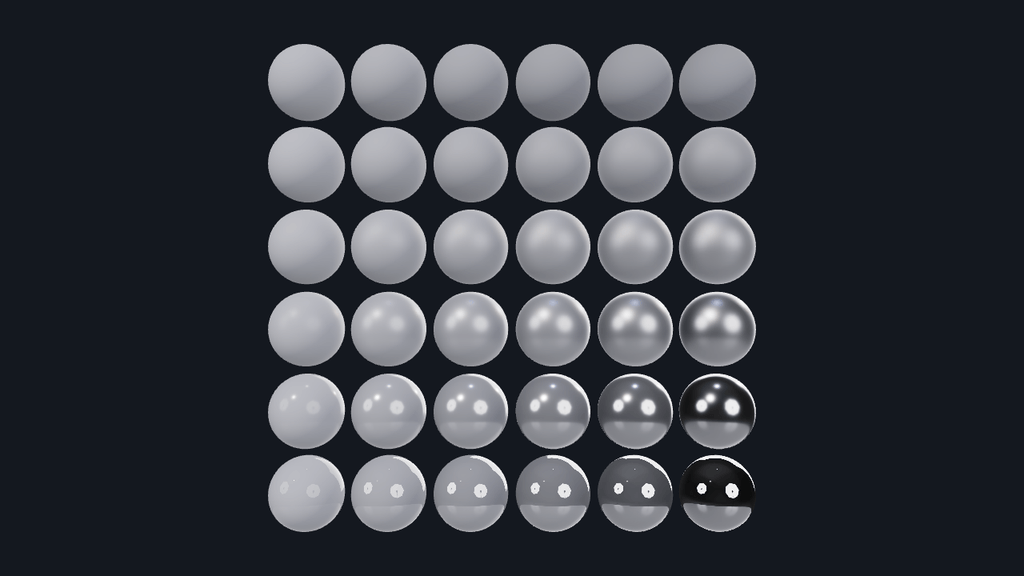
See how roughness and metalness change a material. Metalness increases from left to right, and roughness from bottom to top. Adjust each range or rotate the environment to compare the reflections.
Off airLivePaused
Roughness and metalness
Models · 3D
WebGPU: checking…See browser support
Try this
- Set both metalness ends to one: every sphere becomes a metal, and the base colour now tints the reflection instead of the surface.
- Set Top row to 0.3 to compare only the smoother end of the roughness range.
- Rotate the environment and watch the reflections slide across every sphere at once.
Show source code
Source
import { Camera, createMaterialAsset, Environment, MeshAsset, MeshRenderer, pbrMaterialDefinition } from "ignifx";import { bootExample } from "../_kit/boot.ts";import { bindColor, srgbFromHex } from "../_kit/color.ts";import { twoPlaces } from "../_kit/format.ts";import { attachOrbit, FREE_MIN_PITCH } from "../_kit/orbit.ts";import { bind, color, readout, slider } from "../_kit/panel.ts";import { createLightRig, loadEnvironment } from "../_kit/stage.ts";import type { PanelSliderControl } from "../_kit/panel.ts";import type { AssetHandle, ColorLike, MaterialAsset } from "ignifx";/** * Thirty-six spheres, one per pair of numbers: metalness grows from left to right and roughness * from bottom to top. Every sphere shares one mesh and differs only in two material factors. * * A metal has no diffuse colour, so its base colour tints what it reflects; a non-metal's base * colour is its diffuse colour, with a colourless reflection on top. The reflections come from the * studio environment, and the sliders write material uniforms, so dragging one changes all * thirty-six spheres on the next frame with no shader rebuild. *//** Which end of which axis a slider writes. */type RangeEnd = "metalHigh" | "metalLow" | "roughHigh" | "roughLow";/** How many columns of metalness, and rows of roughness. Thirty-six materials, one mesh. */const GRID = 6;/** Each sphere's diameter, in metres. */const SPHERE_DIAMETER = 0.5;/** Segments per sphere. Enough that a mirror surface shows no facet at the size the grid is seen. */const SPHERE_SEGMENTS = 24;/** Centre-to-centre spacing, in metres: a tenth of a diameter of air between neighbours. */const SPACING = 0.55;/** The base colour every material starts with: a neutral light grey, so metal and plastic differ only by their two numbers. */const START_COLOR: ColorLike = srgbFromHex("#c8cad2");/** * The background: a dark slate that the scene's exposure and ACES curve present close to the site's * `--surface`, `#14181F`. Not black, because a smooth metal shows only its surroundings and the * right-hand column would lose its outline against black. */const CLEAR_COLOR: ColorLike = srgbFromHex("#292d37");/** The probe's exposure: low enough that the rough plastics keep their ramp, high enough to light the metals. */const EXPOSURE = 1.25;/** * Interpolates one axis of the grid. * * @param low - The value in the first row or column. * @param high - The value in the last one. * @param index - Which row or column, from `0` to `GRID - 1`. * @returns The value for that row or column. */function ramp(low: number, high: number, index: number): number { return low + ((high - low) * index) / (GRID - 1);}bootExample({ title: "Roughness and metalness", settings: { // No `features.shadows`: the grid has no floor to cast onto. rendering: { clearColor: CLEAR_COLOR }, }, async setup({ app, panel }) { const eye = app.world.createEntity("Main Camera"); eye.addComponent(Camera, { near: 0.05, far: 100, fov: 40 }); // Straight at the grid, the only view in which every square is comparable. There is no floor, so // the camera may orbit below it too: a reflection that does not move with the eye is not one. const orbit = attachOrbit(app, eye, { yaw: 0, pitch: 0, minPitch: FREE_MIN_PITCH, minDistance: 1.5, maxDistance: 14, }); orbit.frame({ center: { x: 0, y: 0, z: 0 }, radius: (SPACING * GRID) / 2 }, 1.1); // Three lamps at low intensity, and no shadows. The probe does most of the lighting; the lamps // put a recognisable highlight on the rough plastics, which the probe alone leaves flat. createLightRig(app, { shadows: false, keyIntensity: 1.4, fillIntensity: 0.25, rimIntensity: 0.6, focus: { x: 0, y: 0, z: 0 }, }); const environment = loadEnvironment(app, "studio"); await environment.promise; // `studio.environment.json` loads with its skybox off, so the component says the same rather than // being reported as `IGX-0711`. The background is the clear colour. const sky = app.world .createEntity("Environment") .addComponent(Environment, { environment, skybox: { enabled: false, size: 20 } }); sky.imageProcessing.toneMapping = "aces"; sky.imageProcessing.exposure = EXPOSURE; // One mesh for all thirty-six spheres: a `MeshAsset` is an asset, so assigning the same handle // to every renderer shares the geometry rather than copying it. const sphere = MeshAsset.sphere(app, { diameter: SPHERE_DIAMETER, segments: SPHERE_SEGMENTS }); /** Every material, in row-major order: `materials[row * GRID + column]`. */ const materials: AssetHandle<MaterialAsset>[] = []; const offset = (SPACING * (GRID - 1)) / 2; for (let row = 0; row < GRID; row += 1) { for (let column = 0; column < GRID; column += 1) { const material = createMaterialAsset( app, pbrMaterialDefinition({ name: `grid/${String(row)}-${String(column)}`, baseColor: START_COLOR, metallic: ramp(0, 1, column), roughness: ramp(0, 1, row), }), [], ); materials.push(material); const entity = app.world.createEntity(`Sphere ${String(row)}-${String(column)}`); entity.transform.localPosition.set(column * SPACING - offset, row * SPACING - offset, 0); entity.addComponent(MeshRenderer, { mesh: sphere, materials: [material], castShadows: false }); } } /** The live ranges the four sliders write, and the colour the swatch writes. */ const ranges = { metalLow: 0, metalHigh: 1, roughLow: 0, roughHigh: 1 }; const look = { color: START_COLOR }; /** * Rewrites every material's metalness and roughness from {@link ranges}: thirty-six uniform * writes on an already-compiled pipeline, and no shader work at all. */ const applyRanges = (): void => { materials.forEach((material: AssetHandle<MaterialAsset>, index: number): void => { const row = Math.floor(index / GRID); const column = index % GRID; material.value?.setMetallicRoughness( ramp(ranges.metalLow, ranges.metalHigh, column), ramp(ranges.roughLow, ranges.roughHigh, row), ); }); }; /** Gives every material the swatch's colour, in sRGB. */ const applyColor = (colour: ColorLike): void => { for (const material of materials) { material.value?.setBaseColor(colour); } }; /** One end of one axis — the `key` of {@link ranges} — as a slider labelled `label`. */ const end = (label: string, key: RangeEnd): PanelSliderControl => slider( label, { min: 0, max: 1, step: 0.01, format: twoPlaces }, { value: ranges[key], change: (value: number): void => { ranges[key] = value; applyRanges(); }, }, ); panel({ title: "Roughness and metalness", groups: [ { label: "Metalness, left to right", controls: [end("Left column", "metalLow"), end("Right column", "metalHigh")], }, { label: "Roughness, bottom to top", controls: [end("Bottom row", "roughLow"), end("Top row", "roughHigh")], }, { label: "Surface", controls: [ color("Base colour", bindColor(look, "color", applyColor)), // Rotating the probe moves every reflection at once without touching a material. What // separates a mirror from a satin is the roughness rows above, not the environment. slider( "Probe rotation", { min: 0, max: 360, step: 1, format: (value: number): string => `${String(value)}°` }, bind(sky, "rotation"), ), ], }, { label: "Frame", collapsed: true, controls: [readout("Draw calls", (): string => String(app.renderer.drawCalls))], }, ], }); },});